
We've built and open-sourced Monty — a minimal, secure Python interpreter written in Rust, for running code written by AI agents.
It got a lot of attention on social media. Now I want to explain why I'm excited about Monty, with more nuance than 280 characters allows.
LLMs work faster, cheaper and more reliably when they write code instead of making sequential tool calls. Anthropic wrote about it twice, Cloudflare coined the term "CodeMode" and now use it in the MCP server, HuggingFace built something similar a year ago.
This isn't controversial; the controversy starts when we need to decide how to run the code.
I want to convince you that Monty provides an excellent solution for code execution for many use cases.
The Continuum
When you harness an LLM to do useful work, you're making a trade-off between how much control you retain and how much capability you grant. At one extreme, the LLM picks a function name and fills in some JSON. At the other, you've handed a neural network your mouse and keyboard.
Between those poles sit several distinct approaches, each with its own profile for control, capability, cost, complexity and setup burden. Here's how they compare:
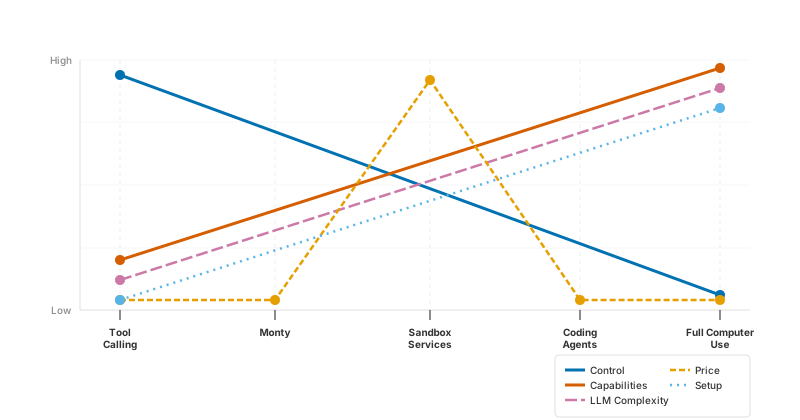
Notice where Monty sits: just to the right of tool calling. That positioning is deliberate.
Tool calling
Tool calling is where most agents start. The LLM picks a function, provides JSON arguments, you execute it, return the result, and the LLM decides what to do next. It's safe, it's predictable, and it's excruciatingly sequential. Need to call function A, then function B with the output of A, and finally C with the output of B? That's three or four round-trips to the LLM.
Most agents running in the cloud today are using tool calling, but tool calling slows down and restricts the models so much that they're often prevented from performing tasks we've become used to them completing with coding agents - LLMs equipped with tool calling are somewhat impotent.
Monty et al.
Monty lets the LLM write Python instead. Rather than picking one tool at a time, it can express loops, conditionals, parallel async calls, data transforms — all the things Python is good at. The difference from just calling exec() or eval() is that Monty provides a custom Python runtime where the only way for Monty code to interact with the outside world is through external functions you explicitly provide.
The tools you would generally register directly with the LLM are exposed to the LLM as functions that it can call from code; this is what Cloudflare calls "CodeMode".
It's worth noting that Monty is not the only project with this rough design and philosophy, there's also just-bash from Vercel and bashkit - notably bashkit already supports Monty to run Python code, and Vercel are keen to adopt Monty once our javascript API is more complete.
Sandbox services
Modal, E2B, Cloudflare, Daytona and the like — give you full CPython in a managed container. Any library, any code. The trade-off is a network call to spin up that container, cold starts measured in seconds, per-execution cost, and above all an external dependency that enterprise security teams tend to have strong feelings about.
Despite the downsides, sandbox services provide LLMs with enormous capabilities and as a result are currently experiencing a very rapid increase in adoption.
Coding agents
Claude Code, Codex, Cursor, and similar — get terminal access, browser access via Playwright, the works. Tremendously capable, but you've largely delegated control. These are tools you use interactively, not components you embed in your agent. Generally these only work if you have a human developer tending them, reversing them out of the ditch whenever they crash.
My impression is that coding agents are currently the bleeding edge of giving LLMs control for most use cases - and we're using them increasingly for non-coding tasks. While they're very powerful, they're rarely able to run fully autonomously (e.g. deploy and leave for weeks) - the solution space is just too large, so the outcomes are just too varied for most real-world applications.
Full computer use
This is the logical extreme: mouse and keyboard control, the LLM driving your desktop. You've federated everything you can do to a neural network controlled by a company that built its empire by breaching IP conventions.
Start Left, Move Right
There's a conventional approach to sandboxing that goes roughly like this: start with a full VM or container — everything enabled, full access — then progressively lock it down. Restrict the network. Restrict the filesystem. Restrict syscalls. Keep restricting until it's "safe enough".
This is working backwards. You start with everything and try to remove the dangerous parts. The attack surface is enormous and you're playing whack-a-mole with escape vectors. Every OS has different isolation primitives. Every capability you restrict is a potential misconfiguration. Cursor published an excellent post on agent sandboxing that show just how painful this approach is across platforms.
Monty's approach is the opposite: start from nothing, then selectively grant capabilities. The default is zero access — no filesystem, no network, no environment variables, strict resource limits. You explicitly opt in to each capability via external functions that you wrote, you control, and you can audit.
This is the difference between a firewall that blocks known-bad ports and one that blocks everything, then allowlists specific traffic.
As Monty matures — and we make it easy to provide shims to popular libraries like requests, polars, duckdb, playwright — capabilities move rightward on the continuum. But always by explicit addition, never by failing to restrict something that was there all along.
What Monty Actually Is
Monty is a Python interpreter written in Rust. Not CPython-with-restrictions. Not Python compiled to WASM. A from-scratch bytecode VM that uses Ruff's parser to turn Python source into its own bytecode format.
What it supports:
- Functions (sync and async), closures, comprehensions
- f-strings, type hints, dataclasses when defined on the host
sys,typing,asyncio,pathlibstandard library modules.re,datetime,jsoncoming soon- External function calls — the mechanism for interacting with the host
- Snapshotting — serialize execution state mid-flight to bytes, resume later or elsewhere
- Type checking — ships with ty bundled in the binary
- Memory, recursion and execution time limits within the interpreter
- REPL support - from our testing LLMs strongly assume a REPL - that functions and values it previously defined are available when code is next executed
What it doesn't support:
- Classes - coming soon
- Match statements - coming soon
- context managers - coming soon
- Full standard library - we'll add more over time as and when the LLM wants to use it
- Third-party packages - Monty will probably never support 3rd party libraries.
Here's the hello-world+ from the README:
# /// script
# dependencies = [
#     "pydantic-monty>=0.0.7",
# ]
# ///
import pydantic_monty

code = "print(f'{get_greeting(tone='friendly')} {place}')"
type_stubs = """
def get_greeting(tone: str) -> str:
	...
place: str
"""
m = pydantic_monty.Monty(
    code,
    inputs=["place"],
    external_functions=["get_greeting"],
    type_check=True,
    type_check_stubs=type_stubs,
)

def get_greeting(tone: str) -> str:
    return "Hello" if tone == "friendly" else "Greetings"

m.run(inputs={"place": "World"}, external_functions={"get_greeting": get_greeting})
The LLM writes the code in the code string. Monty parses it, type-checks it against the stubs, compiles it to bytecode, and executes it — calling back into your Python (or Rust, or JavaScript) code whenever it hits an external function.
As per this gist, time taken to run the above code (returning the string, instead of printing it) takes:
- 4.8ms with type checking enabled
- 4.5μs without type checking (yes, microseconds)
Practical Advantages
Latency
| Approach | Start latency |
|---|---|
| Monty | 0.004ms |
| Docker | 195ms |
| Sandbox services | ~1000ms+ |
| Pyodide | 2800ms |
Monty starts in microseconds because it's embedded in the parent process.
Cost
Two components matter: execution cost and state storage cost.
Execution: Monty runs in your process. No extra infrastructure, no per-execution billing, no container compute time.
State storage: a CPython process can't be serialised at all. A micro-VM snapshot runs to gigabytes. A Monty snapshot is single-digit kilobytes. If you're building agents that pause and resume — say, waiting for human approval — this difference is not academic.
Setup Complexity
uv add pydantic-monty
(or pip install pydantic-monty for the boomers)
Or in JS/TS:
npm install @pydantic/monty
That's it. No Docker daemon, no cloud account, no API keys.
The package is ~4.5MB.
Using Monty from cpython adds about 5MB of memory.
Portability
Monty is a Rust binary with no native dependencies. It runs on Linux, macOS, Windows, and anywhere else you can compile Rust — embedded systems, edge devices, the lot. Imagine you want to give a local model sandbox access in a car, or in space - monty should be about the easiest and safest way to provide an agent with code execution capabilities.
Examples
Weather Agent
Here's a practical comparison. We have a weather agent with three tools: get_lat_lng, get_temp, and get_weather_description. The task: "Compare the weather of London and Paris.".
Here we're using the CodeExecutionToolset which will soon land in Pydantic AI.
Here's the full code for the example:
import asyncio
import json

import logfire
from httpx import AsyncClient
from pydantic_ai import Agent, RunContext
from pydantic_ai.toolsets.code_execution import CodeExecutionToolset
from pydantic_ai.toolsets.function import FunctionToolset
from typing_extensions import TypedDict

logfire.configure()
logfire.instrument_pydantic_ai()

class LatLng(TypedDict):
    lat: float
    lng: float

weather_toolset: FunctionToolset[AsyncClient] = FunctionToolset()

@weather_toolset.tool
async def get_lat_lng(ctx: RunContext[AsyncClient], location_description: str) -> LatLng:
    """Get the latitude and longitude of a location."""
    r = await ctx.deps.get(
        'https://demo-endpoints.pydantic.workers.dev/latlng',
        params={'location': location_description},
    )
    r.raise_for_status()
    return json.loads(r.content)

@weather_toolset.tool
async def get_temp(ctx: RunContext[AsyncClient], lat: float, lng: float) -> float:
    """Get the temp at a location."""
    r = await ctx.deps.get(
        'https://demo-endpoints.pydantic.workers.dev/number',
        params={'min': 10, 'max': 30},
    )
    r.raise_for_status()
    return float(r.text)

@weather_toolset.tool
async def get_weather_description(ctx: RunContext[AsyncClient], temp: float) -> str:
    """Get the weather description from the temperature."""
    r = await ctx.deps.get(
        'https://demo-endpoints.pydantic.workers.dev/weather',
        params={'temp': temp},
    )
    r.raise_for_status()
    return r.text

agent = Agent(
    'gateway/anthropic:claude-sonnet-4-5',
    toolsets=[weather_toolset],
    # toolsets=[CodeExecutionToolset(toolset=weather_toolset)],
    deps_type=AsyncClient,
)

async def main():
    async with AsyncClient() as client:
        await agent.run('Compare the weather of London and Paris.', deps=client)

if __name__ == '__main__':
    asyncio.run(main())
With tool calling
With standard tool calling (toolsets=[weather_toolset]), this task requires four sequential LLM round-trips:
- start, decide to call
get_lat_lngtwice for London and Paris, - receive the result of the first function, call
get_temptwice for London and Paris, - receive the result of the second function, call
get_weather_descriptiontwice for London and Paris, - receive the result of the third function, summarise the result and return the final summary
Many models don't even do as well as that, and make one function call at a time, increasing the task to 7 round trips.
In this example with sonnet 4.5, this took:
- 12.2s
- 4.1k input tokens
- 480 output tokens
- cost $0.019
Here's a public trace from Logfire showing the full flow (View full trace full screen):
With CodeMode
With Monty (toolsets=[CodeExecutionToolset(toolset=weather_toolset)] enabled), the LLM writes one Python block (this is actual output generated by claude-sonnet-4-5):
# Get coordinates and weather data for both London and Paris
results = await asyncio.gather(
    get_lat_lng(location_description="London"),
    get_lat_lng(location_description="Paris")
)

london_coords = results[0]
paris_coords = results[1]

# Get temperatures for both cities
temps = await asyncio.gather(
    get_temp(lat=london_coords["lat"], lng=london_coords["lng"]),
    get_temp(lat=paris_coords["lat"], lng=paris_coords["lng"])
)

london_temp = temps[0]
paris_temp = temps[1]

# Get weather descriptions for both temperatures
descriptions = await asyncio.gather(
    get_weather_description(temp=london_temp),
    get_weather_description(temp=paris_temp)
)

london_description = descriptions[0]
paris_description = descriptions[1]

# Return the results
{
    "London": {
        "temperature": london_temp,
        "description": london_description,
        "coordinates": london_coords
    },
    "Paris": {
        "temperature": paris_temp,
        "description": paris_description,
        "coordinates": paris_coords
    }
}
Two LLM calls, one script. One line of code changed.
In this example with sonnet 4.5, this took:
- 9.1s
- 3.3k input tokens
- 493 output tokens
- cost $0.017
The saving is relatively modest because the example is relatively simple, the saving increases as the complexity of the task increases.
Here's a public trace from Logfire showing the full flow (View full trace full screen):
Web Scraping Agent
The weather example is illustrative but simple. Here's a more involved case: extracting structured pricing data from LLM provider websites, full source in the Monty repository here.
Here we're "moving right" on the above diagram - giving the LLM significantly more capabilities and relaxing the constraints on the solution space to allow the LLM to solve a more complex problem.
You might consider this as "curated computer use": we're building a pythonic API to let the LLM control some aspect of the computer.
The challenge is that pricing pages contain far too much HTML to fit in an LLM's context window. You can't just dump the page and ask the model to parse it. Instead, the agent needs to fetch the HTML, use BeautifulSoup to navigate and extract the relevant sections, then record structured data for each model it finds.
Two capabilities are available in code:
- Playwright - allows interaction with a browser through playwright
- Beautiful Soup - interface to calling the
beautifulsoup4library.
The way we expose Beautiful Soup to Monty is via a beautiful_soup function which returns a Tag dataclass. Although you can't yet define classes in Monty, you can return dataclasses from external functions, and the code can access their attributes and call their methods.
def beautiful_soup(html: str) -> Tag:
    """Parse html with BeautifulSoup and return a `Tag`."""
    element = BeautifulSoup(html, 'html.parser')
    assert isinstance(element, BsTag), f'Expected a BeautifulSoup Tag, got {type(element)}'
    return Tag(
        name=element.name,
        attrs=dict(element.attrs),
        string=element.string,
        text=element.get_text(),
        html=str(element),
    )


@dataclass
class Tag:
    name: str
    attrs: dict[str, str | list[str]] = field(default_factory=dict)
    string: str | None = None
    text: str = ''
    html: str = ''

    def find(
        self, name: str | None = None, attrs: dict[str, str] | None = None, string: str | None = None
    ) -> Tag | None:
        """Find the first descendant tag matching the criteria."""
        # bs4's types are horrible, this is the easiest work around
        result = _parse(self.html).find(name, cast(Any, attrs), string=cast(Any, string))
        if result is None:
            return None
        else:
            return _from_beautifulsoup(result)

    def select(self, selector: str) -> list[Tag]:
        """Find all descendants matching a CSS selector."""
        return [_from_beautifulsoup(r) for r in _parse(self.html).select(selector)]

    ...
(This example is heavily truncated, full code here)
In the above example of beautiful soup we recreated the bs4 tag within each method on the Tag, hence avoiding the need to pass the actual bs4 library tag through Monty.
Sometimes we can't get away with that trick, in the case of playwright, we need access to the actual browser session and it's too slow or disruptive to open a new browser page for every method call.
To accomplish this, we use the following pattern:
There's an open_page method registered with Monty:
from playwright.async_api import Page as PwPage

...

pw_pages: dict[int, PwPage] = {}

@dataclass
class Browser:
    _pw_browser: PwBrowser

    async def open_page(
        self,
        url: str,
        wait_until: Literal['commit', 'domcontentloaded', 'load', 'networkidle'] = 'networkidle',
    ) -> Page:
        """Open a URL in a headless browser and return a `Page`.

        Use this to load a web page so you can inspect its HTML content.

        Args:
            url: The URL to navigate to.
            wait_until: When to consider navigation complete:
                `'commit'` — after the response is received,
                `'domcontentloaded'` — after the `DOMContentLoaded` event,
                `'load'` — after the `load` event,
                `'networkidle'` — after there are no network connections for 500ms.
        """
        from .external_functions import Page

        page = await self._pw_browser.new_page()
        await page.goto(url, wait_until=wait_until)
        page_id = id(page)
        pw_pages[page_id] = page
        return Page(
            url=page.url,
            title=await page.title(),
            html=await page.content(),
            id=page_id,
        )
(This example is heavily truncated, full code here)
We register open_page as a pure function in Monty like this:
m = Monty(
    extracted.code,
    external_functions=['open_page', 'beautiful_soup', 'record_model_info'],
    type_check=True,
    type_check_stubs=stubs,
)
...
output = await run_monty_async(
    m,
    external_functions={
        'open_page': browser.open_page,
        'beautiful_soup': beautiful_soup,
        'record_model_info': record_models.record_model_info,
    },
    print_callback=monty_print,
)
Full code here.
Then the Page type is similar to Tag above, but with a __post_init__ method to get the playwright page object:
@dataclass
class Page:
    """A snapshot of a Playwright page."""

    url: str
    title: str
    html: str
    id: int
    _pw_page: PwPage = field(init=False)

    def __post_init__(self):
        self._pw_page = pw_pages[self.id]

    async def go_to(
        self,
        url: str,
        wait_until: Literal['commit', 'domcontentloaded', 'load', 'networkidle'] = 'networkidle',
    ) -> None:
        ...
(This example is heavily truncated, full code here)
Here's a public trace from Logfire showing the full flow (View full trace full screen):
That said, this approach of building custom dataclasses for every interface we need to expose to Monty is uglier than it should be. We're planning a new approach where you can inject any type into Monty, while keeping it safe by default.
Next steps
We're working hard on Monty, follow what we're doing on GitHub and please report any issues you find, especially:
- any security vulnerabilities - I get the impression from issues that a number of people have already tried hard to break out of the Monty sandbox, and no one has succeeded, but real hardness comes with time and stress
- any Python behaviour you see LLMs wanting to use - if LLMs want it, we'll add it
Monty is early, but I'm as excited about it as anything we're doing. It seems like the obvious way to solve a problem many people have.




