
Ingress is still the most common way teams expose HTTP/S services, but many production setups rely on controller-specific annotations for rewrites, redirects, auth hooks, header tweaks, and rate limiting. Over time that turns into configs that are harder to review and less portable between environments.
Gateway API moves many of those behaviors into typed, role-oriented resources.
This guide focuses on a low-risk migration approach: run Gateway API next to your existing Ingress, validate behavior against a new IP, cut over DNS, and keep the old Ingress around long enough to roll back quickly if something surprises you.
TL; DR
- The Shift: Gateway API replaces many common Ingress annotations with typed, portable routing features.
- The Strategy: Don’t mutate your live Ingress in place. Stand up a Gateway in parallel, test it with Host headers against the new IP, then switch DNS.
- For GKE Users: On GKE,
gke-l7-global-external-managedis the straightforward “managed Google LB” option, but feature parity still depends on what you’re using today (rewrites/auth/rate limiting/WAF in particular). - Critical Check: Feature parity varies by controller. Before deleting Ingress, verify your specific Gateway controller supports your required filters (e.g., URL rewrites or auth).
Ingress vs. Gateway API: A Mental Model
Gateway API splits what used to be a single Ingress object into three layers:
The Glossary
-
GatewayClass (The Implementation): a cluster-scoped resource that represents a class of Gateways. Similar role to IngressClass
-
Gateway (The Entry Point): the actual entry point (listeners, ports, TLS).
-
HTTPRoute (The Routing Rules): routing rules (matches, filters, backends).
That split is the point: it lets you centralize the “shared edge” configuration while still letting teams ship and change their own routes safely.
Before You Migrate: Inventory Your Ingress
Before you write any Gateway YAML, take note of what your Ingress is actually doing. The highest-risk items are usually:
- TLS Termination: note whether certs come from Secrets,
cert-manager, or provider-specific resources. - Redirects & Rewrites: search for rewrite/redirect annotations and confirm whether the behavior is path-only, host+path, or regex-based.
- Header Manipulation: especially security headers or headers used by your app (e.g., auth context)
- Auth / WAF / Rate limiting: anything implemented via annotations usually won’t translate 1:1; you’ll need a controller-native mechanism.
Pick a controller and check feature parity
Since Gateway API is a specification, you need a controller to actually move the traffic.
The managed GKE route
If you are on Google Kubernetes Engine and want a fully managed experience, use the GKE Gateway Controller.
- Target Class:
gke-l7-global-external-managed - What it does: Deploys a Global External Application Load Balancer.
Feature Mapping: Nginx Ingress to Gateway API
Gateway API gives you standard shapes for things like rewrites and redirects, but the exact behavior still depends on your controller and its supported filter set. Treat this mapping as a starting point, then verify each feature against your controller docs (and your own tests), especially for auth, rate limiting, and anything that used to rely on custom snippets.
| Feature | Nginx Ingress Annotation | Gateway API Equivalent | GKE / Implementation Note |
|---|---|---|---|
| Path Rewrite | rewrite-target |
Filter: URLRewrite |
Use the filters list in your HTTPRoute rule. |
| Redirects | permanent-redirect, force-ssl-redirect |
Filter: RequestRedirect |
Configure statusCode (301/302) and scheme (https) directly in the route. |
| Traffic Splitting | canary, canary-weight |
Field: backendRefs (weight) |
Core feature. No separate "Canary" object needed. Just list multiple backends in one Rule and assign weights (e.g., 90 vs 10). |
| Header Modification | configuration-snippet, proxy-set-header |
Filter: RequestHeaderModifier |
You can add, set, or remove headers in the filters block. |
| Mirroring | mirror-target |
Filter: RequestMirror |
Send a copy of traffic to a secondary service without affecting the response. |
| Timeout Configuration | proxy-read-timeout |
Field: timeouts (in Rule) |
Expressed in HTTPRoute rules. You can set request and backendRequest timeouts natively. |
| External Auth | auth-url |
Filter: ExternalAuth |
Watch out: This is controller-specific. On GKE, you often configure this via SecurityPolicy (Cloud Armor) or IAP rather than relying on a portable ExternalAuth filter. |
| Rate Limiting | limit-rps |
- | Rate limiting is still mostly controller-specific. on GKE it’s often cleaner to do this at the load balancer edge (e.g., Cloud Armor) or at your DNS provider rather than inside the Gateway controller. |
A Note on Snippets: If you rely on
configuration-snippet(raw NGINX directives/Lua), there’s no portable Gateway API translation. You’ll need to replace it with native Gateway API features where possible, or use your controller’s extension mechanism (policy attachments/custom filters—often Wasm/Lua/ext-proc depending on the implementation), or move the logic to another layer (edge/WAF/mesh/app).
Parallel run, cut over, then delete
Do not attempt an in-place conversion where you edit the live Ingress. The safest path is a parallel run. You will spin up a completely new Load Balancer (Gateway) alongside the old one (Ingress), and shift traffic DNS.
Step 1: Install & Enable
Ensure the Gateway API CRDs are installed in your cluster. On GKE Standard, enable the Gateway API feature; on GKE Autopilot, it is enabled by default.
Step 2: Create the Gateway
Apply your Gateway manifest. This provisions the load balancer and wires up the entry point.
apiVersion: gateway.networking.k8s.io/v1
kind: Gateway
metadata:
  name: gke-external-eu
spec:
  gatewayClassName: gke-l7-global-external-managed
  listeners:
  - name: http
    protocol: HTTP
    port: 80
Validation: kubectl get gateway — wait for PROGRAMMED=True and an External IP.
Step 3: Start Small (The "Canary App" Strategy)
Do not migrate your most critical production service first.
Pick a "low-risk" candidate for your first conversion. Good candidates include:
- Internal admin tools (where downtime is annoying but not fatal).
- Staging/Development environments.
- A read-only marketing site.
Take this non-critical Ingress resource and convert it to an HTTPRoute. (See the "Concrete Conversions" section below).
- Tip: It is safe for a Service to accept traffic from both Ingress and Gateway simultaneously.
Step 4: Test the New Path
Use curl to hit the new Gateway IP address directly, passing the Host header manually to verify routing without changing DNS.
curl -H "Host: app.example.com" http://<NEW_GATEWAY_IP>/api
Step 5: The DNS Cutover
Once validated, update your DNS provider to point app.example.com to the new Gateway IP.
Step 6: Monitor & Cleanup
During parallel-run you need a clean way to tell “Ingress traffic” from “Gateway traffic” in your logs and traces.
A simple trick is to inject a header on the Gateway path (or add a distinct label/attribute at the edge if your controller supports it). Then you can compare latency/error rate between the two paths without guessing.
Observability Tip: Pydantic Logfire can capture request headers as attributes, which makes it easy to filter/group by traffic source.
How to Configure Header Injection:
Add the RequestHeaderModifier filter to your HTTPRoute:
apiVersion: gateway.networking.k8s.io/v1
kind: HTTPRoute
metadata:
  name: api-route
spec:
  parentRefs:
  - name: gke-external-eu
  hostnames: ["app.example.com"]
  rules:
  - matches:
    - path:
        type: PathPrefix
        value: /api
    filters:
    - type: RequestHeaderModifier
      requestHeaderModifier:
        add:
        - name: X-Gateway-ID
          value: gke-external-eu
    backendRefs:
    - name: api
      port: 80
Your app will receive these headers on requests that come through the Gateway.
In our example, we use Logfire httpx instrumentation to capture headers and we see them as http.request.header.* attributes. You can then create dashboards to compare latency histograms, error rates, and throughput side-by-side between your Ingress and Gateway API paths.
🔍 Live Example: RequestHeaderModifier in Action
We've used Logfire Public Traces so you can see exactly how this works:
This trace shows a request routed through Gateway API. In the live view, you can:
- See the
X-Gateway-IDheader (gke-external-eu) in the request attributes - Explore the complete user session with multiple API calls
- View latency metrics for each span
Dashboard Comparison:
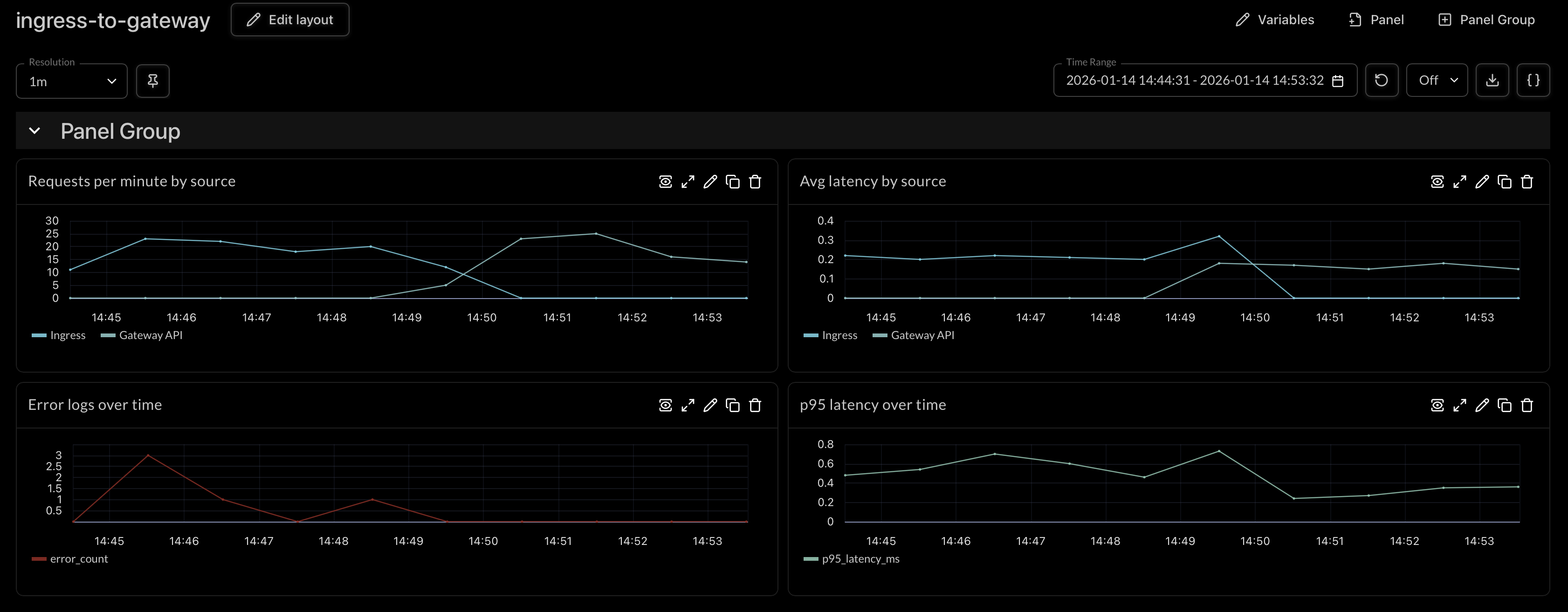
Live comparison of Ingress vs Gateway API traffic in Logfire. Click image to view full size. Learn more about creating dashboards and querying traces in the Logfire documentation.
The Cutover: If the new path is stable for a confidence window (e.g., 24 hours), remove the old Ingress resource.
Validation Commands:
kubectl get gateway,httproute -Akubectl describe gateway <name>(Check for attached routes)kubectl describe httproute <name>(Check for "Accepted" / "ResolvedRefs" conditions)
Three Concrete Conversions
Here are copy-pasteable examples of how common Ingress patterns translate to Gateway API.
Conversion 1: Host + PathPrefix Routing (Basic, Portable)
Ingress Version
apiVersion: networking.k8s.io/v1
kind: Ingress
metadata:
  name: app
spec:
  rules:
  - host: app.example.com
    http:
      paths:
      - path: /api
        pathType: Prefix
        backend:
          service:
            name: api
            port:
              number: 80
Gateway + HTTPRoute Version
apiVersion: gateway.networking.k8s.io/v1
kind: Gateway
metadata:
  name: external
spec:
  gatewayClassName: gke-l7-global-external-managed # Specific to GKE
  listeners:
  - name: http
    protocol: HTTP
    port: 80
    hostname: app.example.com
---
apiVersion: gateway.networking.k8s.io/v1
kind: HTTPRoute
metadata:
  name: api-route
spec:
  parentRefs:
  - name: external
  hostnames: ["app.example.com"]
  rules:
  - matches:
    - path:
        type: PathPrefix
        value: /api
    backendRefs:
    - name: api
      port: 80
Note: If the route doesn't attach, check kubectl describe httproute. A common error is a mismatch between the hostname in the Route and the Gateway listener.
Conversion 2: TLS (HTTPS) Termination
Ingress Version (TLS)
apiVersion: networking.k8s.io/v1
kind: Ingress
metadata:
  name: app-https
spec:
  tls:
  - hosts:
    - app.example.com
    secretName: app-tls
  rules:
  - host: app.example.com
    http:
      paths:
      - path: /
        pathType: Prefix
        backend:
          service:
            name: web
            port:
              number: 80
Gateway (HTTPS Listener) + HTTPRoute
apiVersion: gateway.networking.k8s.io/v1
kind: Gateway
metadata:
  name: external-https
spec:
  gatewayClassName: gke-l7-global-external-managed
  listeners:
  - name: https
    protocol: HTTPS
    port: 443
    hostname: app.example.com
    tls:
      mode: Terminate
      certificateRefs:
      - kind: Secret
        name: app-tls
---
apiVersion: gateway.networking.k8s.io/v1
kind: HTTPRoute
metadata:
  name: web-route
spec:
  parentRefs:
  - name: external-https
  hostnames: ["app.example.com"]
  rules:
  - matches:
    - path:
        type: PathPrefix
        value: /
    backendRefs:
    - name: web
      port: 80
GKE Callout: This configuration deploys a Google Global External Application Load Balancer with an HTTPS frontend, referencing your Kubernetes Secret for the SSL cert (supported patterns vary by controller and setup).
Conversion 3: Redirect (HTTP → HTTPS)
Ingress Version (Annotation-based)
apiVersion: networking.k8s.io/v1
kind: Ingress
metadata:
  name: app
  annotations:
    nginx.ingress.kubernetes.io/force-ssl-redirect: "true"
spec:
  rules:
  - host: app.example.com
    http:
      paths:
      - path: /
        pathType: Prefix
        backend:
          service:
            name: web
            port:
              number: 80
Gateway API (HTTPRoute Redirect Filter)
apiVersion: gateway.networking.k8s.io/v1
kind: HTTPRoute
metadata:
  name: http-to-https
spec:
  parentRefs:
  - name: external   # your HTTP (port 80) Gateway/listener
  hostnames: ["app.example.com"]
  rules:
  - matches:
    - path:
        type: PathPrefix
        value: /
    filters:
    - type: RequestRedirect
      requestRedirect:
        scheme: https
        statusCode: 301
Note: Ingress annotations are not portable; Gateway API moves this into a standardized field.
The stuff that breaks migrations
- Cross-Namespace References: By default, a Gateway in namespace
inframight not trust an HTTPRoute in namespaceapp. You must explicitly configureReferenceGrantsorallowedRouteson the Gateway listener to permit this. - Hostname Strictness: Gateway API is more explicit about hostname attachment, since you need routes attached to the Gateway. If your Gateway Listener allows
*.example.comand your HTTPRoute specifiesapi.test.com, it won’t attach. - TLS Strategy on GKE: If you previously used
ManagedCertificateCRDs, you will need to switch to referencing them vianetworking.gke.io/certmap,networking.gke.io/pre-shared-certs(GKE specific) or usingcert-managerannotations.
Final Checklist
Before you call it "Done":
- Feature parity verified (redirects, rewrites, headers, TLS)
- Gateway shows
PROGRAMMED=Truewith External IP - HTTPRoutes show
Accepted=Truein status - Direct testing passes:
curl -H "Host: app.example.com" http://<GATEWAY_IP>. For HTTPS, use SNI-aware testing (curl --resolve …) so you’re actually exercising the right cert and hostname behavior. - Health checks passing
- Monitoring shows stable metrics (4xx/5xx, latency)
- Confidence window passed (24-48 hours)
- Old Ingress deleted
FAQ
"Why doesn't my HTTPRoute attach?"
Check ParentRefs, namespace boundaries (need ReferenceGrant?), and hostname alignment. Use kubectl describe httproute <name> to see conditions.
"Can multiple teams own routes safely?"
Yes, this is a core design principle. Think of a shared Gateway with root domain and TLS configuration, with multiple routes from specific hostnames (e.g *.mydomain.com at Gateway, admin.domain.com HTTPRoute) Use ReferenceGrant for cross-namespace attachment.
"Do I still need Ingress?"
After verifying no traffic flows through it and your confidence window passes, you don't need it anymore.
"What if I need to rollback?"
Before deleting Ingress: revert DNS to old IP (1-5 minutes). After deleting: reapply Ingress YAML, wait for provisioning (~10 min), update DNS.




