
AI agents are getting dangerously capable. They can book hotels, send emails, manage accounts, and stitch together APIs, all autonomously with minimal human input. Most of the conversation so far has focused on better models and better prompts, but there's a harder problem lurking underneath: how do you actually wire these agents into production software so they can execute real-world tasks reliably?
The problem is that agents are inherently dynamic and brittle. LLM calls fail, tools time out, APIs return half-structured data, and networks flake. Any one of these can derail a multi-step agent loop. When that happens halfway through an agent run, the worst possible outcome is usually what we do today: throw everything away and start over, burning tokens and repeating work the agent already completed.
That's the gap we set out to close. DBOS teamed up with Pydantic to make AI agents reliable by default. The integration layers DBOS, a lightweight database-backed durable execution library, directly underneath your agents, adding fault tolerance, observability, and scheduling without introducing an external workflow engine. In this post, we'll walk through how that works using a concrete deep-research agent as an example.
What is DBOS?
DBOS is a lightweight durable execution library built directly on top of Postgres. It lets you write long-lived, failure-resilient code, which can survive crashes, restarts, deploys, and transient errors without losing state or accidentally duplicating work.
Instead of pushing reliability into an external system, DBOS lives inside your application. You install the open-source library, annotate workflows and steps in your code, and run your app as usual. As those workflows execute, it automatically checkpoints progress into the database. If something goes wrong, it resumes execution from the last completed step, not from the beginning.
Beyond workflows, DBOS also includes durable, database-backed queues. These serve as a practical alternative to systems like Celery or BullMQ, while remaining fully integrated with workflow execution. DBOS queues support concurrency limits, rate limits, timeouts, retries, and prioritization, without introducing a separate broker or control plane.
Architecturally, a DBOS application is deliberately simple. All durability logic lives inside the library linked into your process. Your database acts as both the source of truth for the execution state and the recovery mechanism when failures happen.
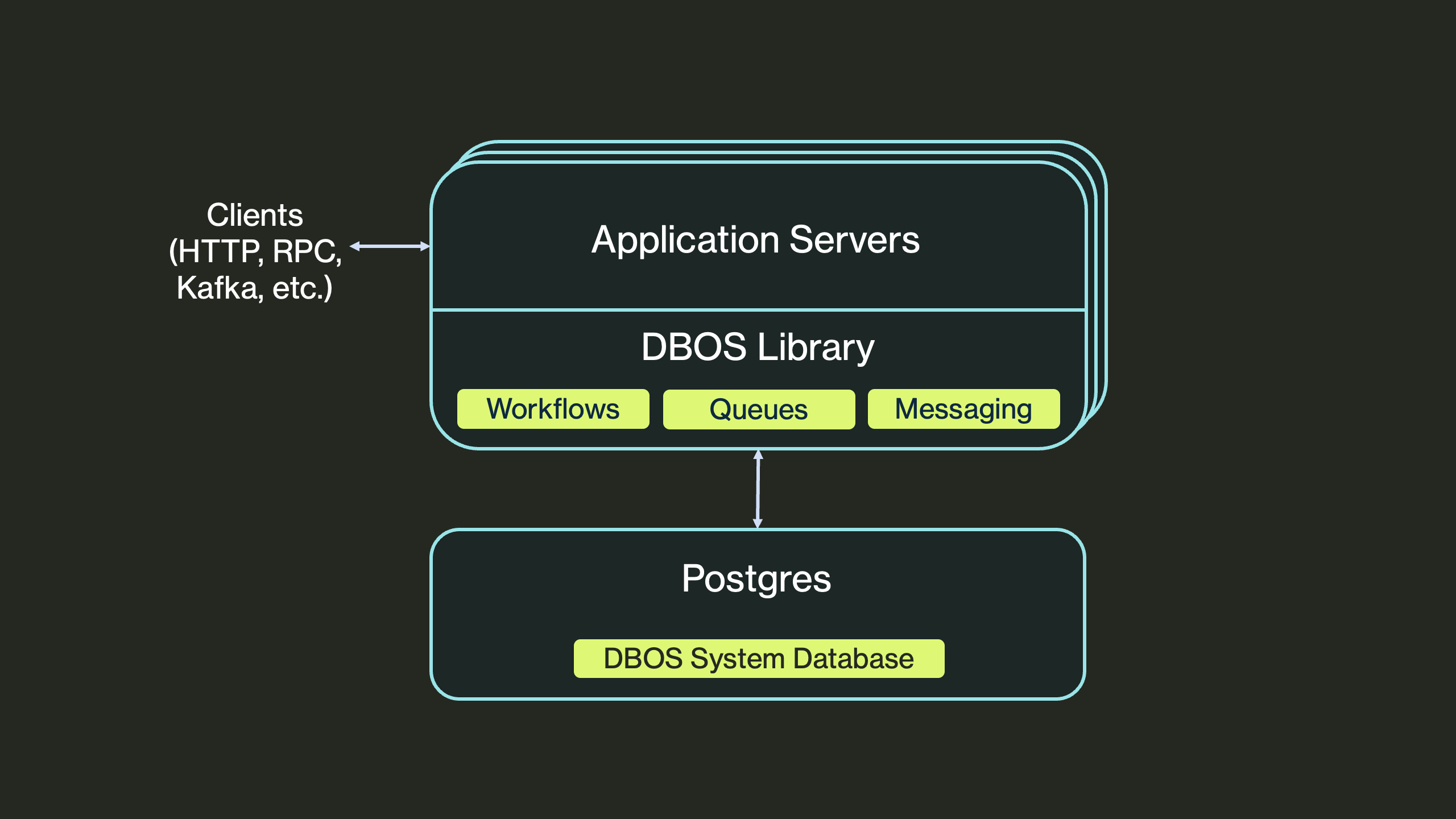
Composing Libraries for Production AI Agents
DBOS and Pydantic AI are a natural fit because they share the same design philosophy: both are lightweight libraries that integrate directly into your existing application code. Pydantic AI lets you express agent logic, tools, and structured outputs without introducing a separate agent runtime. DBOS does the same for reliability: adding durability, recovery, and scheduling without an external orchestrator. Together, they let you build production-grade agents by composing libraries without adopting a new platform. Your agents remain plain Python code, just with stronger guarantees.
Getting started with Durable Agents
Let's start with a plain Pydantic AI agent:
from pydantic_ai import Agent

agent = Agent(
    model="anthropic:claude-sonnet-4-6",
    system_prompt="You are a helpful research assistant"
)

...
result = await agent.run("What are the best Python web frameworks?")
...
This works great, but it's not crash-proof. Every agent run depends on external systems: LLM APIs, tool endpoints, MCP servers, network calls. Any of those can fail midway. If the process crashes or a request times out, the agent has no idea what already happened, and the only recovery strategy is to start over.
The Pydantic AI + DBOS integration solves this by making agent execution durable. Here's the same agent, now running with durable execution:
from pydantic_ai import Agent
from pydantic_ai.durable_exec.dbos import DBOSAgent

agent = Agent(
    model="anthropic:claude-sonnet-4-6",
    system_prompt="You are a helpful research assistant"
)

# Wrap it for DBOS durable execution
dbos_agent = DBOSAgent(agent)

# Now dbos_agent.run() is automatically a durable workflow, that survives crashes and redeploys.
...
result = await dbos_agent.run("What are the best Python web frameworks?")
...
That's the only change. By wrapping your agent with DBOSAgent, you get durability without rewriting your agent logic. Under the hood, it automatically:
- Wraps
Agent.run()andAgent.run_sync()as DBOS workflows (it works for both sync and async Python functions) - Wraps model calls and MCP communication as DBOS steps, so their results are checkpointed
You can use the durable agent directly, embed it inside an existing DBOS workflow, or use it as a building block for multi-agent systems. When one agent calls another, DBOS automatically treats those sub-agent runs as child workflows, preserving isolation and guaranteeing end-to-end reliability across agents. In practice, this means you can compose agents freely and still have strong execution guarantees.
Integration with Logfire for End-to-End Observability
Durability solves correctness, but production agents also need observability. This is where the DBOS + Pydantic AI + Logfire stack fits together cleanly.
DBOS can emit OpenTelemetry spans for every workflow and step execution, while Pydantic AI already produces spans for agent runs, model requests, and tool invocations. When combined, you get a single trace that spans from high-level agent reasoning all the way down to individual retries and database-checkpointed steps.
All of these spans can be sent directly to Pydantic Logfire, giving you a true end-to-end view of your application. This is especially valuable for agents, where execution paths are dynamic and failures are often intermittent or data-dependent.
Enabling this integration is simple: you just configure Logfire to trace Pydantic AI and enable OpenTelemetry export when initializing DBOS:
logfire.configure()
logfire.instrument_pydantic_ai()

dbos_config: DBOSConfig = {
    "name": "my-app",
    "enable_otlp": True,
}
DBOS(config=dbos_config)
In practice, this means your agents aren't just reliable, they're debuggable.
Case Study: A Multi-Agent Deep Research Platform
To make these ideas concrete, we built a multi-agent deep research system that automatically plans, executes, and synthesizes research in response to a user query. The system combines Pydantic AI for structured agent logic with DBOS for durable execution.
The full implementation is open source and available on GitHub: https://github.com/dbos-inc/dbos-demo-apps/tree/main/python/pydantic-research-agent
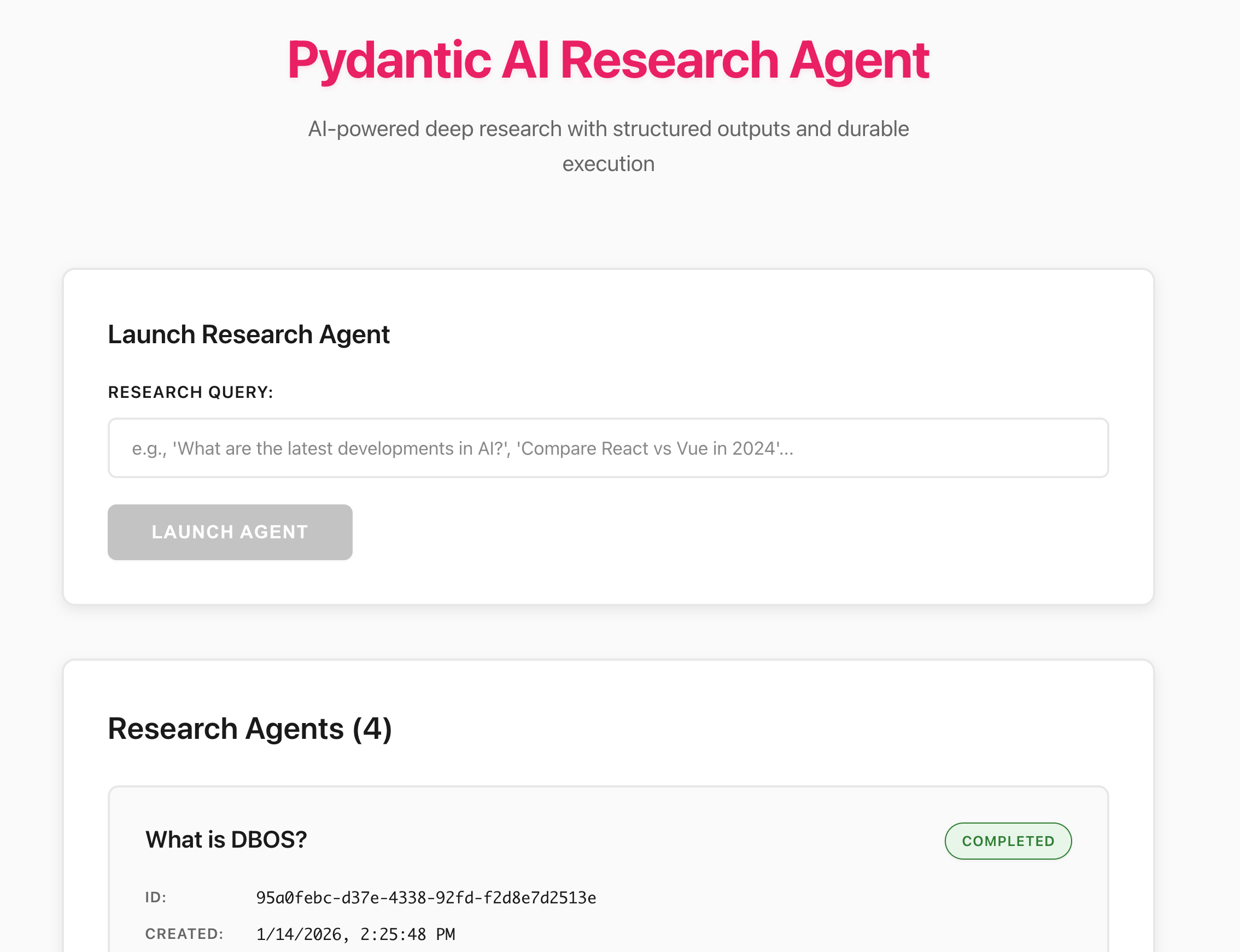
At a high level, the system is composed of three cooperating agents, each implemented with Pydantic AI and wrapped with DBOSAgent for durability:
- Planning agent (Claude Sonnet): Generates a structured research plan, including up to five web search steps and clear analysis instructions.
- Search agent (Gemini 2.5 Flash): Executes web searches using the Gemini API's built-in web search tool. These searches are launched in parallel using asynchronous workflows to maximize throughput.
- Analysis agent (Claude Sonnet): Synthesizes search results into a final report and can dynamically invoke additional searches if more context is needed.
All three agents run as durable workflows. Fan-out (parallel searches) and fan-in (aggregation and synthesis) are handled explicitly by DBOS, while sub-agent calls are automatically treated as child workflows. This guarantees end-to-end reliability across the entire research process, even when agents call other agents.
Together, this architecture provides several practical benefits:
- Resilience: Research continues across crashes, restarts, and redeploys without losing progress.
- Scalability: Parallel search workflows leverage concurrent execution.
- Observability: DBOS events and Logfire traces provide real-time visibility into research progress.
- Model Optimization: Different models are used where they perform best (planning, search, analysis).
- Cost Efficiency: Fast, inexpensive models handle high-volume search; stronger models focus on reasoning.
In the next section, we'll walk through how these agents are orchestrated in code.
The Deep Research Workflow
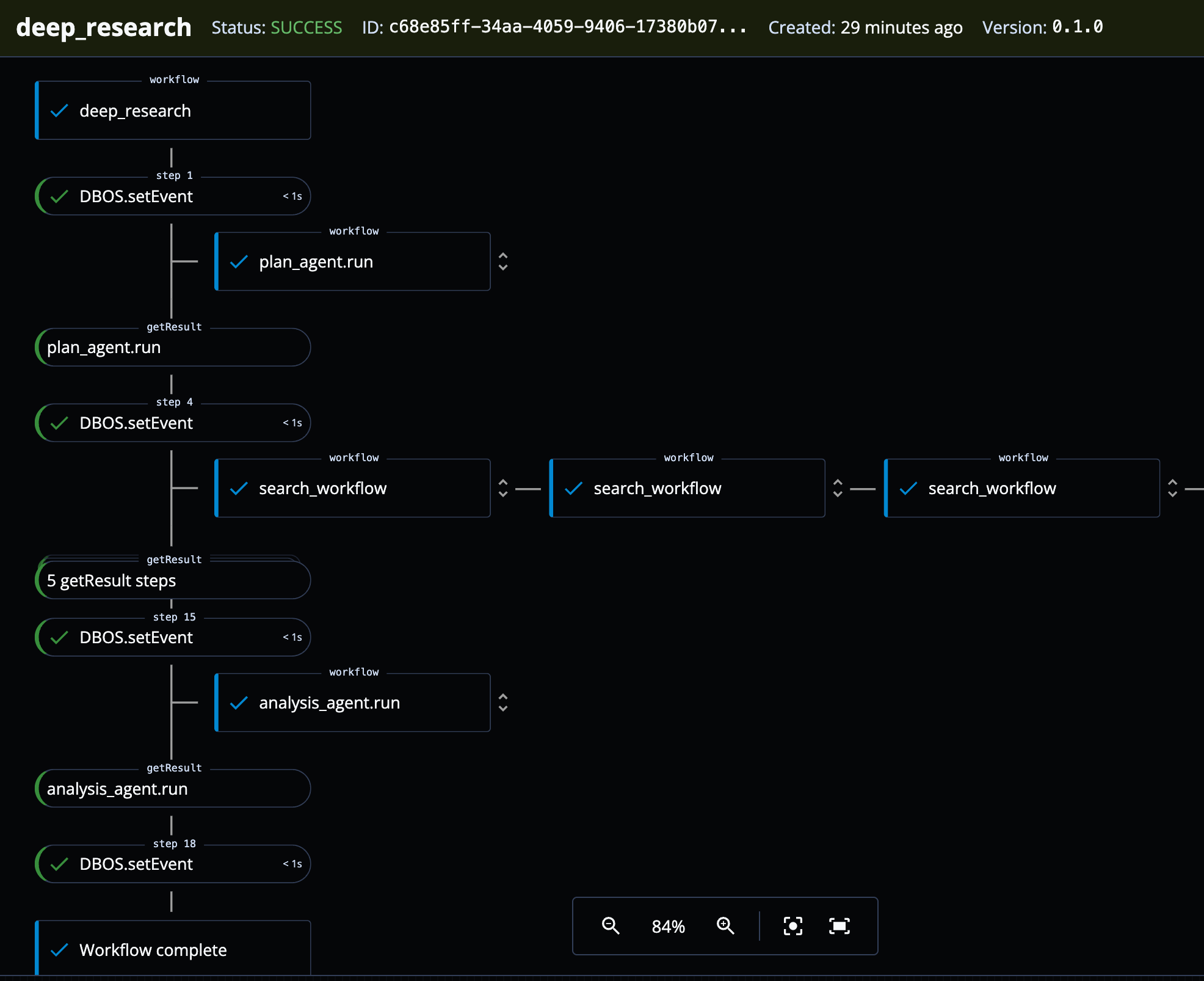
The core of the system is a DBOS workflow, and conceptually it's a classic fan-out / fan-in pattern. The workflow starts by asking the planning agent to break the user query into a structured research plan. It then fans out multiple search workflows in parallel, waits for them to complete, and finally invokes the analysis agent to synthesize a report. Throughout execution, it emits progress events so the frontend can track the agent's state in real time.
@DBOS.workflow()
async def deep_research(query: str) -> str:
    # Set and update an agent status the frontend can display
    agent_status = AgentStatus(
        created_at=datetime.now().isoformat(),
        query=query,
        report=None,
        status="PLANNING",
    )
    await DBOS.set_event_async(AGENT_STATUS, agent_status)
    result = await dbos_plan_agent.run(query)
    plan = result.output
    tasks_handles: List[WorkflowHandleAsync[str]] = []

    agent_status.status = "SEARCHING"
    await DBOS.set_event_async(AGENT_STATUS, agent_status)
    for step in plan.web_search_steps:
        # Asynchronously start search workflows without waiting for each to complete
        task_handle = await DBOS.start_workflow_async(
            search_workflow, step.search_terms
        )
        tasks_handles.append(task_handle)

    search_results = [await task.get_result() for task in tasks_handles]

    agent_status.status = "ANALYZING"
    await DBOS.set_event_async(AGENT_STATUS, agent_status)
    analysis_result = await dbos_analysis_agent.run(
        format_as_xml(
            {
                "query": query,
                "search_results": search_results,
                "instructions": plan.analysis_instructions,
            }
        ),
    )
    agent_status.report = analysis_result.output
    agent_status.status = "COMPLETED"
    await DBOS.set_event_async(AGENT_STATUS, agent_status)
    return analysis_result.output
A few things are worth calling out:
- Each phase of the workflow is durably checkpointed, so crashes or restarts resume from the last completed step.
- Search tasks are launched asynchronously using
DBOS.start_workflow_async, allowing parallel execution. - Progress updates are emitted via
DBOS.set_event_async, making it easy for the frontend to reflect real-time agent state.
Reliable Sub-Agent Calling
One subtle but powerful feature of the integration is how agent-to-agent calls work.
Because DBOSAgent wraps agent.run() as a DBOS workflow, calling one agent from another automatically creates a child workflow. For example, the analysis agent exposes a tool that performs an extra web search if it determines more information is needed:
@analysis_agent.tool_plain
async def extra_search(query: str) -> str:
    """Perform an extra search for the given query."""
    result = await dbos_search_agent.run(query)
    return result.output
When this tool is invoked, the search agent runs as a durable child workflow and its execution is independently checkpointed and observable. In practice, this makes complex multi-agent systems remain debuggable. You can freely build agents that call other agents, then DBOS handles execution boundaries and recovery automatically, while Pydantic AI focuses on reasoning, structure, and tool selection.
Observability and Debuggability
You can view agent traces directly in Logfire. Because both DBOS and Pydantic AI emit OpenTelemetry spans, you get a full end-to-end picture of what the system is doing, from agent runs and model calls to workflow steps.
You can also easily visualize workflow execution using DBOS Conductor. As shown below, the web UI clearly displays the fan-out pattern of the search workflows and the fan-in pattern used to collect results before calling the analysis agent. In addition, you can cancel, restart, or even fork workflows directly from Conductor.
Bonus: Debug with MCP
You can also use the Logfire MCP server and the DBOS MCP server with your coding agents to chat directly with your observability data. This lets you ask questions about agent runs, workflow state, and failures in natural language, making it much easier to debug complex agent behavior without digging through raw logs or traces.
In summary, this demo shows an end-to-end example of combining durable execution with multi-agent AI orchestration to build reliable, observable, and production-grade AI applications.
Try It Yourself
Crash your agents: The deep research example is fully working and can be run locally. Try introducing failures (terminate the process mid-run, turn off your WiFi) and watch how execution resumes automatically without redoing completed steps.
Explore the integration docs: The Pydantic AI + DBOS integration documentation walks through setup, configuration, and more advanced patterns for building durable, production-ready agents.
Share what you're building: We'd love to learn how others are building agents in production systems. Are you building multi-agent workflows or running agents at scale? Share your experiences, patterns, and challenges in the DBOS Discord community.
Frequently Asked Questions
What is durable execution for AI agents?
Durable execution is a programming model where the runtime automatically checkpoints each step of a workflow to a database. If a process crashes, restarts, or is redeployed, the workflow resumes from the last completed checkpoint rather than starting over. For AI agents, this means that expensive LLM calls, tool invocations, and multi-step reasoning chains are never lost or repeated due to infrastructure failures.
How does Pydantic AI integrate with DBOS?
Pydantic AI integrates with DBOS through the DBOSAgent wrapper. You create your agent with Pydantic AI as usual, then wrap it with DBOSAgent(agent). This automatically converts agent.run() into a durable DBOS workflow and wraps model calls and MCP communication as checkpointed steps. No changes to your agent logic are required.
Can durable agents recover from crashes mid-run?
Yes. When a durable agent crashes mid-run, DBOS automatically resumes execution from the last successfully checkpointed step. Completed model calls and tool invocations are replayed from the database rather than re-executed, so you don't burn extra tokens or repeat work. This applies to both single-agent runs and multi-agent workflows where agents call other agents.
How do you monitor durable AI agents in production?
DBOS emits OpenTelemetry spans for every workflow and step, while Pydantic AI produces spans for agent runs, model requests, and tool calls. By sending both to Pydantic Logfire, you get a unified trace that covers the full execution path. You can also use the DBOS Conductor web UI to visualize, cancel, restart, or fork workflows, and both Logfire and DBOS offer MCP servers for querying observability data with natural language.
Is DBOS open source?
Yes. DBOS is a lightweight, open-source Python library that you install with pip. It uses Postgres as its only infrastructure dependency — there is no separate broker, orchestrator, or control plane. All durability logic runs inside your application process, and all execution state is stored in your database.




