
AI coding agents have quietly turned developer laptops into the most exposed credential stores in the company. Provider keys sit in dotfiles and environment variables, reachable by any package you install — all so your editor can be a little smarter.
Today we're shipping logfire gateway launch, a new command in the Pydantic Logfire CLI that runs your AI coding tools through the Pydantic AI Gateway without ever putting any API key on your laptop.
uvx --with 'logfire[gateway]' logfire gateway launch claude
That's it. Claude Code starts up, talks to OpenAI, Anthropic, Google — whichever providers you've configured in Logfire — and every token, dollar, and tool call shows up in your Logfire project.
How it works
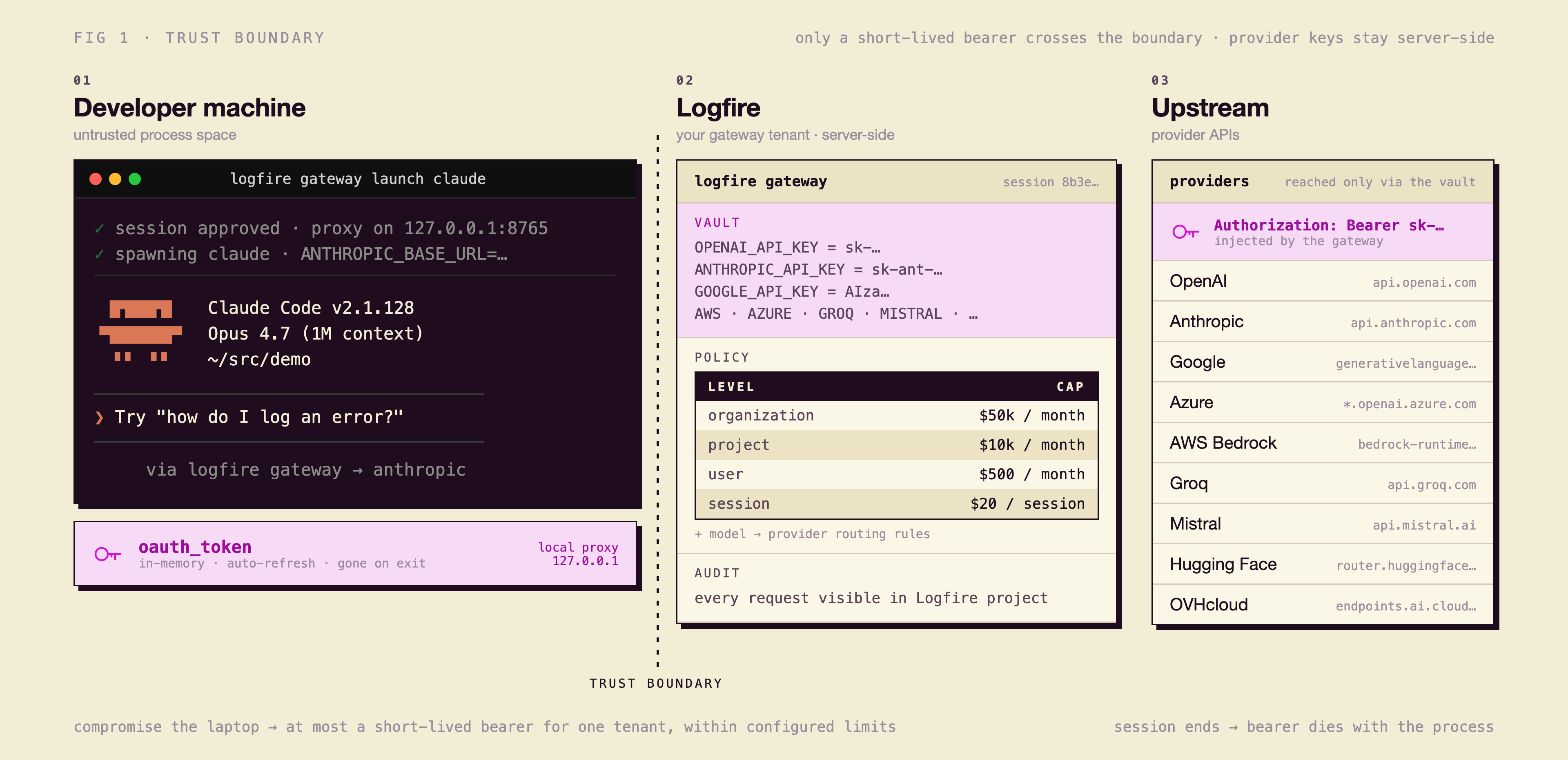
There are three things in the picture: your laptop, the gateway, and the upstream providers. The provider credentials live in the gateway and never leave it. Your laptop only ever holds a short-lived OAuth token, in memory, for the duration of one session. Everything in between is the gateway's job: enforce limits, record every trace, decide which provider answers.
No more plaintext provider keys on disk
Using coding agents requires either a provider subscription or a raw API key. Raw API keys end up in the usual suspect locations: .bashrc, .zshrc, .env, a config file in your home directory. Attackers know exactly where to look.
We've seen a steady stream of supply-chain incidents where malicious npm and PyPI packages quietly read local credentials, dotfiles, and environment variables, and exfiltrate whatever they find. A developer laptop is now a high-value target precisely because it tends to hold long-lived tokens for everything: source control, package registries, cloud providers, SaaS APIs, and now LLM providers, all sitting in cleartext, all reachable by any package the developer happens to install.
This is true either way — whether you're using Pydantic-managed credentials or your own provider key. The moment that key lives on a developer laptop, you're one compromised dependency away from losing it.
logfire gateway launch gets you out of that game. Here is what actually happens when you run it:
- The CLI opens your browser to a Logfire authorization page using a PKCE-protected OAuth flow, so there's no client secret to store anywhere.
- You explicitly approve the session, scoped to a single project and the gateway proxy.
- The CLI starts a small local proxy bound to
127.0.0.1(never0.0.0.0) and hands the coding tool a one-off bearer token for that proxy only. - The proxy holds the OAuth access token in its own process memory — the launched tool never sees it, only the local bearer — refreshes it automatically in the background as it nears expiry, and discards it the moment you exit the command.
- Every request the tool makes is forwarded through the gateway, traced in Logfire, and counted against your limits before it ever reaches a provider.
The real provider keys live inside the gateway, server-side, where they belong. A malicious postinstall script can read ~/.env in a millisecond. Reaching into another process's memory to grab a live OAuth token is a different class of attack — and even if one succeeds, the worst it can do is talk to your gateway, within your limits, until that session ends. Close the terminal, or revoke the session in Logfire, and the door shuts. Nobody walks away with your raw OpenAI or Anthropic key.
Hierarchical limits, from organization to session
Costs are the other thing that quietly gets out of hand once a coding agent has access to a real key. A single misconfigured agent in a loop can run a four- or five-figure bill in an afternoon, and the only people who notice are usually in finance, at month close. By that point the spend is already real.
It's the same gateway your production agents already run on, so the limits, alerts, audit logs, and dashboards you've configured for production traffic apply to terminal sessions out of the box.
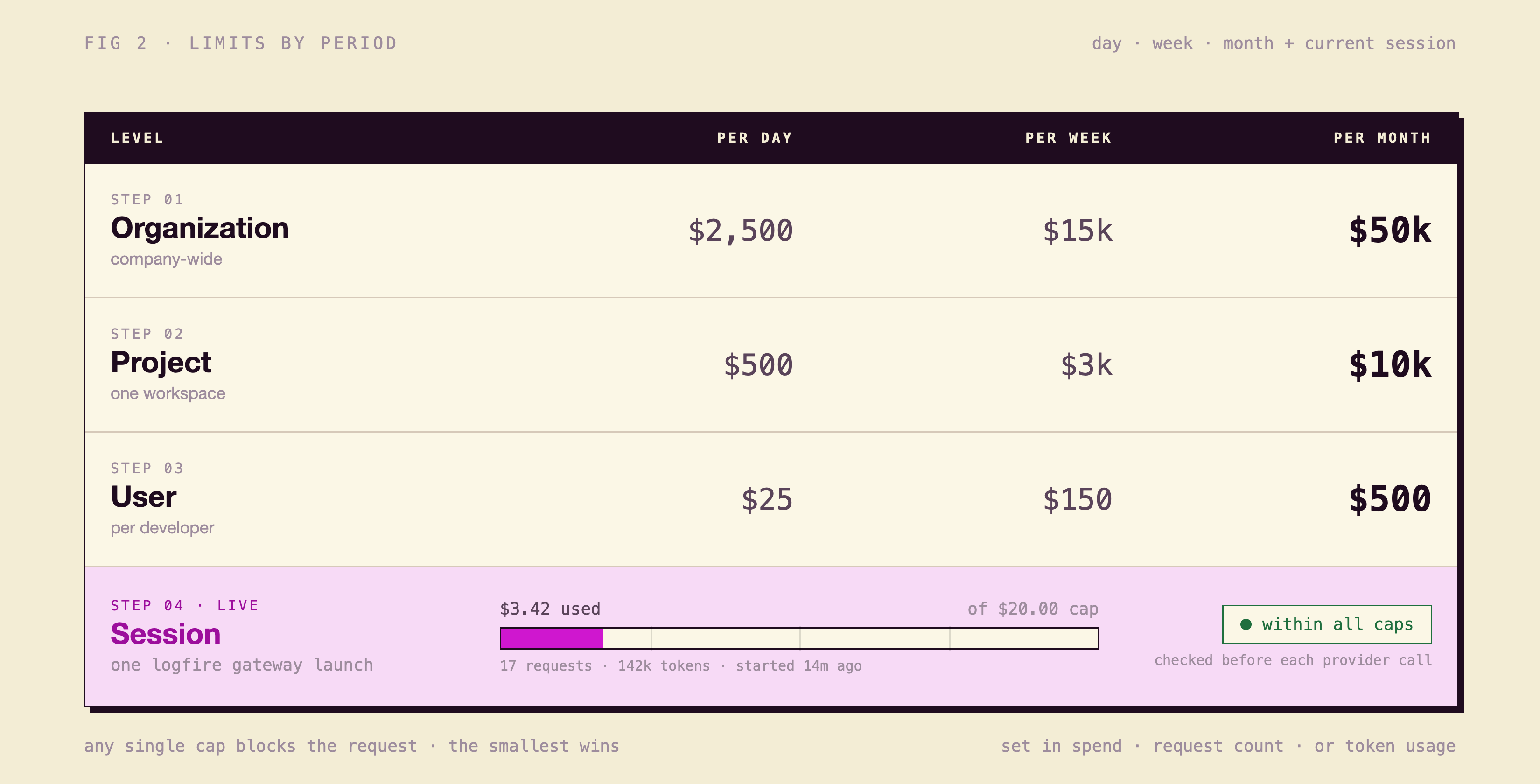
The Logfire Gateway enforces four levels of limits, and they all compose:
- Organization limits. The top of the stack. A single number that says "this company will not spend more than this on LLMs this month," enforced server-side across every user, project, and provider.
- Project limits. Group sessions by project and cap the whole thing. The
customer-support-botproject and thefriday-afternoon-experimentsproject can have very different ceilings. - User limits. Set a budget per developer. Useful for "every engineer gets $X a month of LLM spend" without anyone forwarding receipts.
- Session limits. Each
logfire gateway launchinvocation is its own session. Cap spend, request count, or token usage per session so a runaway agent loop has a hard ceiling that's much lower than your monthly bill.
The gateway checks limits before requests reach a provider, so you can't blow through them by switching models, regions, or machines.
One endpoint, many providers
The same session can route to OpenAI, Anthropic, Google Vertex, Groq, and AWS Bedrock. See the Gateway documentation for the current list of tested providers. Your coding tool thinks it's talking to one endpoint; the gateway decides which provider answers based on the routing group you've configured in Logfire. Swap from GPT to Claude to Gemini by editing the routing group server-side — no changes to the tool's configuration on the laptop, and no re-issued keys.
Every request can be traced in Logfire alongside the rest of your application telemetry, so cost, latency, and errors are all in one place. You aren't bolting a routing layer onto your stack, then a separate logging product, then a separate cost tool. One identity, one audit trail, one bill.
Getting started
Run one command:
$ uvx --with 'logfire[gateway]' logfire gateway launch claude
If you don't have a Logfire account yet, the CLI will walk you through creating one.
- Read the story. Pydantic AI Gateway.
- Configure routing groups and limits. Gateway docs.
- Roll it out across an organization. Contact us for SSO, custom roles, and audit-log forwarding.
Try it on one project this week. If something is missing, tell us — GitHub issues, or contact for anything not public.




