
Score live production traces, catch regressions and improvements as they happen, and feed production data into the test suite that makes your next deploy stronger.
Pydantic Logfire now supports online evals. Attach evaluators to any function or agent, sample as much or as little of your traffic as you want, and review results in the Logfire UI as they accumulate. The same Evaluator classes you already use when evaluating datasets offline during development work here, with the same rubric and code, now scoring production.
In this post, we'll cover why online evals matter, what you can do with them today, where they fit alongside the rest of your eval workflow, and what the Logfire UI looks like when you've wired everything up.
Where online evals fit
Offline evals and online evals do different jobs in the development cycle, and you want both.
Offline evals give you fast feedback while you're developing. Run your Evaluator classes against curated datasets, see how a prompt change or a model swap moves the numbers, and iterate before anything ships. You're testing hypotheses about what will and won't work.
Online evals tell you how your agent is actually performing once it's live: hallucination rate, tool-use accuracy, response quality, all the same metrics you tracked offline, but on real production traffic. Every production call, or a sampled subset, gets scored automatically as part of the same pipeline that captures your traces. When your hallucination rate creeps up after a model upgrade, tool-use accuracy improves after a prompt change, or your average response score regresses on a particular query type, you see it in the production data. Online evals provide continuous, automated scoring of your live agent on the inputs your users actually send.
What online evals do
Online evals turn production traffic into something measurable. Here are three things you can do today.
Score every production trace, automatically. Every call, or a sampled subset, runs against the evaluators you attach. A cheap heuristic can run on every request; an expensive LLM judge can run on one percent. You define what gets checked and how often. Know if your agent is hallucinating, whether it's costing twice as much as it used to, or whether your users are getting worse answers after deploy.
Define your own judges. Hallucination, tool-use correctness, citation accuracy, tone, refusal handling, whatever your domain demands. The evaluators you write return whatever shape makes sense (pass/fail, a numeric score, a category, or a mapping of named results), and the Logfire UI adapts to display each one usefully over time.
Build the dataset for your next experiment. Every score is anchored to the trace that produced it, so a regression is one click from the prompt, the tool calls, and the response. From there, the trace can do two jobs in your offline test suite. It can be an example of how your agent should have behaved differently, or it can be an example of where the judge itself got it wrong. The first improves your agent; the second improves your evaluators. Either way, your offline test suite gets stronger with every production case you save into it.
Built on Pydantic Evals and OpenTelemetry
Online evals use the same Evaluator classes you already write for Pydantic Evals. The rubric you use offline scores production too, from one place in your code. And because eval results emit as OpenTelemetry events, the data flows over the same pipeline as the rest of your traces.
What's in the Logfire UI today
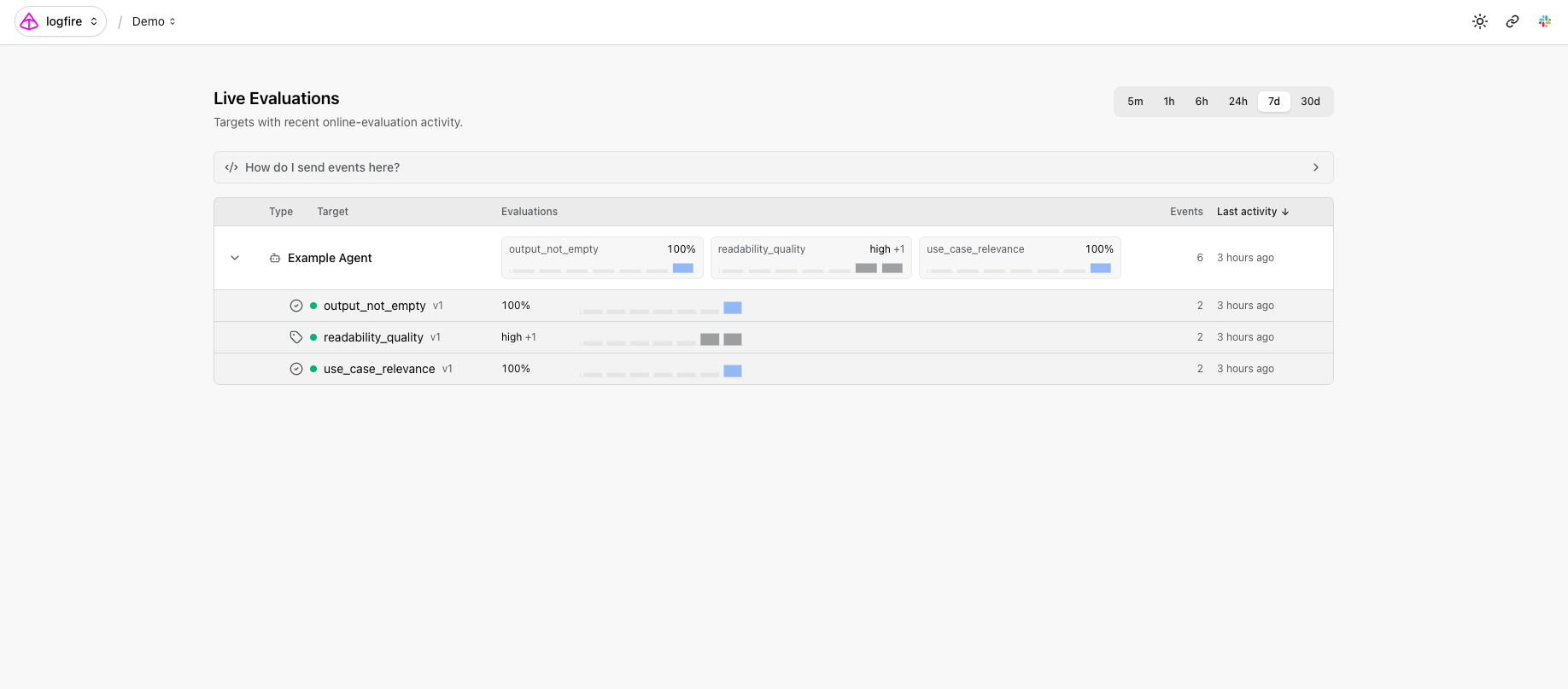
The Evals: Live Monitoring page lists every target you've wired up, each function or agent, with sparklines and summaries for every evaluator attached to it.
Drill into a target to see trend lines per evaluator and recent events you can filter and sort.
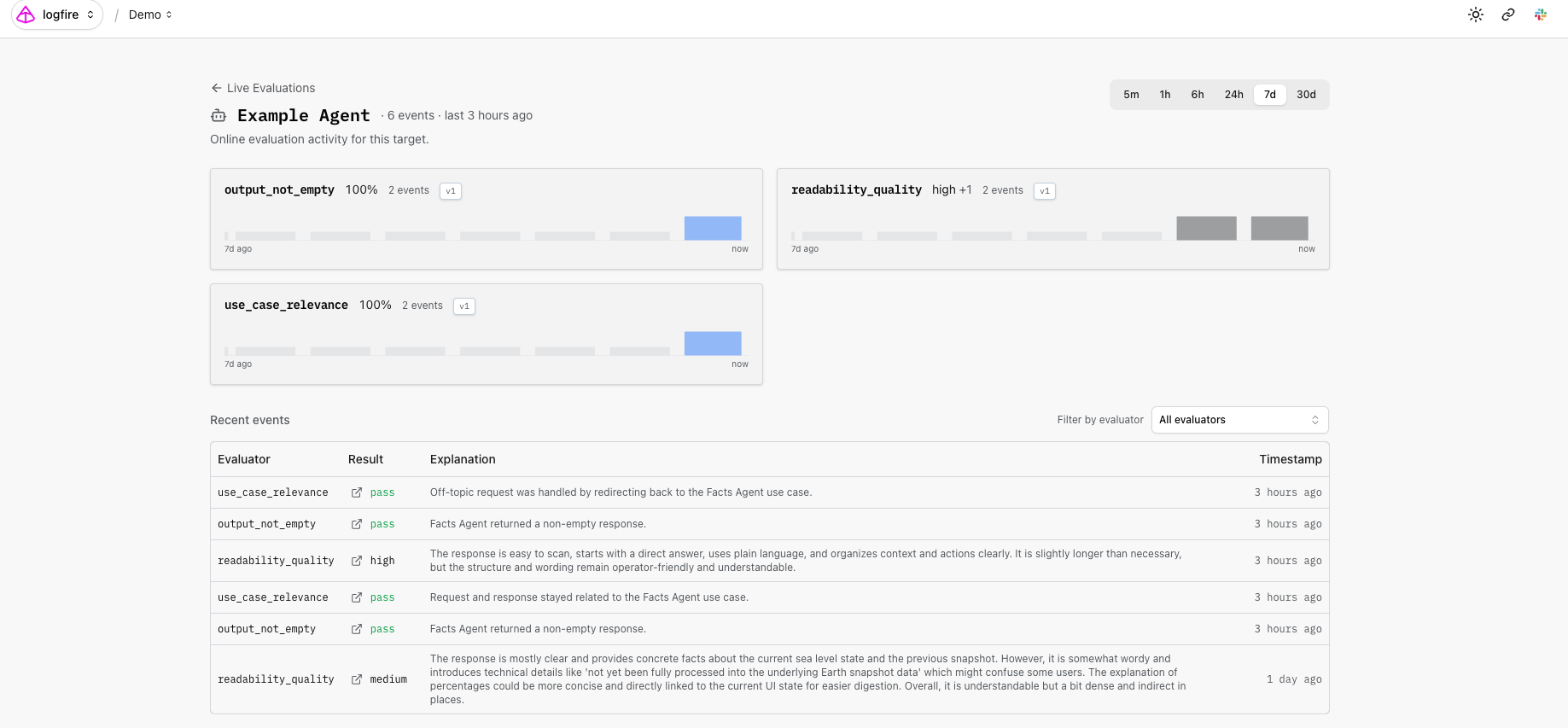
This is where the integration with the rest of Logfire pays off. A regression detected by an online evaluator is never an isolated number; it's inherently tied to the traces that produced it. Combined with Logfire's SQL access and MCP server, your evaluation events are queryable like any other trace data. Connect an AI coding agent in your editor and ask: find the traces where the citation evaluator failed in the last hour, and show me the prompts that produced them. Your evals become a query surface, not just a dashboard.
Get started today
If you're already on Logfire, online evals are available in your account today. Results appear in the Live Monitoring page as soon as your application emits its first evaluation event. If you're new to Logfire, sign up for free. We'd love to hear what you build.
Frequently asked questions
What's the difference between online evals and offline evals?
Offline evals run a curated dataset through your AI system during development while you iterate on prompts, models, or tools. Online evals run on live production traffic, automatically scoring real calls against the same evaluators. Most teams want both: offline for fast feedback while developing changes, online for monitoring once shipped.
When should I choose online evals over offline evals?
Use online evals when you want to monitor how your AI is performing on real user inputs in production. They're how you catch quality drift after a deploy and how you spot regressions in hallucination rate, tool-use accuracy, or response quality on real traffic.
Do online evals replace human review?
No. Online evals automate the scoring step so human reviewers can focus on the cases that matter: low-scoring traces, edge cases, ambiguous outputs. Human review of those cases produces two kinds of useful data. First, examples of how the agent should have behaved differently: what the response should have said, which tool it should have called, what tone it should have used. Second, examples of where the automated judge got the score wrong, which is what teaches the judge to be more accurate over time. The richer the annotation, the more useful the example becomes.
What evaluators can I use?
Any Evaluator class from Pydantic Evals, including the built-in LLMJudge for natural-language rubrics and any custom evaluator you write. Common production checks: hallucination detection, citation accuracy, tool-use correctness, refusal handling, output format validation.




