
Three years ago, a model just predicted the next token. It could write you a story, but it could not look anything up, run anything, or check its own work. We wrapped it in a loop: call the model, run a tool, feed the result back, repeat, and called that an agent. We built a system around the agent to keep it reliable on real work, and called that a harness.
The harness thesis made the case that long-running agents need that harness. This article is about what makes one good.
A harness is everything around the agent loop that turns a model's output into verified, durable work instead of a transcript you have to read and trust. The familiar pieces:
- Tools the agent can call safely
- Memory that survives a single model call
- Guardrails that catch a bad action before it lands
- Context management that keeps the window full of what matters
What makes a harness good is timing: getting the right text to the model at the right moment. Ryan Lopopolo, who works on Codex at OpenAI, reduces it to one line: "all the harness should do is surface instructions to the model at the right time."1 That comes up twice over a run: what the model is told before it acts, and how it gets caught once it starts to drift.
A good harness discloses
The instinct, when you want an agent to behave, is to tell it everything up front. Every rule, every tool, loaded into the prompt before the first turn. This backfires two ways:
- Front-load every instruction and you overwhelm the model before it has done any work.
- Front-load every tool and you spend the context window describing capabilities instead of using them.
The second cost is measurable. Cloudflare found an MCP server with thousands of endpoints would burn 1.17 million tokens on tool definitions before the user said a word.2 Anthropic hit the same wall and fixed it the same way: discover tools on demand, and one workload dropped from 150,000 tokens to 2,000.3
So a good harness defers. It shows the model what is available in one line, and hands over the full instructions and tools only when the model reaches for them.
Lopopolo's example is a coding agent. Don't load the rules for decomposing a React component at the start. Let the agent prototype, then surface the rule at lint time, when it becomes relevant.1 The agent meets the instruction at the moment it can act on it.
In Pydantic AI v2, this is a flag on a capability. Mark it defer_loading=True and it stays out of the prompt until the model loads it: the model sees a one-line description in a catalog, then pulls in the whole bundle, instructions and tools together, in one step. ToolSearch does the same for tools, so an agent can carry hundreds and pay for the handful it uses.
Thanks to Pydantic Monty, our sandboxed Python subset, we can take that further. With code mode the agent writes code that calls tools as functions and discovers them as it goes, instead of reading a schema for every one. We learned this building tools for Pydantic Logfire: after forty-plus of them, we realized "we didn't have an MCP server, we had an API with delusions of grandeur," and the model did better writing a few lines of Python than picking from a wall of unlabeled buttons.4
The rule under both: information should reach the model when it is needed, not before.
A good harness steers
Disclosure decides what the model sees. Steering catches the run when it goes wrong anyway.
Every long run drifts. The agent wanders down a dead end, misreads a result, or keeps going when it should have stopped to ask. What matters is how far it gets before anything notices. Steering shortens the distance between a mistake and its correction.
Lopopolo's test for this is sharp:
Every time I have to type "continue" to the agent is a failure of the harness to provide enough context around what it means to continue to completion.1
If a human has to nudge the loop by hand, the harness left something out.
Steering comes from two places:
- A check the harness runs: verify the artifact before the agent declares victory, or force a different move after the same tool gets called fifty times.
- A signal from outside the run: a production alert that redirects a live agent mid-task without stopping it.
Pydantic AI v2 ships the second case as a pending message queue: a message pushed into a live run is held until the current step finishes, then delivered on the next turn, so a steer never lands mid-thought. It is new enough that we are still growing what you can push into a running agent.
One primitive: the capability
Disclose and steer aren't two features you bolt on. In Pydantic AI v2 they are the same primitive seen twice: the capability.
A capability bundles an agent's instructions, tools, hooks, and model settings into one composable unit, and you attach it by adding it to a list. The powerful ones use hooks to read and rewrite what the model sees on every step: its tools, its instructions, its message history. That is how a capability defers its own tools, trims a result before it overflows the window, or slips in a reminder without poisoning the durable history.
The first-party capabilities live in the Pydantic AI Harness, the batteries for your agent: file system access, code mode, context management, guardrails. Core stays small, the harness moves fast, and a capability graduates into core once it proves essential.
Capabilities can also be built dynamically, per run. That is the first hint of something larger: a harness that assembles its own capabilities while it runs is a short step from a harness that assembles agents.
A harness is mostly a list you compose. Here a coding agent gets scoped file access, code mode, and tools it can find on demand instead of all at once:
from pydantic_ai import Agent
from pydantic_ai.capabilities import ToolSearch
from pydantic_ai_harness import CodeMode, FileSystem

capabilities = [
    FileSystem(root_dir='.'),  # scoped reads and writes, no traversal above the root
    CodeMode(),                # write code that calls tools, sandboxed by Monty
    ToolSearch(),              # discover tools on demand, not all up front
]

agent = Agent(
    'anthropic:claude-opus-4-7',
    instructions='Fix the issue, then verify the fix.',
    capabilities=capabilities,
)
Our own coding agent, loopy (it runs headless or live in our chat UI), builds that list per run: it reads the repo it is pointed at, turns the skills it finds there into capabilities, and spins up new sub-agents as it works.
Instrumentation is now a capability too, so every model call, tool call, and hook lands on one OpenTelemetry timeline in Pydantic Logfire. A harness you cannot see is a harness you cannot fix, and those traces are what later let a harness reason about its own runs.
Why the loop comes next
The agent was already a loop: a model calling tools until it hits its goal. The next word borrows the term for something bigger, a loop of agents, and the gap between the two is real.
A harness arms a single run and makes it reliable. You reach for a loop when one run is not enough. Two things set it apart from anything a single harnessed agent can do:
- It chooses its own structure. Instead of following a plan you wrote, the loop decides how to split the work. It spawns sub-agents for the pieces, gives each only the tools its job needs, checks their results, and merges them back. The decomposition is the system's call, not yours.
- It outlives the run. The loop can go idle and wake on an outside event: a closed PR, a failed test, a teammate's reply. It survives restarts, carries state across long horizons, and takes new context mid-flight instead of starting over.
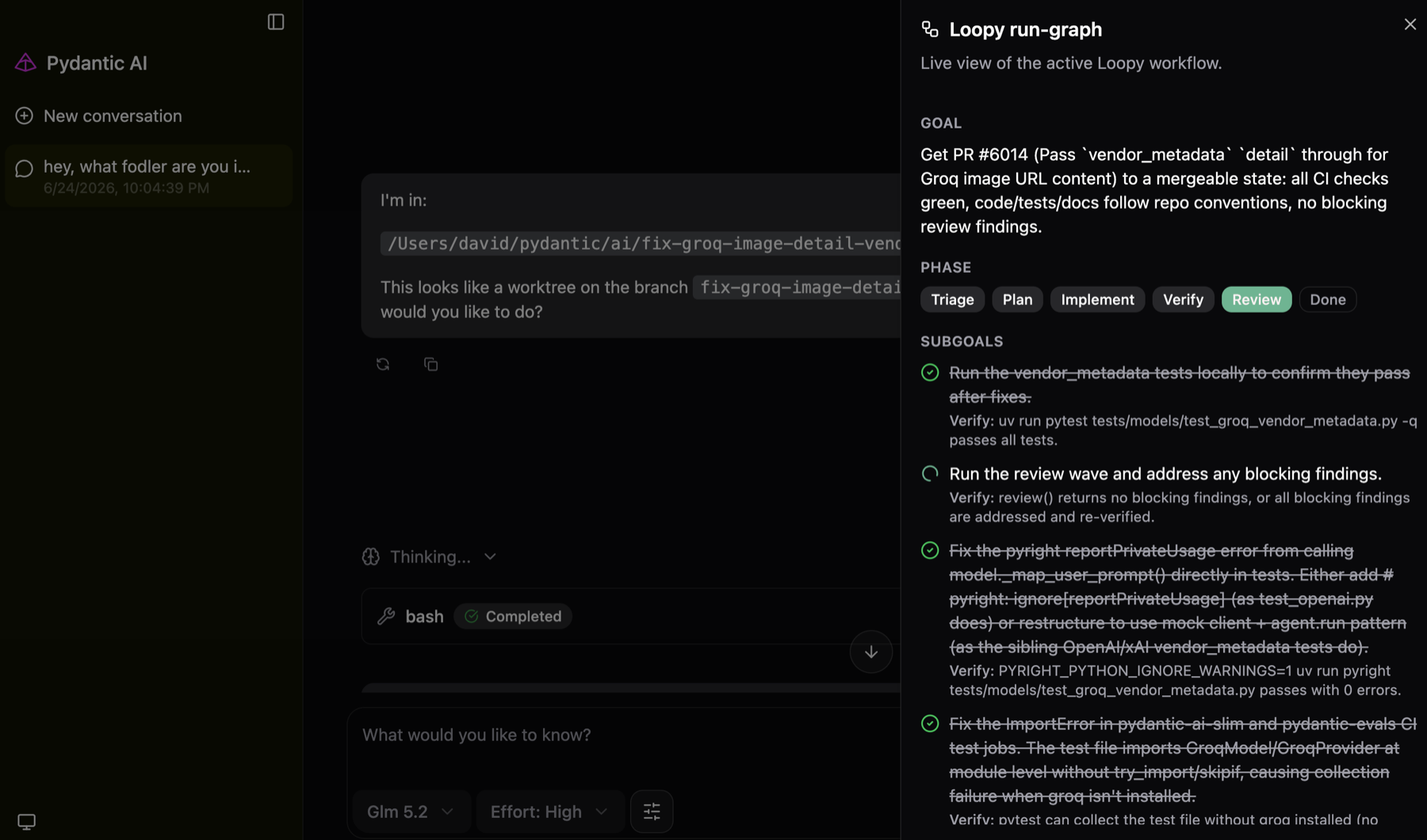
So a loop is not a bigger harness. It is a system that assembles its own agents and stays alive between answers.
That is what the Pydantic AI Harness is chasing, and where this series goes next.
This is part one of three on where harnesses are heading. Next: what changes when agents start building agents.
To feel the ideas here first, build an agent with the Pydantic AI examples, add a capability or two from the Harness capability matrix, and watch it run on one timeline in Logfire.
Citations
Footnotes
-
Ryan Lopopolo, "Harness Engineering: How to Build Software When Humans Steer, Agents Execute", AI Engineer. ↩ ↩2 ↩3
-
Cloudflare, "Code Mode: the better way to use MCP". ↩
-
Anthropic, "Code execution with MCP: building more efficient agents". ↩
-
Jiri Kuncar, "Your agent would rather write code", Pydantic. ↩




