Evaluate agents and LLM apps against datasets built from production traces, run the suite from your code, and compare a candidate with a baseline case by case. Logfire keeps the experiment history and the evidence together so your team can decide what to ship.
Trusted by teams building production software and AI
Example comparison
The candidate fixed the failures. It also cost more.
A candidate can clear task errors while evaluator coverage changes and token use rises. The aggregate shows where to look. Open the cases
behind each result before deciding whether the gain justifies the cost.
Task errorsClearedThe candidate fixed the failing cases
QualityImprovedInspect the cases behind the score
GroundednessCheck coverageResult counts can differ
Estimated costIncreasedMore input tokens per result
Follow the evidence. The comparison view shows evaluator deltas and the cases behind each row.
The loop
Dataset, scorer, experiment, comparison
Build a dataset
Cases come from four places: production traces you found going wrong, user feedback, hand-written examples of behavior you care about, and synthetic variations of all three. The first is the one that compounds: a run you saw fail in Live view can be saved directly as a case, so the bug report and the regression test are the same object rather than two things you keep in sync.
Define scorers
A scorer decides whether one result was good. Deterministic checks handle structure, schema and forbidden content, and cost nothing. LLM judges handle the qualitative questions a regex cannot express, with a rubric you write. Human review covers what you do not yet trust either to decide. Real suites use all three, because each is wrong in a different way.
Run experiments from your code
You run the evaluation, not us. Call it from CI, from a script, or from your machine, with your model credentials and your data; Logfire records the experiment and stores every case-level result. That boundary is deliberate: your evals stay in your pipeline, and what you get here is the history, the comparison and the query surface over it.
Compare against a baseline
Prompt evaluation and model evaluation are the same move here: hold the dataset still, change one thing, and read the delta per scorer and per case. The summary tells you what moved; the case view tells you which inputs moved it, which is the part that decides whether to ship. Direction is something you set per scorer, because a higher number is not automatically an improvement: latency and cost go the other way.
In code
Evals are code, and they live in your repo
pydantic-evals works with any Python you can call, not only Pydantic AI, and logfire/evals gives Node the same shape:
cases, a dataset, evaluators, a report. A custom scorer is an ordinary function in either. Because the suite is code, it is reviewed in pull requests
and runs in CI beside your other tests.
Dataset files are YAML or JSON and round-trip between the two, so a case written by a Python service and a case written by a Node one are
the same case.
Note what this means: the suite runs on your side. You run it, with your credentials and your data, and Logfire records the
experiment, stores every case-level result, and gives you the history and the comparison over it. Judging live traffic is the case where you
can hand the running over instead.
from pydantic_evals import Case, Dataset
from pydantic_evals.evaluators import IsInstance, LLMJudge

dataset = Dataset(
    name='support-faq',
    cases=[
        Case(
            name='refund_policy',
            inputs='Can I return this after 40 days?',
            expected_output='No, the return window is 30 days.',
        ),
    ],
    evaluators=[
        IsInstance(type_name='str'),
        LLMJudge(rubric='States the 30-day window, invents no exception.'),
    ],
)

report = dataset.evaluate_sync(answer_question)
import { Case, Dataset, LLMJudge, setDefaultJudge } from'logfire/evals'// The TypeScript SDK ships no model client. Give it a judge once at// startup and every LLMJudge below uses it; the callback's `reason`// is what gets recorded alongside the verdict.setDefaultJudge(async ({ output, rubric }) => {
const { pass, reason } = awaitaskYourModel(output, rubric)
return { pass, reason, score: pass ? 1 : 0 }
})
const dataset = newDataset({
cases: [
newCase({
name: 'refund_policy',
inputs: 'Can I return this after 40 days?',
expectedOutput: 'No, the return window is 30 days.',
}),
],
evaluators: [
newLLMJudge({
rubric: 'States the 30-day window, invents no exception.',
}),
],
})
const report = await dataset.evaluate(answerQuestion)
Try it on your stack
Run an eval on your own cases
Start free with 10 million spans, logs, and metrics each month. No credit card required.
Live evals read the evaluation results your application emits against real traffic, so a scorer can watch production rather than only the
dataset you thought to write. Because those results are OpenTelemetry events in the same records table as your traces, watching them is a
query:
Worth being exact about the boundary. Scoring your suite happens in your application, which means the prompt, the response and the judge's
reasoning never have to leave your side of the line for a score to exist, and the volume you score is a decision you make rather than one
that arrives on an invoice. That is the default because it is the right default for a suite you gate CI on.
Sampling is configured in your code, so how much of production gets scored stays your decision. And because it is SQL, the same question
broken down by customer, by model or by prompt version is the same query with one more group by.
Worst-performing scorer in the last day
select
attributes->>'gen_ai.evaluation.name'as scorer,
avg(cast(attributes->>'gen_ai.evaluation.score.value'asdouble))
as mean_score,
count(*) as scored_runs
from records
where attributes->>'gen_ai.evaluation.score.value'isnot nulland start_timestamp > now() -interval'24 hours'groupby scorer
orderby mean_score asc;
Human review
The judgments a scorer cannot make
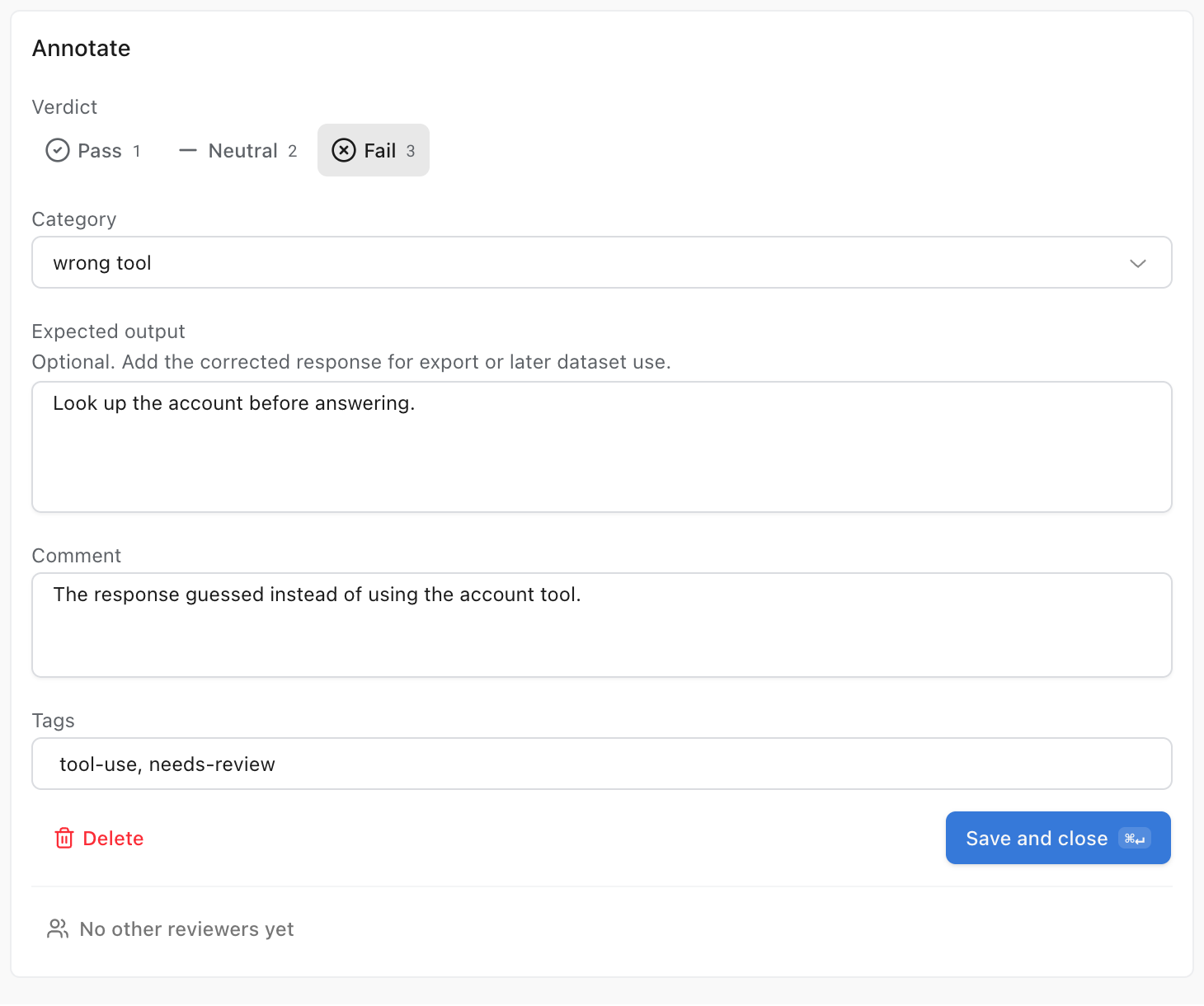
Some failures no scorer catches, and agent runs are where they cluster: the answer was right but the tone was wrong, or it guessed where it
should have called a tool. Those get marked by a person, on the run itself, and the verdict is stored as structured data rather than as a
note in someone's head.
A verdict, a failure category, tags, and, the part that closes the loop, the corrected output, captured for export into a dataset. The run you just failed becomes the case that guards against it. Reviews are per-run, so two people can disagree and you can see that they did.
In production
What the loop is worth
“
In a month, we were already 10 times better, just because we could really control the state of each of the steps that we have.
An eval is a test for behavior that has no single correct answer. Instead of asserting one exact output, you collect a dataset of cases, define scorers that judge each result, and track how the scores move as you change the prompt, the model or the retrieval. The point is not a pass or fail number, it is being able to tell whether a change made things better or worse before it reaches users.
What is the difference between offline and online evaluation?
Offline evaluation runs against a curated dataset while you are developing, so it catches regressions before you deploy. It is the closest thing an LLM application has to unit tests. Online evaluation scores real production traffic after the fact, which is the only way to see the inputs your dataset does not contain yet. Most teams need both: offline to gate a change, online to find the cases the dataset is missing.
Does Logfire run my evals for me?
By default you do, and that is worth being precise about. You run an evaluation from your own code, with pydantic-evals or anything else that emits the OpenTelemetry GenAI evaluation events, and Logfire records the experiment, stores it, and lets you compare it against a baseline case by case. Your suite runs in your CI, on your machine, with your data and your model credentials. Hosted judging, where Logfire runs a rubric against an agent's live traffic instead, is the other option: see the LLM-as-a-judge page.
How do production traces become test cases?
Open the failed span in Live view and save it as a dataset case. Its recorded inputs seed the regression case, so you do not have to retype the run in another tool.
Can I combine code scorers, LLM judges and human review?
Yes, and most useful eval suites do all three. Deterministic checks are cheap and exact, so use them for structure, schema and forbidden content. LLM judges handle the qualitative questions a regex cannot. Human review is for the cases where you do not yet trust either, and for building the labeled set that tells you whether your judge agrees with you.
What does human annotation record?
Reviewers work through a queue and record a verdict, a category, an expected output and tags against a run. Those verdicts are stored with the run and are queryable like anything else, so they are useful for triage and for curating a dataset. They are deliberately not folded into experiment or live-eval aggregates, so a reviewer's opinion never silently moves a score your CI is gating on.
How much do evals cost?
Evaluation results use Logfire's normal telemetry allowance rather than a separate per-score meter. Personal includes 10 million records per month and pauses ingestion at the limit. Team and Growth include the same allowance, then charge $2 per million additional records. That distinction matters once a nightly suite runs thousands of scores a night.
Do I have to use Pydantic AI?
No. pydantic-evals works with any Python code you can call, including applications built on other frameworks or on raw provider SDKs, and Logfire ingests evaluation results from anything emitting the OpenTelemetry GenAI evaluation conventions. Using Pydantic AI means the traces underneath are richer, but it is not a requirement for the evals workflow.
Can I keep my existing Braintrust evals?
Yes. Change two environment variables and the Braintrust SDK's Eval runs land in Logfire's Evals workspace through a compatibility endpoint, verified for the standard Eval flow in Python and TypeScript. Braintrust-hosted datasets, prompts, and the model proxy are out of scope. See Logfire vs Braintrust for the details.
How do you evaluate an AI agent?
An agent run is multi-step, so scoring only the final answer hides where it went wrong. Save the failing run from production as a case, then write evaluators that score the path as well as the output: whether the right tool was called, whether a lookup happened before the claim, whether the run stayed inside its step budget. Because the evaluation result and the trace of the run are records in the same table, a failed score links back to the steps that produced it rather than standing alone as a number.
What makes a good LLM evaluation framework?
Four properties: cases that come from production rather than imagination, scorers you can write and version in your own code, comparisons that show per-case movement rather than one blended average, and results stored somewhere you can query. An LLM evaluation framework that lives apart from your telemetry makes the first property expensive, which is why evals and tracing sit in one product here.
Can I use evals to optimize prompts?
Yes, that is one of the main loops: version a prompt, run the candidate against the baseline on the same dataset, and once you accept the winning change, promote it by moving the label. The dedicated prompt optimization page covers prompt versioning, labels and gradual rollout in detail.