A leaked secret should never reach a model. A runaway agent should not keep spending. Put data protection, spend limits, and model access rules on the request path: before the provider call happens.
Trusted by teams building production software and AI
Runaway spend
Stop one caller without stopping production
When a coding agent enters a loop, a dashboard can explain the bill later. It cannot stop the next request. Give each caller its own spend
policy at the shared Pydantic AI Gateway and the over-budget agent stops there, while checkout and support keep using the
same providers.
Routes can share one gateway and the same providers because the budget boundary is the policy attached to each project or API key.
Spend policies
Budgets that stop the request
Most LLM cost tooling reports. It tells you the next morning what you spent, which is useful for planning and no use at all for control. A spend
policy here runs on the request path. Once the limit is met, the request is refused.
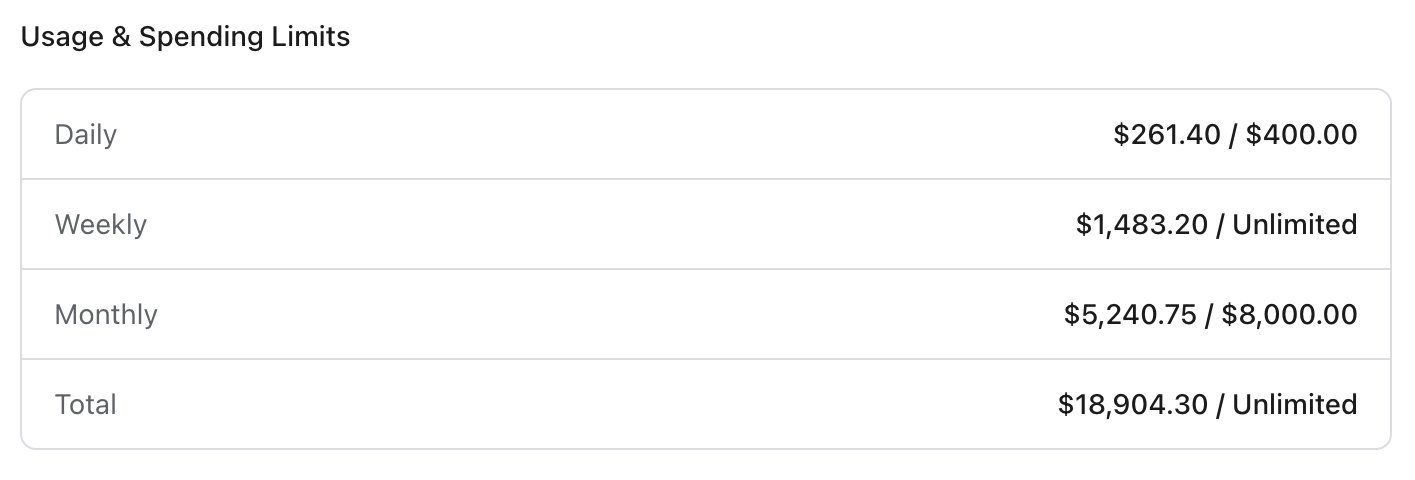
Spend against limit on a single production key. The windows are independent, so a daily ceiling can catch a runaway loop while the monthly one holds the budget.
Scoped to a provider, a model, or everything
A policy is a named set of rules, and a rule can be scoped to a provider, a single model, or everything. So you can say the thing you actually mean: fifty dollars a day on the expensive reasoning model, no ceiling on the cheap one, and a monthly cap across the organization either way.
Four windows, used together
Daily, weekly, monthly, total. Set several at once. A daily ceiling catches a runaway retry loop; a monthly one holds the quarter's budget. A total limit suits a trial, or a fixed-scope project that should stop when the money runs out rather than renew.
Block, or just watch
Blocking mode refuses the request once the limit is met. Alerting mode lets it through and records the breach. Most teams start in alerting, until they know what a normal week costs.
Attach it where the money is spent
A policy binds to an organization, a project, a team member, or a single API key, and one policy can be attached in several places at once. The org-wide ceiling and the per-project allowance stay one object instead of two settings that drift.
Per key or per user, not one shared pool
Segment a policy and the limit applies to each key, or each end user, separately. Twenty dollars a month segmented by user is twenty dollars each, not twenty between them. That is the control that makes a per-seat AI feature safe to ship, and you did not have to build the metering.
Counted on the request path
Spend accumulates as requests complete, rather than being reconciled from a report the next morning. A limit enforced a day late is a post-mortem.
Try it on your stack
Route one model call through the gateway
Start free with 10 million spans, logs, and metrics each month. No credit card required.
Guardrails inspect a request on its way to the provider. Prebuilt and custom regex protections cover the structured things: access keys, card
numbers checked with Luhn, US social security numbers, phone numbers, IP addresses. For personal data with no fixed shape, the gateway calls out
to third-party DLP solutions like Presidio, Microsoft's open-source PII detector, running as a service you host.
Because you run it, the detection policy, the recognizers and the version stay yours. You also choose what happens when the service is
unreachable: fail open and let the request through, or fail closed and block it.
A detection can observe, flag, redact or block, and you pick the action per route rather than per protection. The rule that blocks on a public
provider can merely record on an internal one.
A guardrail runs before the request reaches the provider, so a match can be redacted or refused rather than merely recorded after the fact, and
the response carries a header saying which protections fired.
Access control
What can be reached, and by whom
Which models can be called
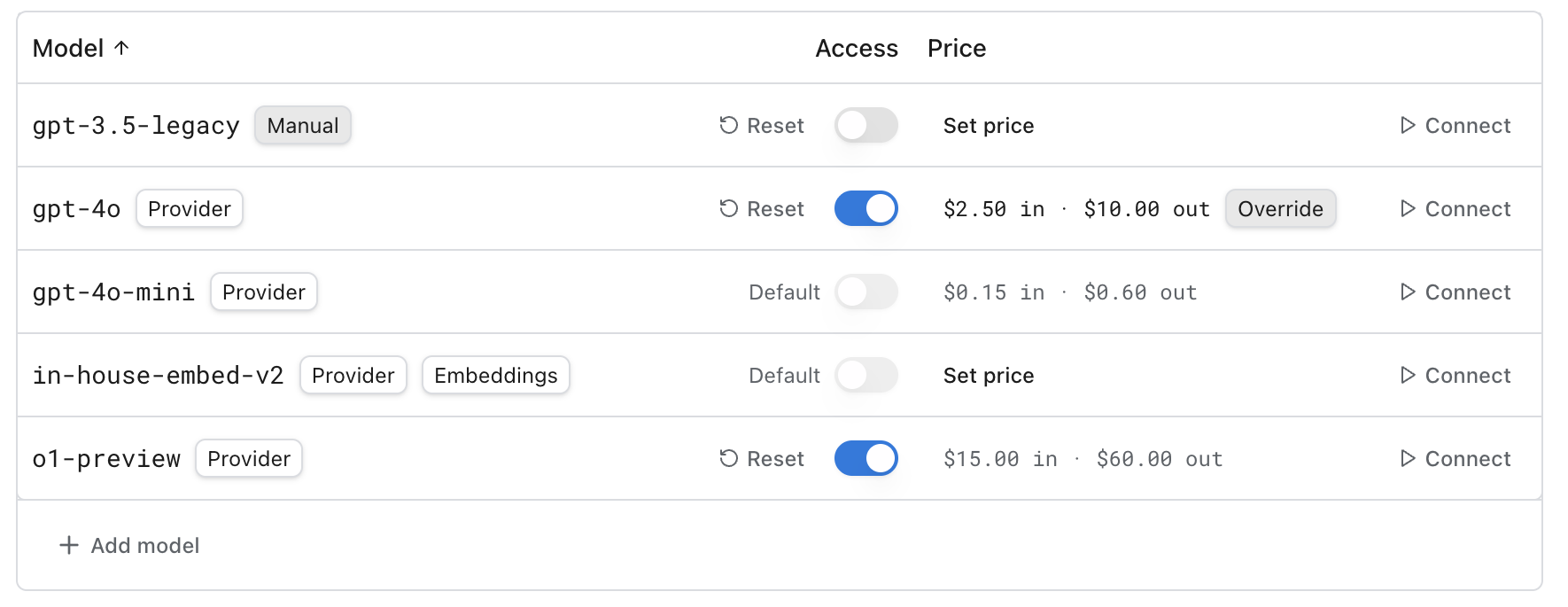
Allow and deny per model, with a default for anything unlisted. Turn the default off and only approved models are reachable, including against a provider catalog that grows without asking you.
What a model costs you
Override catalog prices per model where your negotiated rate differs, or where the model is one of your own. Policies and reporting then count in numbers that match your invoice.
Which provider takes it
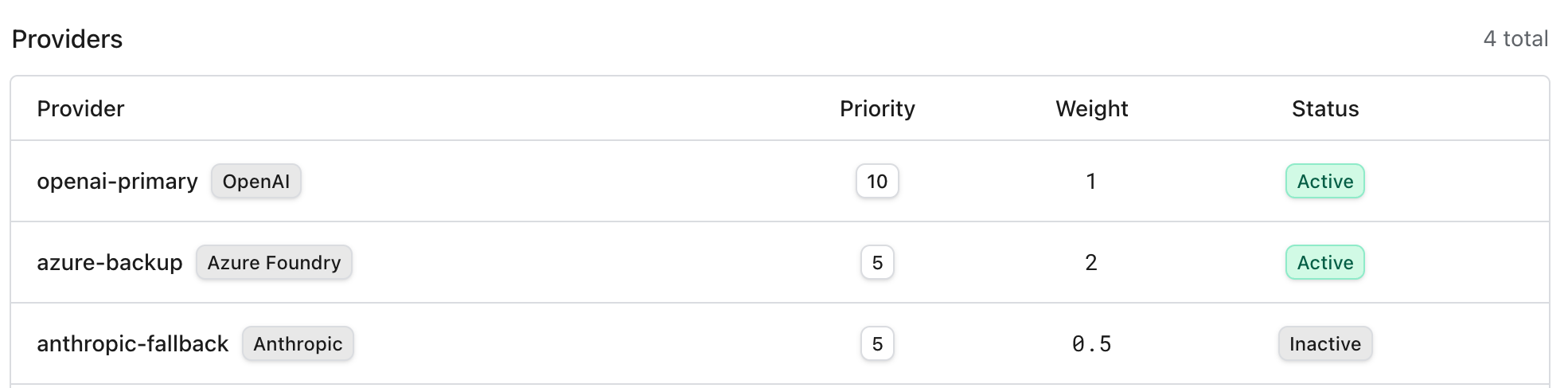
Group providers behind one route with a priority and a weight. Priority orders the fallback chain, weight splits traffic between equals. Deactivate a member to drain it without losing the config.
Who can change any of it
Identity comes from Logfire: same SSO, same organization, same roles. There is no second invite list to keep current, so offboarding someone takes their gateway access with it.
Allow and deny per model, with a default for anything unlisted. Turn the default off and only approved models are reachable, including against a provider catalog that grows without asking you.
Priority orders the fallback chain. Weight splits traffic between providers that share a priority. A member can be deactivated rather than deleted, which is how you drain a provider without losing its configuration.
Audit
Every call, tied to who made it
Every request through the gateway is recorded as an OpenTelemetry span carrying the model, tokens, latency, cost, and the key and organization
member behind it, and the response carries a header saying which protections fired. Because it is telemetry, the audit trail is queryable with
SQL and the gateway call sits in the same trace as the queries and tools the agent ran around it, so "what did this agent do with the answer" is
the same question as "who called the model".
Comparison
How the enforcement points compare
Controls each gateway advertises on its own product documentation, reviewed 2026-08-22
Control
Pydantic
Portkey
Kong
LiteLLM
Cloudflare
Spend policy that refuses the request
Daily, weekly, monthly and total windows, blocking or alerting
Budget limits
User, model and time-bound token quotas
Per-key budgets with tpm/rpm limits
Spend limits returning 429
Inspects the request before it leaves
Regex plus an external detector you host
PII redaction before send
PII sanitization
—
DLP: pass, flag or block
Detection runs on your own infrastructure
Yes, Presidio that you host
—
—
—
—
Per-model allow list
Allow and deny, with the default off
Centralized model access
Access control
Model access per virtual key
—
Audit tied to an identity
OpenTelemetry spans, queried with SQL
Org-wide audit logs
Caller identity on every A2A call
Audit logs (enterprise)
Request logs
The call sits in the trace around it
Same trace as the queries and tools
—
—
—
—
An em dash means the vendor does not advertise that control on its own product pages, not that it cannot be assembled some other way. Most of
this list can refuse a request on a budget you set, so that is not the line between them. Two rows have a single answer: where detection runs,
and whether the call that was allowed sits in the trace of everything the agent did next.
Providers
What you can route to
Model providers supported by the Pydantic AI Gateway, and whether each is available with built-in credentials, your own credentials, or both.
Provider
Model families
Built-in
BYOK
OpenAI
GPT
Yes
Yes
Anthropic
Claude
Yes
Yes
Google Vertex
Gemini, Claude
Yes
Yes
AWS Bedrock
Nova, Claude, and others
Yes
Yes
Azure
GPT
Yes
Yes
Groq
Open-source models
Yes
Yes
Any OpenAI-compatible
Chat and Responses APIs
No
Yes
Any Anthropic-compatible
Messages API
No
Yes
BYOK means you keep your own provider contracts and credentials, and the gateway routes with them. Built-in means
one key reaches every model without you holding seven provider accounts. Most organizations run both: a negotiated OpenAI contract for volume, built-in
for everything they have not signed for yet.
Setup
A base URL, not a rewrite
Requests pass through in each provider's native format. There is no universal schema in the middle, so your existing SDK keeps working and a
provider's new features are available the day they ship.
Every request is recorded as an OpenTelemetry trace with its model, tokens, latency and cost, then sent to Logfire alongside the rest of your
application telemetry.
from pydantic_ai import Agent

# Any provider the gateway reaches, by model string.
agent = Agent('gateway/openai:gpt-5')

result = agent.run_sync('Hello World')
print(result.output)
Gateway markup by plan, for requests routed with your own provider credentials and for requests routed through built-in providers.
Plan
Your own keys (BYOK)
Built-in providers
Personal
0%
5%
Team
0%
5%
Growth
0%
3%
Enterprise Cloud
0%
3%
Enterprise Dedicated
0%
3%
Enterprise Self-hosted
0%
Not applicable
Routing with your own provider keys costs nothing extra, on any plan, including Enterprise. If you are comparing gateways, check that line
specifically: a percentage on credentials you brought yourself is common.
Built-in providers carry a markup because we are buying the capacity: 5% on Personal and Team, 3% on Growth and Enterprise Cloud. Self-hosted
Enterprise has none, because the traffic never reaches us. Full detail is on the pricing page.
Optimization
Cost optimization at the gateway
The same levers that control risk control cost. Routing groups give each provider a priority and a weight: watch per-provider cost and latency
in the traces, move weight toward the provider that is winning, and let priority order the fallback when one degrades. Price overrides make
every report count in your negotiated rates, so the optimization target matches the invoice. Spend policies put a ceiling on any experiment,
which is what makes trying a cheaper model safe.
The gateway controls the path a request takes; what the request says is the other half. The
prompt optimizer reads production runs and proposes prompt changes with the evidence attached, so the content
of a request gets the same scrutiny as its route.
FAQ
Common questions
What is an AI gateway?
An AI gateway sits between your applications and the model providers they call. Every request goes through one endpoint, so there is one place to enforce a budget, inspect a payload, restrict which models can be reached, fail over to another provider, and record what happened. Without one, every service that talks to a model needs its own copy of all of it, and every one of them has to keep it current.
How is this different from a proxy that just forwards requests?
The forwarding is the easy part. What makes a gateway worth deploying is what it can refuse. A request over budget is blocked before it costs money. A request carrying a customer's personal data is redacted or rejected before it reaches a third party. A model nobody approved cannot be called at all. Those controls only hold if they sit somewhere every request has to pass through, which is what the gateway is.
How does this compare to Portkey, Kong, LiteLLM or Cloudflare?
Most gateways on that list can cap spend, and several inspect payloads. Pydantic AI Gateway combines detection that can run on infrastructure you host with every allowed call landing in the same trace as the queries and tools the agent ran next. The comparison table on this page is sourced from each vendor's product documentation so you can check the details directly.
Do I have to rewrite my code to use it?
No. The gateway passes requests through in each provider's native format rather than translating them into a universal schema, so you point your existing SDK at a different base URL and the rest of your code is unchanged. With Pydantic AI it is a model string: 'gateway/openai:gpt-5'. The tradeoff is deliberate. A universal schema is convenient right up until a provider ships a feature it does not model.
What happens when a spend limit is hit?
It depends how you set the policy. In blocking mode the request is refused once the limit is met. In alerting mode it goes through and the breach is recorded, which is what you want while you are still learning what normal looks like. Limits come in daily, weekly, monthly and total windows and you can set several at once: a daily ceiling to catch a runaway loop, a monthly one to hold the budget.
Can I set a budget per user rather than per application?
Yes. A policy can be segmented so its limit applies per API key or per end user instead of as one shared pool. A $20 monthly limit segmented by user is twenty dollars each, not twenty dollars between them. Policies attach at the organization, project, member or key level, and the strictest one that applies wins.
What do the guardrails actually detect?
Two kinds of thing. Prebuilt and custom regex protections catch structured secrets and identifiers: API keys, card numbers validated with a Luhn check, US social security numbers, phone numbers, IP addresses. Third-party DLP solutions like Presidio, hosted by you, handle the named-entity work regex cannot, meaning people, locations, and personal data with no fixed format. Both inspect the request on its way to the provider.
Does Presidio run on your infrastructure or mine?
Yours. External detection runs as a service you host and the gateway calls out to it, so the detection policy, the recognizers and the version are all under your control rather than ours. You also decide what happens if that service is unreachable: fail open and let the request through, or fail closed and block it. For a DLP control the honest default is usually fail closed.
How much does the gateway cost?
Bring your own provider keys and there is no markup on any plan, including Enterprise. If you use our built-in providers instead, so one key reaches every model without you holding seven provider accounts, the markup is 5% on Personal and Team and 3% on Growth and Enterprise Cloud. Self-hosted Enterprise has no markup, because the traffic never touches our infrastructure.
Can I self-host it?
Yes. The gateway can run in your own Cloudflare account, or on-premises with our support, so requests and payloads never leave your infrastructure. Configuration still happens in the Logfire dashboard, and the observability is the same either way.
Do I have to use Logfire to use the gateway?
The gateway is configured through Logfire, and identity comes from there. SSO and the organization's roles are the ones your Logfire workspace already uses, so there is no second directory to administer. Gateway requests are recorded as OpenTelemetry traces in that same workspace, alongside the application telemetry around them.
Put a limit on it before it needs one
Get started free. Bring your own provider keys and routing through the gateway costs nothing.