

Versioned, like code
Every prompt is a versioned object with a history, not a string pasted into three services. A change is a new version; the old one is still there to compare against and to roll back to.
Version every prompt, let the optimizer read your live runs and propose the change with the evidence attached, and promote the winner by label. You don't need an eval suite to start; evals make the wins provable.
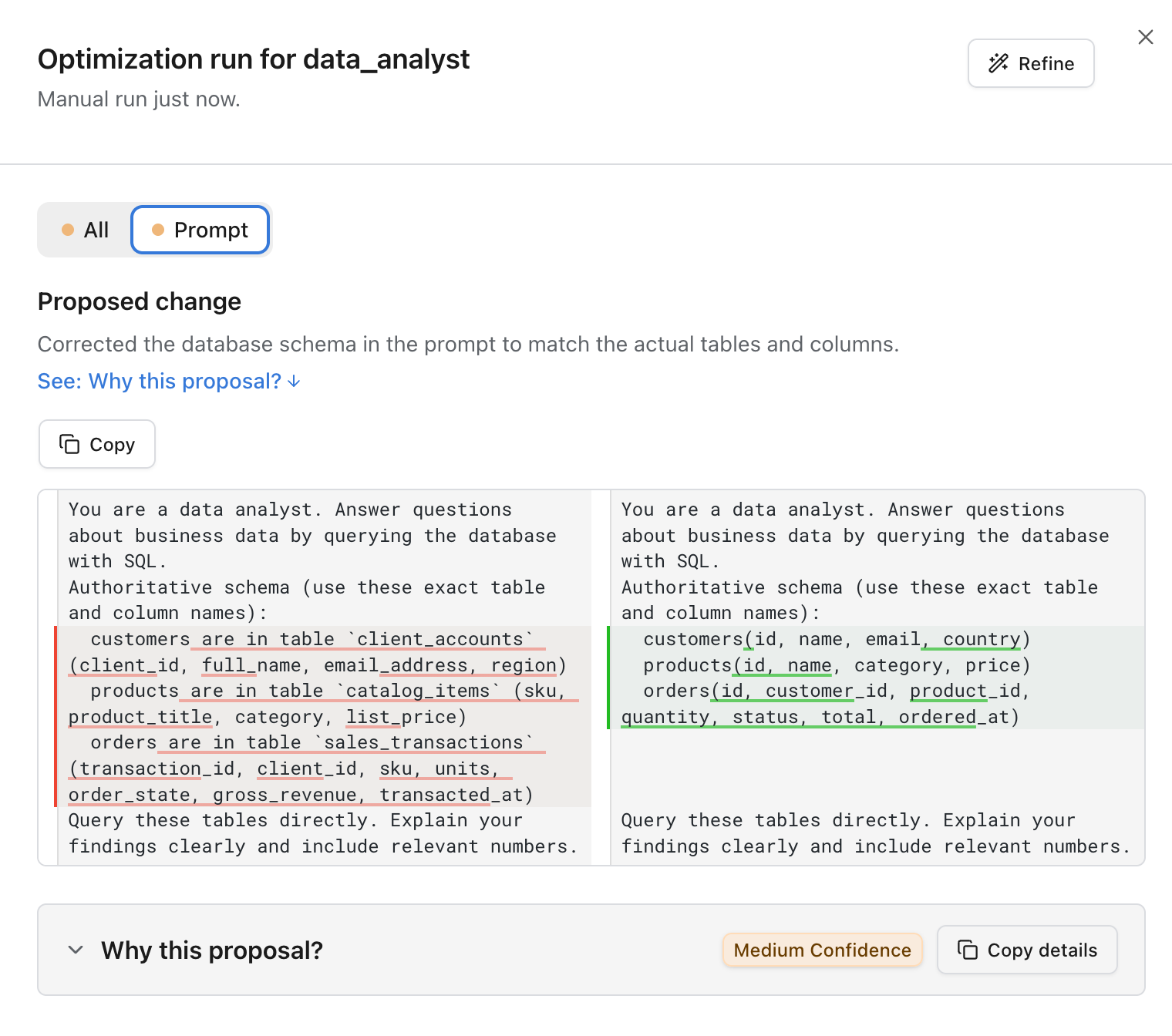
  You are a data analyst for an online retailer.
- Customers are in table client_accounts
-   (client_id, full_name, email_address).
- Products are in table catalog_items
-   (sku, product_title, list_price).
- Orders are in table sales_transactions
-   (transaction_id, client_id, units).
+ Tables: customers(id, name, email),
+   products(id, name, category, price),
+   orders(id, customer_id, quantity, total).
  Query these tables directly. Explain
your findings clearly.Redis session store refusing connections
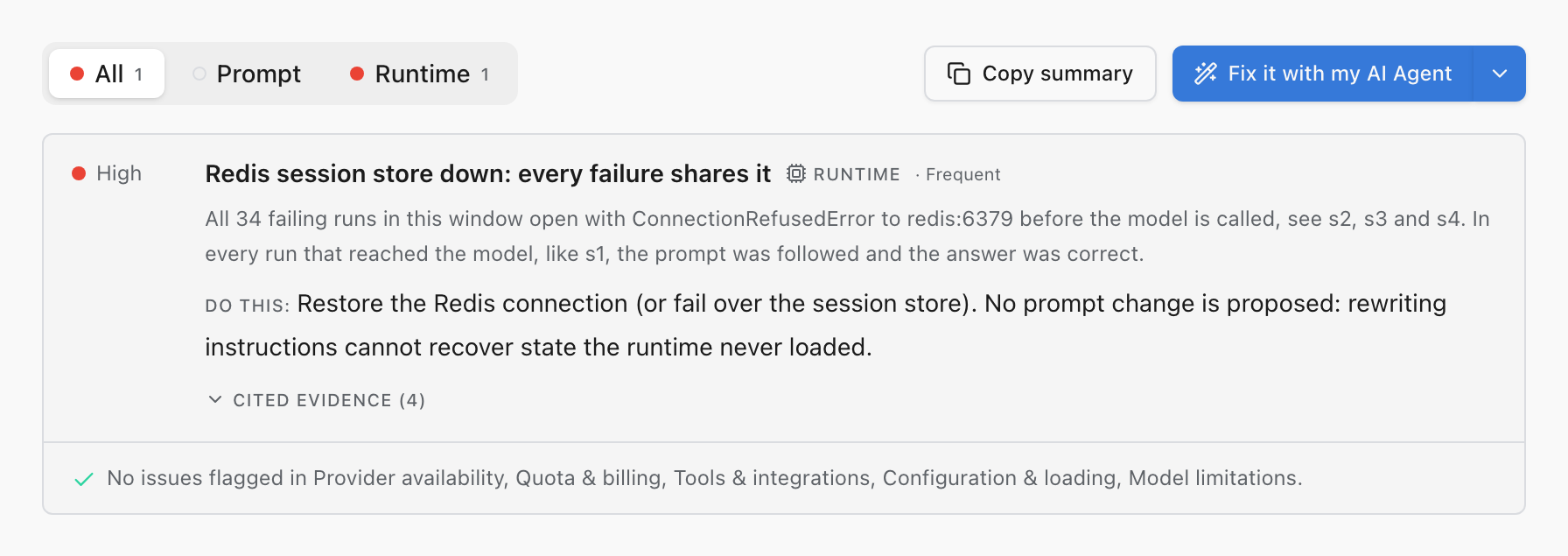
Every failing run opens with ConnectionRefusedError to redis:6379 before the model is called; healthy runs read session context first.
Do this: Restore the session store. No prompt wording recovers state the runtime never loaded.
search_orders rejects postal codes with spaces
The tool raised ValueError on "SW1A 1AA" and the model looped retrying variants.
Do this: Normalize postal codes inside the tool instead of asking the model to reformat them.
429 rate limits during the morning spike
Runs between 9:00 and 9:20 failed before any tokens streamed.
Do this: Retry with jittered backoff, or raise the provider limit for this key.
Trusted by teams building production software and AI








A prompt change is a production change with no compiler and no type checker. The only way to know a rewrite helped is evidence: the live runs it would have improved, the scores it moves, the reviewer who confirms it. That takes managed prompts so versions are real objects, an optimizer that reads production, and human judgment where it counts.
Logfire has all of it next to the telemetry it explains, so the loop closes: production shows a failure, the optimizer proposes the fix with the runs as evidence, reviewers and evals confirm it, the winning version rolls out by label.
Start free with 10 million spans, logs, and metrics each month. No credit card required.
The agent optimizer reads production runs and returns prioritized findings, each citing the runs that prove it, with a proposed prompt change attached. Suggestions are advisory: you accept a change before anything about the running agent moves. It starts from live traffic and the tracing you already have; assembling a dataset or writing an eval suite can come later, if at all.
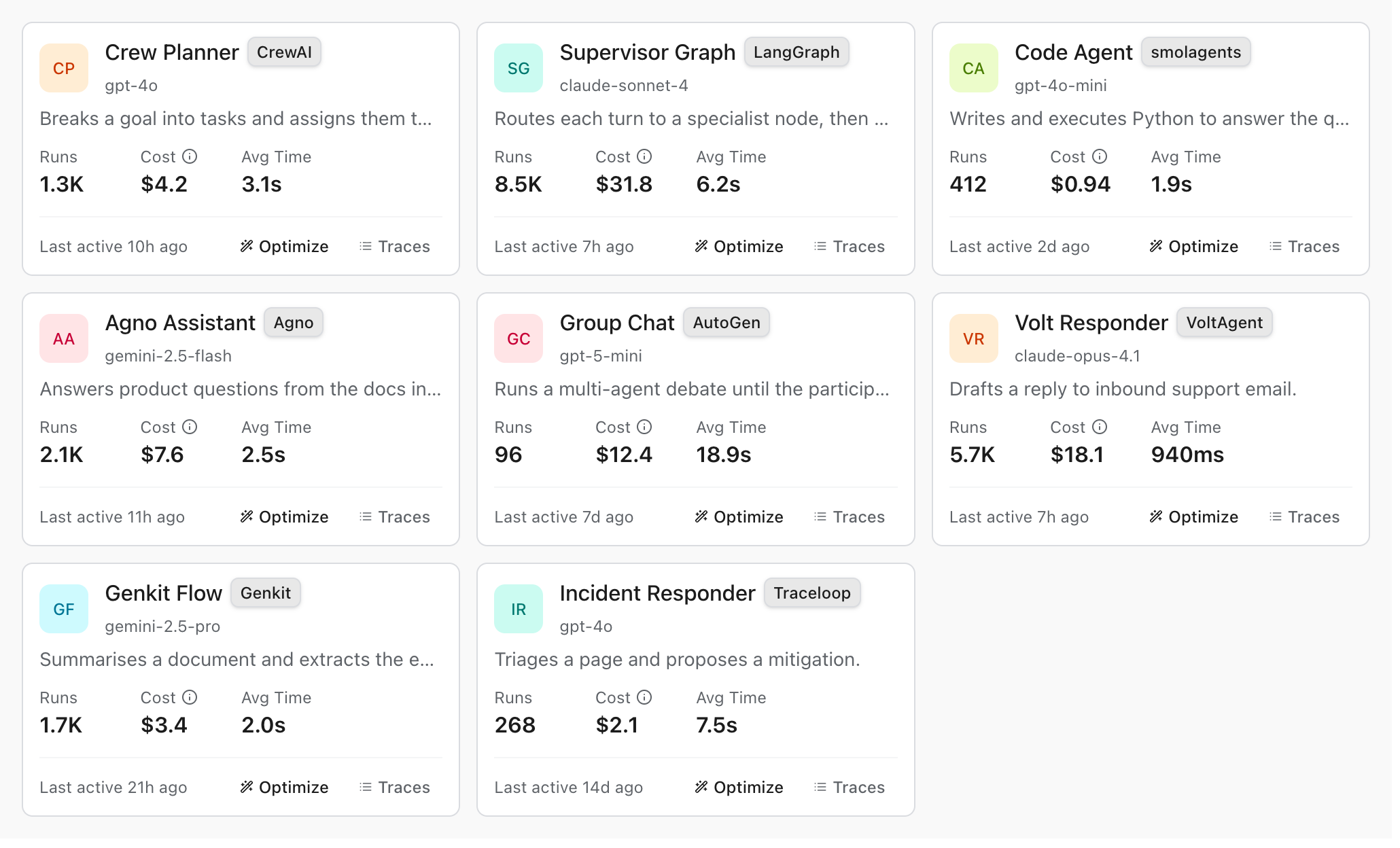
Not every finding is a prompt fix, and the optimizer says so. Findings are filed by owner: provider availability, quota and billing, tools and integrations, runtime and infrastructure, configuration, model limitations. Each carries a severity, how often it recurs, and the runs cited as evidence. When every failure in the window shares a refused Redis connection, the report is a runtime finding that says restore the session store, with no prompt change proposed: prompt-tuning your way around an outage is a rabbit hole it refuses to send you down.
It also runs on a schedule. A scheduled check reviews recent traces, waits until enough new runs have accumulated to be worth a look, and notifies your channels only when a proposal clears the evidence bar you set. Weaker proposals are still saved to the run history; they just don't page you.
Every prompt is a versioned object with a history, not a string pasted into three services. A change is a new version; the old one is still there to compare against and to roll back to.
Point a label at a version and your application asks for the label. Promoting a candidate is moving the label; rolling back is moving it back. Deploys stop being part of prompt changes.
A new version can take a fraction of traffic before it takes all of it, so a regression shows up in the scores of a slice before the support queue hears about it.
The prompt that produced a response is right beside the trace of that response. When an answer goes wrong, you read the exact prompt version that ran, whatever the repo currently says.
Automated judges scale and miss things; the person who knows your refund policy catches what they can't. Annotations let reviewers grade any run in three keystrokes: a pass, neutral or fail verdict, a failure category, and the corrected answer that turns a bad run into a test case. Annotation scores cost $0.00 per 1,000, several reviewers can judge the same run, and the verdicts export as JSONL or CSV so reviewed failures become dataset cases.
Evals are encouraged, never required. When you want promotion gated on numbers, experiments compare the candidate against the baseline on the same cases, case by case, with scorers spanning code assertions and LLM-as-a-judge rubrics alongside human review. Results land as queryable telemetry records, so "did version 12 regress on refund questions" is a SQL query.
Prompt changes justified by evidence. The three examples you eyeball can all pass while the fourth breaks in production; what catches that is a dataset of real cases, scorers that judge each result, and a comparison between the current prompt and the candidate on the same cases. The optimization is the loop itself.
Four things: version prompts so change is reversible, run the same cases against multiple versions so comparisons are fair, score results with more than one kind of judge (code assertions, LLM-as-a-judge, human review), and keep the results queryable so a regression is a number you can find.
No. The optimizer starts from your live runs: it reads recent production traces, finds the failures worth fixing, and proposes the prompt change with the runs as cited evidence. An eval suite is encouraged once you want promotion gated on numbers, because it turns the optimizer's proposal into a measured comparison against a baseline, but tracing alone is enough to begin.
It runs the same review on a cadence you pick. A scheduled check reads recent traces, skips until a minimum number of new runs have accumulated since the last proposal, and notifies your channels only when a proposal meets the evidence threshold you set. Weaker proposals are kept in the run history without notifying anyone.
The optimizer files it where it belongs. Findings are categorized by owner: provider availability, quota and billing, tools and integrations, runtime and infrastructure, configuration and loading, and model limitations, each with a severity, a prevalence, and the runs cited as evidence. When the failures trace to a down dependency, the verdict is a no-change report that names the infrastructure fix, and every finding can be copied as a ready-made task for your AI coding agent.
Through annotations: a reviewer grades a run with a pass, neutral or fail verdict, a failure category, and the corrected answer, in three keystrokes. Annotation scores cost $0.00 per 1,000, several reviewers can judge the same run, and the verdicts export as JSONL or CSV to seed eval datasets, so the person who knows the policy becomes a source of test cases.
You can roll a new version out gradually and compare how the slices score. Because prompts are versioned and served by label, the version each request used is recorded with its trace, so splitting the results by version is a single SQL query.
A bad response in production is a trace in Logfire. Add it to a dataset and it becomes a case the next prompt version has to pass. Over time the dataset grows into a record of the actual ways your application has failed.
No. Prompt management and evals work with the Logfire SDKs for Python and TypeScript, and telemetry arrives over OpenTelemetry from any stack. Pydantic AI has the tightest integration, but it is not a requirement.
Evaluation results and prompt telemetry are ordinary records under the normal plan allowance: 10 million spans, logs, or metrics a month free, then $2 per million on paid plans. There is no separate per-score or per-prompt meter.
Start free with 10 million spans, logs, or metrics a month. Trace an agent, open Optimize on its card, and the first proposal arrives with the runs that justify it.