This is a guest post written by Priya Joseph, Sr. Data Cloud Architect at Snowflake. Co-authored by Douwe Maan, lead developer of Pydantic AI.
Pydantic AI now has a native Snowflake provider, with the addition of SnowflakeModel and SnowflakeProvider.
Users choose Snowflake for secure, governed, trusted enterprise experience. This integration brings Pydantic AI natively into Snowflake's secure perimeter. Snowflake users can now get Pydantic's built-in data validation and type safety combined with Snowflake's enterprise governance.
Running a governed AI agent against your Snowflake data is simple:
import logfire
from pydantic_ai import Agent

logfire.configure()
logfire.instrument_pydantic_ai()

agent = Agent('snowflake:claude-sonnet-5')
result = agent.run_sync('Summarize Q2 churn trends')
The two logfire lines are optional, and worth it. With Pydantic AI instrumented, every run in the rest of this post lands on one trace: the model call, the validated output, and any tool calls in between. The examples below assume they're in place.
Two environment variables (SNOWFLAKE_ACCOUNT and SNOWFLAKE_TOKEN) are all the configuration needed. Everything else, including auth, routing, and governance, is handled inside the secure Snowflake perimeter.
What is Snowflake Cortex Inference?
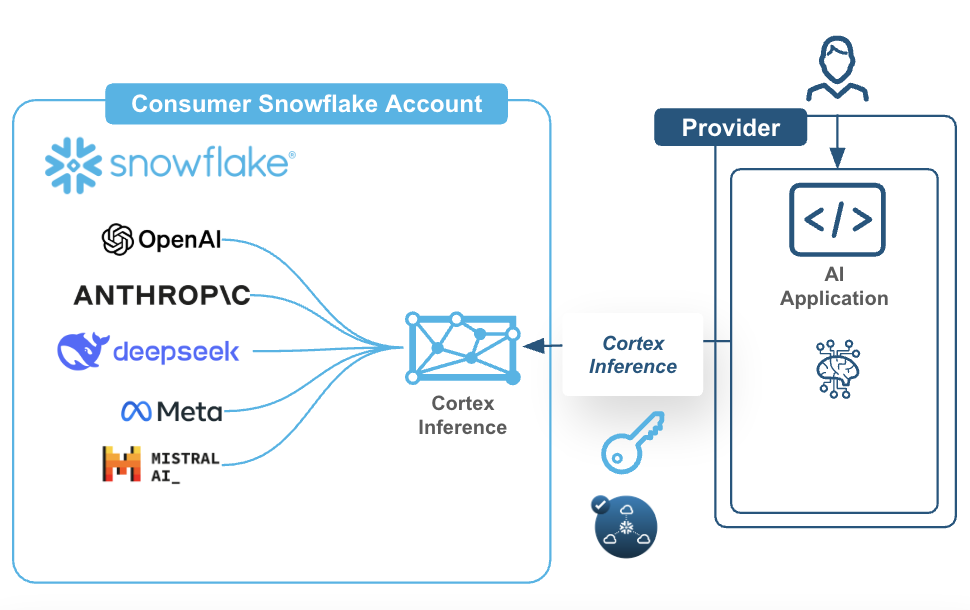
Cortex Inference is a fully managed REST API that serves Claude, GPT, Llama, Mistral, DeepSeek, Grok (xAI), and Snowflake's own models, all from inside your Snowflake account. Data never leaves the Snowflake security perimeter. That matters if you're in a regulated space like finance or healthcare.
The interesting design choice: rather than building a separate adapter per model family, everything routes through Cortex's OpenAI-compatible Chat Completions endpoint (/api/v2/cortex/v1/chat/completions). That single API surface covers tool calling, structured output (json_schema), image input, prompt caching, and reasoning, so one integration covers the full feature surface.
See the Cortex Inference documentation for model availability.
An extended example
Here’s an extended example from the biology domain that showcases the power of Pydantic AI with Snowflake Cortex:
- Structured output for DESeq2 gene expression, with validated Ensembl IDs and significance testing
- Tool calling with BLAST search parameter validation
- Nested models for variant annotations
- Extended thinking for protein analysis questions
- Model portability across frontier and OSS model providers, showing identical Pydantic schemas work with all models
- A long-running PubMed research task with polling
Authentication that travels
The same file should run in external Python, Notebooks, Sprocs, and SPCS.
import os

from pydantic_ai.providers.snowflake import SnowflakeProvider

# Try to detect if we're running inside Snowflake (Notebook, Sproc, SiS)
try:
    from snowflake.snowpark.context import get_active_session
    session = get_active_session()

    SNOWFLAKE_ACCOUNT = session.get_current_account()
    SNOWFLAKE_TOKEN = session.connection.rest._token
    print(" Detected Snowflake environment - using session token")

except ImportError:
    # Running externally (laptop, CI/CD) - use environment variables
    SNOWFLAKE_ACCOUNT = os.environ.get('SNOWFLAKE_ACCOUNT')
    SNOWFLAKE_TOKEN = os.environ.get('SNOWFLAKE_TOKEN')

    if not SNOWFLAKE_ACCOUNT or not SNOWFLAKE_TOKEN:
        raise ValueError(
            "Missing required environment variables:\n"
            "SNOWFLAKE_ACCOUNT: your Snowflake account identifier\n"
            "SNOWFLAKE_TOKEN: your Personal Access Token (PAT)\n"
            "Set them with: export SNOWFLAKE_ACCOUNT='...' SNOWFLAKE_TOKEN='...'"
        )
    print(" Using environment variables for authentication")

# Initialize provider with explicit credentials
# Works in: External Python, Notebooks, Streamlit-in-Snowflake, SPCS
provider = SnowflakeProvider(
    account=SNOWFLAKE_ACCOUNT,
    token=SNOWFLAKE_TOKEN,
    # For private connectivity (PrivateLink), add custom base_url,needs token as well
    # base_url='https://myorg-myaccount.privatelink.snowflakecomputing.com'
)
Structured output (DESeq2 Results)
The Gene model validates the shape of the answer, not just its text. An Ensembl ID that doesn't match the pattern, or a fold change outside the plausible range, fails before it reaches your code.
from typing import List, Literal

import logfire
from pydantic import BaseModel, Field
from pydantic_ai import Agent

logfire.configure()
logfire.instrument_pydantic_ai()


class Gene(BaseModel):
    """Type-safe gene expression result."""

    id: str = Field(pattern=r'^ENSG\d{11}$')  # validates Ensembl ID format
    symbol: str
    log2fc: float = Field(ge=-10, le=10)  # Must be between -10 and 10
    padj: float = Field(gt=0, le=1)  # P-value 0-1

    @property
    def is_significant(self) -> bool:
        return self.padj < 0.05 and abs(self.log2fc) > 1

# Simple 2-line setup
agent = Agent('snowflake:claude-sonnet-5', output_type=List[Gene])
result = agent.run_sync('DUSP1 ENSG00000120129 log2FC=2.9 padj=1.2e-10')
print(f'Gene: {result.output[0].symbol}, Significant: {result.output[0].is_significant}')
Tool calling with validated parameters
Tool inputs are validated before the function runs, so a malformed evalue or an unknown database never reaches BLAST.
class BlastParams(BaseModel):
    """Pydantic validates tool parameters automatically."""

    sequence: str = Field(min_length=20)
    database: Literal['nr', 'nt', 'refseq_protein']
    evalue: float = Field(default=0.001, gt=0, le=1)


def blast_search(params: BlastParams) -> dict:
    """Tool input is validated before execution."""
    return {'hits': 15, 'top': f'Match in {params.database}'}


agent_tools = Agent(
    'snowflake:claude-opus-4-8',
    tools=[blast_search],
    system_prompt='You can run BLAST searches.',
)
# Agent automatically validates and calls tool
result = agent_tools.run_sync('BLAST sequence ATCGATCGATCGATCGATCG against RefSeq proteins')
print(f'Tool result: {result.output}')
Nested models (Variant Annotation)
Output types nest, so a variant annotation comes back as a typed object graph rather than a dictionary you have to pick apart.
class Variant(BaseModel):
    rsid: str = Field(pattern=r'^rs\d+$')
    chromosome: str
    position: int = Field(gt=0)


class Annotation(BaseModel):
    """Nested Pydantic model."""

    variant: Variant  # Nested!
    gene: str
    consequence: Literal['missense', 'nonsense', 'synonymous']
    pathogenic: bool


agent_nested = Agent('snowflake:claude-sonnet-5', output_type=Annotation)
result = agent_nested.run_sync('rs429358 chr19:45411941 APOE missense pathogenic')
print(f'Variant: {result.output.variant.rsid} in {result.output.gene}')
Extended thinking (Claude)
Claude's extended thinking is a model setting, and the validated output type still applies.
class Analysis(BaseModel):
    finding: str
    confidence: float = Field(ge=0, le=1)


agent_thinking = Agent(
    'snowflake:claude-opus-4-8',
    output_type=Analysis,
    model_settings={'thinking': {'type': 'enabled', 'budget_tokens': 5000}},
)

result = agent_thinking.run_sync('Why is BRCA2 important in DNA repair?')
print(f'Analysis: {result.output.finding[:50]}... (confidence: {result.output.confidence})')
Model portability
The same schema works across models. Switching between Claude, GPT, and Llama is a change of one string.
def test_model(model_name: str) -> str:
    """The same Pydantic schema works across ALL models."""
    agent = Agent(model_name, output_type=Gene)
    result = agent.run_sync('FKBP5 ENSG00000096433 log2FC=3.8 padj=3.4e-15')
    return result.output.symbol

# Switch models by changing ONE string
for model in ['snowflake:claude-sonnet-5', 'snowflake:gpt-5.4', 'snowflake:llama3.3-70b']:
    gene = test_model(model)
    print(f'{model}: {gene}')
A long-running PubMed research task with polling
Real work is rarely one call. This example polls PubMed's E-utilities in batches, then hands the abstracts to Cortex for synthesis. The Field(description=...) strings are load-bearing: they become part of the JSON schema the model is asked to fill in.
The PubMed fetching is ordinary aiohttp and not the interesting part — the complete runnable version is in this gist. What matters here is the schema and the agent call:
import asyncio


class ResearchSummary(BaseModel):
    """The schema the model is asked to fill in."""

    key_findings: List[str] = Field(description='3-5 major findings from the literature')
    research_gaps: List[str] = Field(description='Identified gaps or controversies')
    clinical_relevance: str = Field(description='Clinical and translational implications')
    recommended_reading: List[str] = Field(description='Top 3 PMID references')


async def research(topic: str, model: str = 'snowflake:claude-opus-4-8') -> ResearchSummary:
    articles = await fetch_pubmed_articles(topic)  # plain aiohttp; see the gist
    literature = '\n\n'.join(
        f'[PMID {a.pmid}] {a.title}\n{a.abstract}' for a in articles[:5]
    )

    agent = Agent(
        model,
        output_type=ResearchSummary,
        system_prompt=(
            'You are a biomedical research analyst. '
            'Focus on clinical relevance and research gaps.'
        ),
    )
    result = await agent.run(f'Topic: {topic}\n\nRecent literature:\n{literature}')
    return result.output


summary = asyncio.run(research('CRISPR gene editing cancer therapy'))
for pmid in summary.recommended_reading:  # guaranteed List[str]
    print(f'https://pubmed.ncbi.nlm.nih.gov/{pmid}/')
Add logfire.instrument_aiohttp_client() next to the earlier instrument_pydantic_ai() call and the PubMed fetches show up on the same trace as the model call, so a slow run tells you which half was slow.
result.output is a validated ResearchSummary, so summary.recommended_reading is a List[str]. No isinstance checks, no defensive .get() calls, and a clear ValidationError if the model returns something else.
The implementation
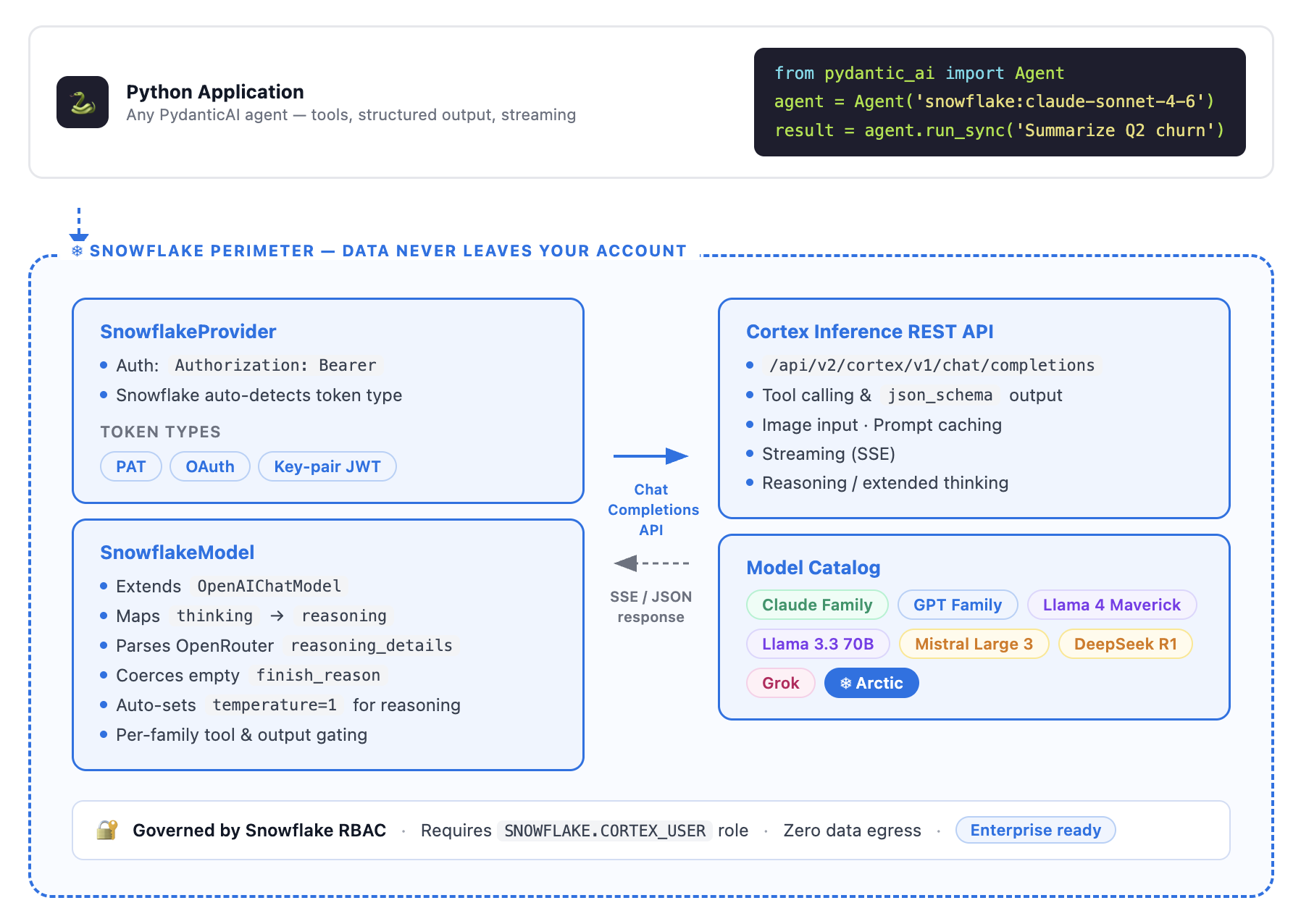
Two classes do the work: SnowflakeProvider handles auth and routing, SnowflakeModel handles the Cortex-specific quirks.
SnowflakeProvider, auth and routing
import os

from pydantic_ai.providers.snowflake import SnowflakeProvider

SNOWFLAKE_ACCOUNT = os.environ.get('SNOWFLAKE_ACCOUNT')
SNOWFLAKE_TOKEN = os.environ.get('SNOWFLAKE_TOKEN')

provider = SnowflakeProvider(
    account=SNOWFLAKE_ACCOUNT,
    token=SNOWFLAKE_TOKEN,  # PAT, OAuth token, or key-pair JWT
    # For private connectivity (PrivateLink):
    # base_url='https://myorg-myaccount.privatelink.snowflakecomputing.com',
)
Auth uses a plain Authorization: Bearer <token> header. Snowflake auto-detects the token type (PAT vs. OAuth vs. JWT), so the provider doesn't need to inspect or route on it. The integration explicitly drops the X-Snowflake-Authorization-Token-Type header that an earlier iteration included.
SnowflakeModel, a thin subclass
SnowflakeModel extends OpenAIChatModel rather than implementing a new base. The additions are Cortex-specific, based on live testing against a real Snowflake account:
-
Reasoning and thinking support for Claude models. Cortex returns reasoning in the
reasoning_detailsarray format (with signatures), not as a plainreasoningstring. The integration reuses the existing codec and replays thinking blocks with signatures on subsequent turns, which Claude's extended thinking requires to work across multi-turn conversations with caching applied automatically.agent = Agent( 'snowflake:claude-opus-4-8', model_settings={'thinking': {'type': 'enabled', 'budget_tokens': 5000}}, ) -
Automatic
temperature=1for reasoning.SnowflakeModelauto adjusts temperature for reasoning to ensure that extended thinking is successful. -
finish_reasoncoercion. Cortex returnsfinish_reason: ""(an empty string) for Claude and Llama completions, where OpenAI-family models return proper values. The model normalizes this so the downstream Pydantic AI logic doesn't break. -
Per-family tool gating. Cortex returns a hard 400 if you send
toolsorresponse_formatto Llama, Mistral, or DeepSeek models. The integration adds per-family profiles that disable tool calling and fall back to prompted structured output for those families, rather than propagating the error to the user.
What's covered by tests
The integration includes VCR cassettes recorded against a live Snowflake account, not mocks.
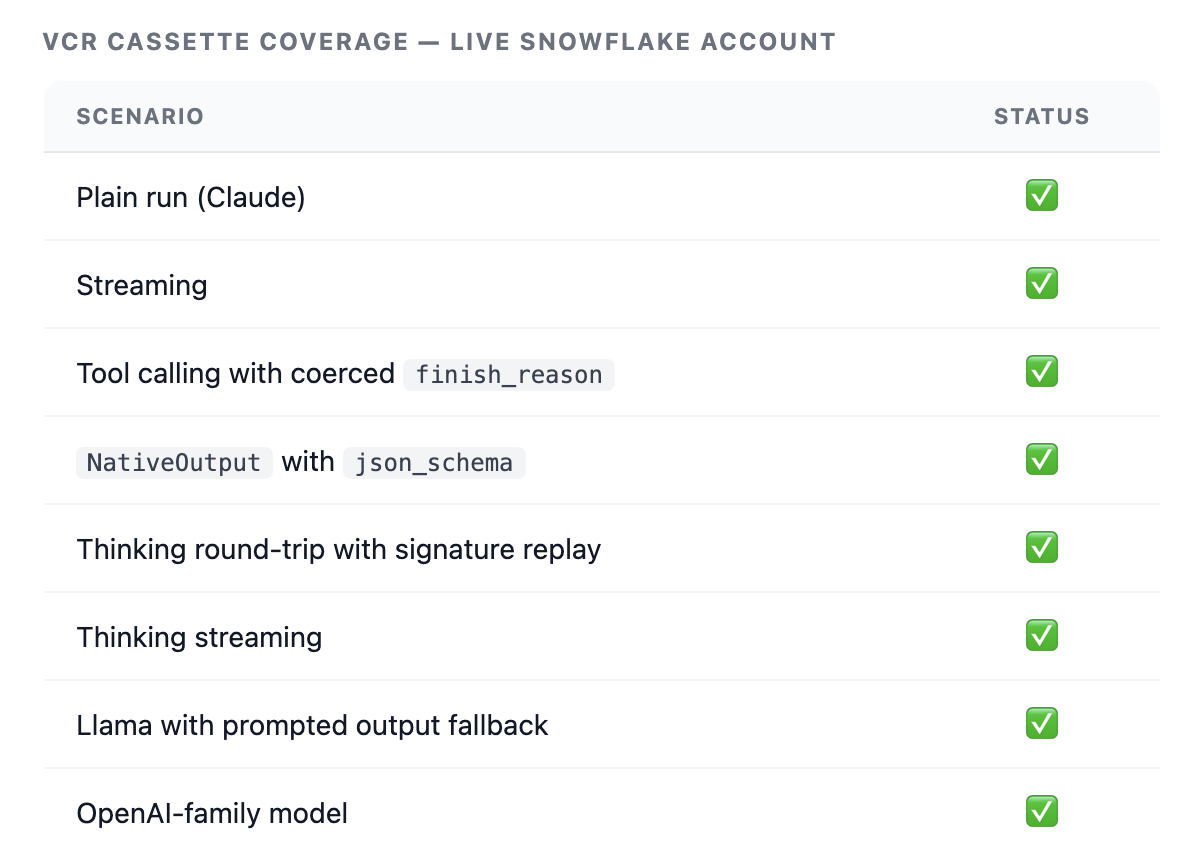
This level of live-recorded coverage is uncommon in provider integrations, and gives the Pydantic maintainers something concrete to review against.
What you get
By combining Pydantic AI agents with Snowflake Cortex Inference, you get:
- Launch-day model access. Snowflake ships new models from Anthropic and OpenAI on launch day as a launch partner. The integration inherits this automatically.
- The full Cortex model catalog, including
frontierand optimized models likesnowflake-llama-3.3-70b(up to 75% lower inference cost via SwiftKV). - Model portability. Switch from
snowflake:llama3.3-70btosnowflake:claude-sonnet-5by changing one string. Tool definitions, output schemas, and agent logic stay identical. - Secure Snowflake Perimeter. Inference happens inside the Snowflake account, subject to existing RBAC and governance policies.
Where you can run it
The provider is a REST client, so it runs anywhere Python does. What changes between contexts is only where the credentials come from.
| Context | Auth | Notes |
|---|---|---|
| External Python (laptop, CI/CD) | SNOWFLAKE_ACCOUNT and SNOWFLAKE_TOKEN env vars |
Needs a personal access token |
| Snowflake Notebooks | Session token, auto-detected via get_active_session() |
No environment variables needed |
| Streamlit-in-Snowflake | Session token | Reachable as st.connection('snowflake').session |
| Snowpark Container Services | Session token, or a PAT in env vars | May need an external access integration for REST endpoints |
| Python stored procedures | Session token | Requires an external access integration |
Stored procedures are the one context that needs setup, because egress is blocked by default:
CREATE OR REPLACE NETWORK RULE cortex_network_rule
  MODE = EGRESS
  TYPE = HOST_PORT
  VALUE_LIST = ('*.snowflakecomputing.com:443');

CREATE OR REPLACE EXTERNAL ACCESS INTEGRATION cortex_access
  ALLOWED_NETWORK_RULES = (cortex_network_rule)
  ENABLED = true;
Grant USAGE on the integration to the procedure's role. The PubMed example above reaches a second host, so it also needs 'eutils.ncbi.nlm.nih.gov:443' in VALUE_LIST.
Try it
pip install "pydantic-ai-slim[snowflake]"
export SNOWFLAKE_ACCOUNT='myorg-myaccount'
export SNOWFLAKE_TOKEN='<your-PAT>'
The role the request runs as needs the SNOWFLAKE.CORTEX_USER database role, which is granted to PUBLIC by default.
If you're building Pydantic AI agents and want native Snowflake Cortex support, review the integration here.