Logfire Integration
Visualize and analyze evaluation results using Pydantic Logfire.
Pydantic Evals uses OpenTelemetry to record traces of the evaluation process. These traces contain all the information from your evaluation reports, plus full tracing from the execution of your task function.
You can send these traces to any OpenTelemetry-compatible backend, including Pydantic Logfire.
Install the optional logfire dependency:
pip install 'pydantic-evals[logfire]'
Configure Logfire before running evaluations:
import logfire

from pydantic_evals import Case, Dataset

# Configure Logfire
logfire.configure(
  send_to_logfire='if-token-present',  # (1)
)


# Your evaluation code
def my_task(inputs: str) -> str:
  return f'result for {inputs}'


dataset = Dataset(name='logfire_demo', cases=[Case(name='test', inputs='example')])
report = dataset.evaluate_sync(my_task)
Sends data to Logfire only if the LOGFIRE_TOKEN environment variable is set
That’s it! Your evaluation traces will now appear in the Logfire web UI as long as you have the LOGFIRE_TOKEN environment variable set.
When you run an evaluation, Logfire receives:
- Evaluation metadata
- Dataset name
- Number of cases
- Evaluator names
- Per-case data
- Inputs and outputs
- Expected outputs
- Metadata
- Execution duration
- Evaluation results
- Scores, assertions, and labels
- Reasons (if included)
- Evaluator failures
- Task execution traces
- All OpenTelemetry spans from your task function
- Tool calls (for Pydantic AI agents)
- API calls, database queries, etc.
Logfire provides a special table view for evaluation results on the root evaluation span:
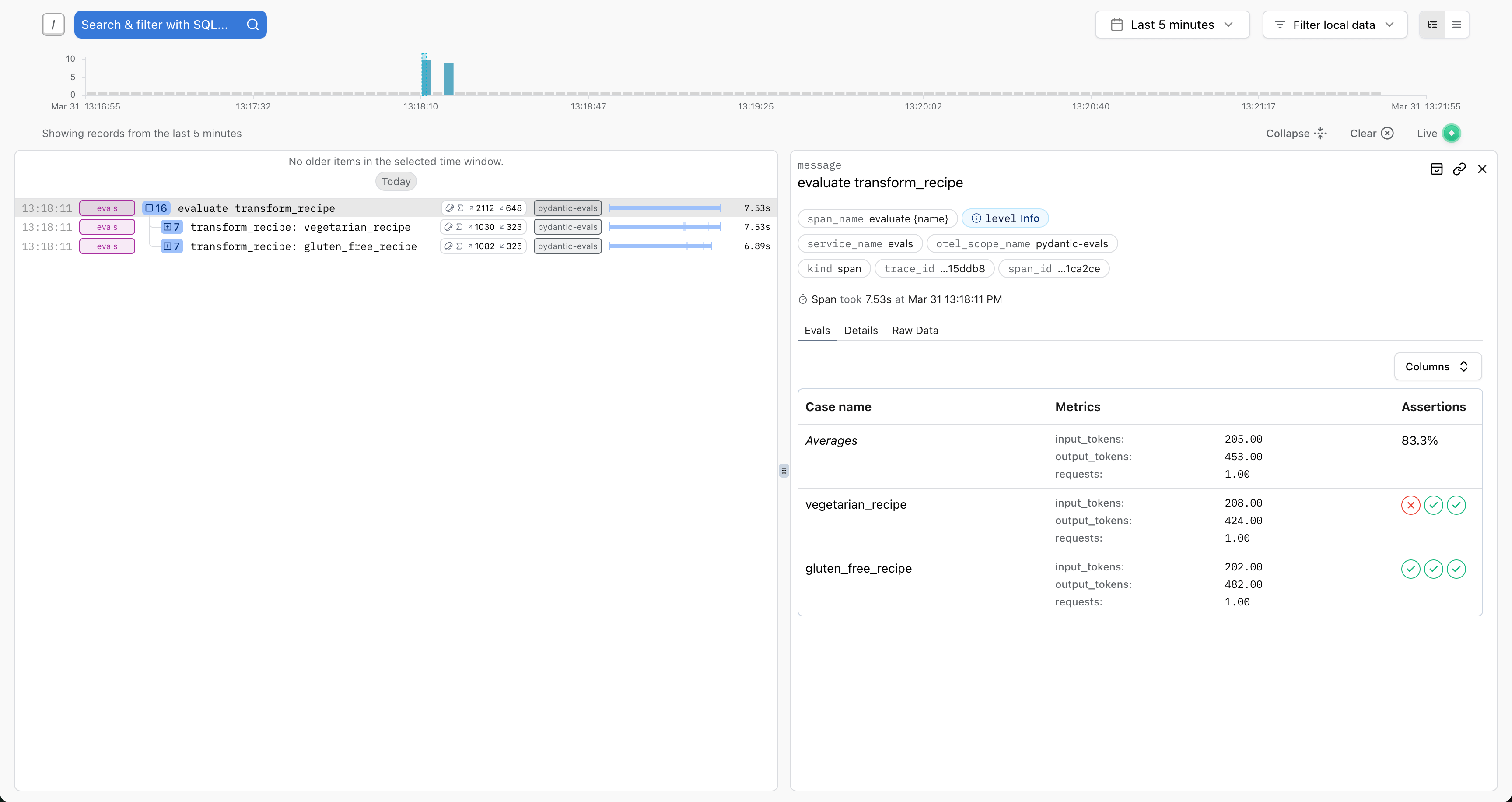
This view shows:
- Case names
- Pass/fail status
- Scores and assertions
- Execution duration
- Quick filtering and sorting
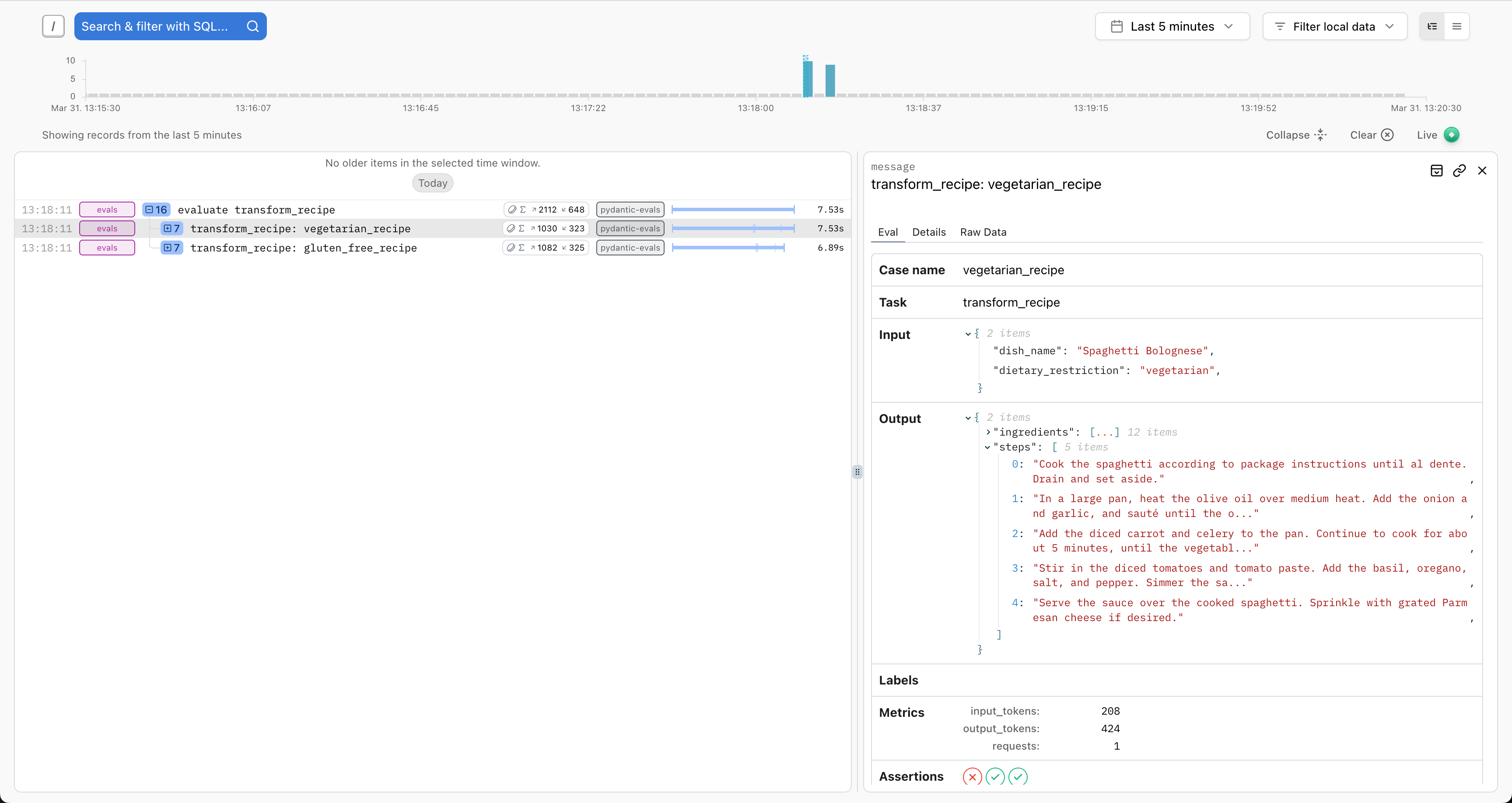
Click any case to see detailed inputs and outputs:
View the complete execution trace including all spans generated during evaluation:
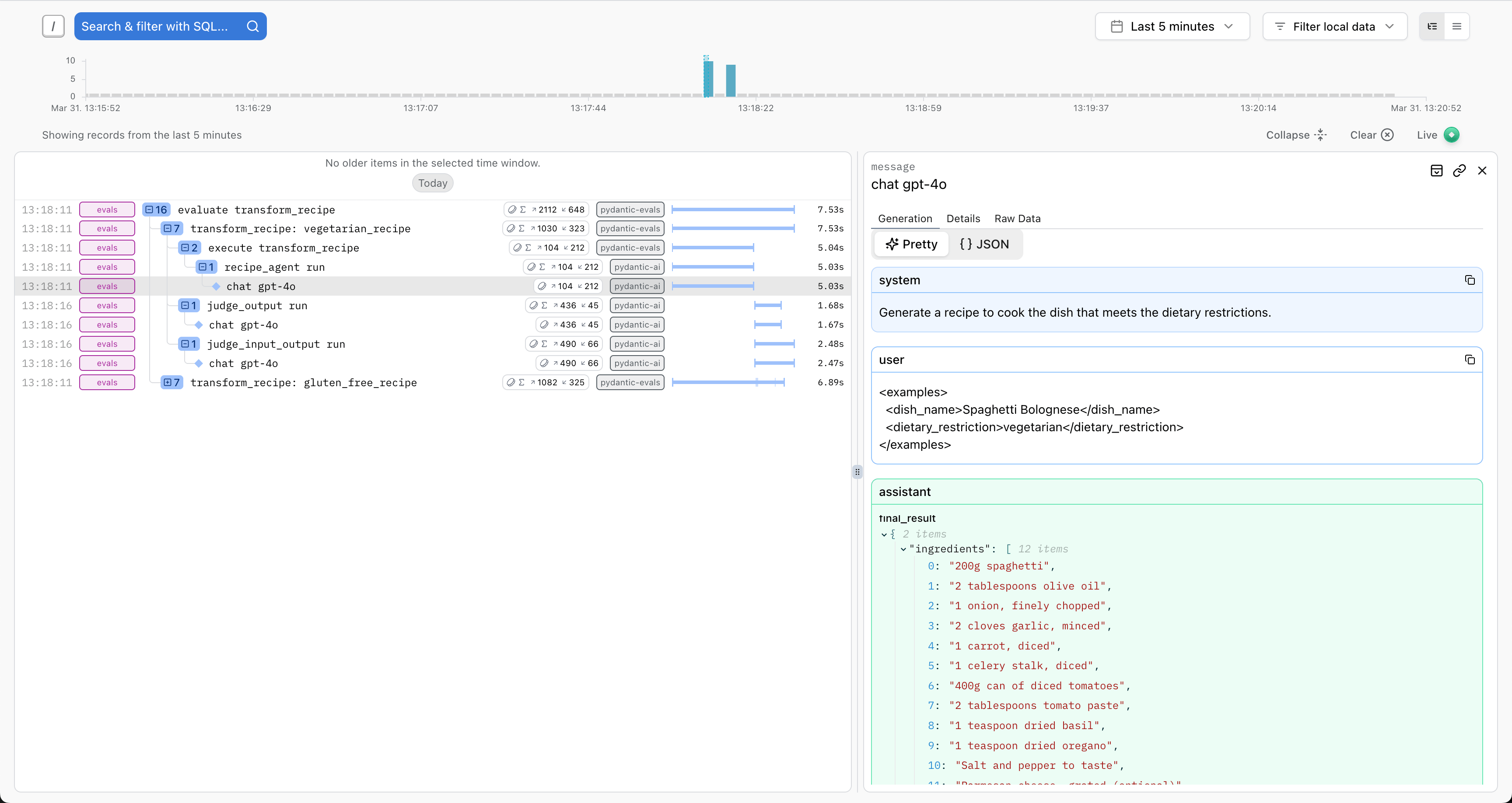
This is especially useful for:
- Debugging failed cases
- Understanding performance bottlenecks
- Analyzing tool usage patterns
- Writing span-based evaluators
Run the same evaluation multiple times and compare in Logfire:
from pydantic_evals import Case, Dataset


def original_task(inputs: str) -> str:
    return f'original result for {inputs}'


def improved_task(inputs: str) -> str:
    return f'improved result for {inputs}'


dataset = Dataset(name='comparison', cases=[Case(name='test', inputs='example')])

# Run 1: Original implementation
report1 = dataset.evaluate_sync(original_task)

# Run 2: Improved implementation
report2 = dataset.evaluate_sync(improved_task)

# Compare in Logfire by filtering by timestamp or attributes
Find failed cases quickly:
- Search for
service_name = 'my_service_evals' AND is_exception(replace with the actual service name you are using) - View the full span tree to see where the failure occurred
- Inspect attributes and logs for error messages
Logfire integration enables powerful span-based evaluators. See Span-Based Evaluation for details.
Example: Verify specific tools were called:
import logfire

from pydantic_evals import Case, Dataset
from pydantic_evals.evaluators import HasMatchingSpan

logfire.configure(send_to_logfire='if-token-present')


def my_agent(inputs: str) -> str:
    return f'result for {inputs}'


dataset = Dataset(
    name='logfire_demo',
    cases=[Case(name='test', inputs='example')],
    evaluators=[
        HasMatchingSpan(
            query={'name_contains': 'search_tool'},
            evaluation_name='used_search',
        ),
    ],
)

report = dataset.evaluate_sync(my_agent)
The span tree is available in both:
- Your evaluator code (via
ctx.span_tree) - Logfire UI (visual trace view)
Check:
- Token is set:
echo $LOGFIRE_TOKEN - Configuration is correct:
import logfire logfire.configure(send_to_logfire='always') # Force sending - Network connectivity: Check firewall settings
- Project exists: Verify project name in Logfire UI
If some spans are missing:
-
Ensure logfire is configured before imports:
import logfire logfire.configure() # Must be first -
Check instrumentation: Ensure your code has enabled all instrumentations you want:
import logfire

logfire.instrument_pydantic_ai()
logfire.instrument_httpx(capture_all=True)
Always configure Logfire before running evaluations:
import logfire

from pydantic_evals import Case, Dataset

logfire.configure(send_to_logfire='if-token-present')


# Now import and run evaluations
def task(inputs: str) -> str:
    return f'result for {inputs}'


dataset = Dataset(name='logfire_demo', cases=[Case(name='test', inputs='example')])
dataset.evaluate_sync(task)
import logfire

logfire.configure(
    service_name='rag-pipeline-evals',
    environment='development',
)
- Check Logfire regularly to identify patterns
- Look for consistently failing cases
- Analyze performance trends
- Adjust evaluators based on insights
- Span-Based Evaluation - Use OpenTelemetry spans in evaluators
- Logfire Documentation - Complete Logfire guide
- Metrics & Attributes - Add custom data to traces