Pydantic Logfire: Setup Different Environments
As developers, we find ourselves working on different environments for a project: local, production, sometimes staging, and depending on your company deployment strategy… You can have even more! 😅
With Logfire you can distinguish which environment you are sending data to.
You just need to set the environment parameter in logfire.configure().
import logfire

logfire.configure(environment='local')  # (1)
Usually you would retrieve the environment information from an environment variable.
Under the hood, this sets the OpenTelemetry resource attribute deployment.environment.name.
Note that you can also set this via the LOGFIRE_ENVIRONMENT environment variable.
If you are using languages other than Python, you can set the environment like this:
OTEL_RESOURCE_ATTRIBUTES="deployment.environment.name=prod"
Once set, you will see your environment in the environment picker in the Logfire UI.
The picker lives in the side navigation, directly below the project picker, and reads
all envs until you narrow it down. It applies to observability pages like
Live View, Dashboards
and SQL Workbench (on pages where environments don’t apply,
the picker is shown disabled):
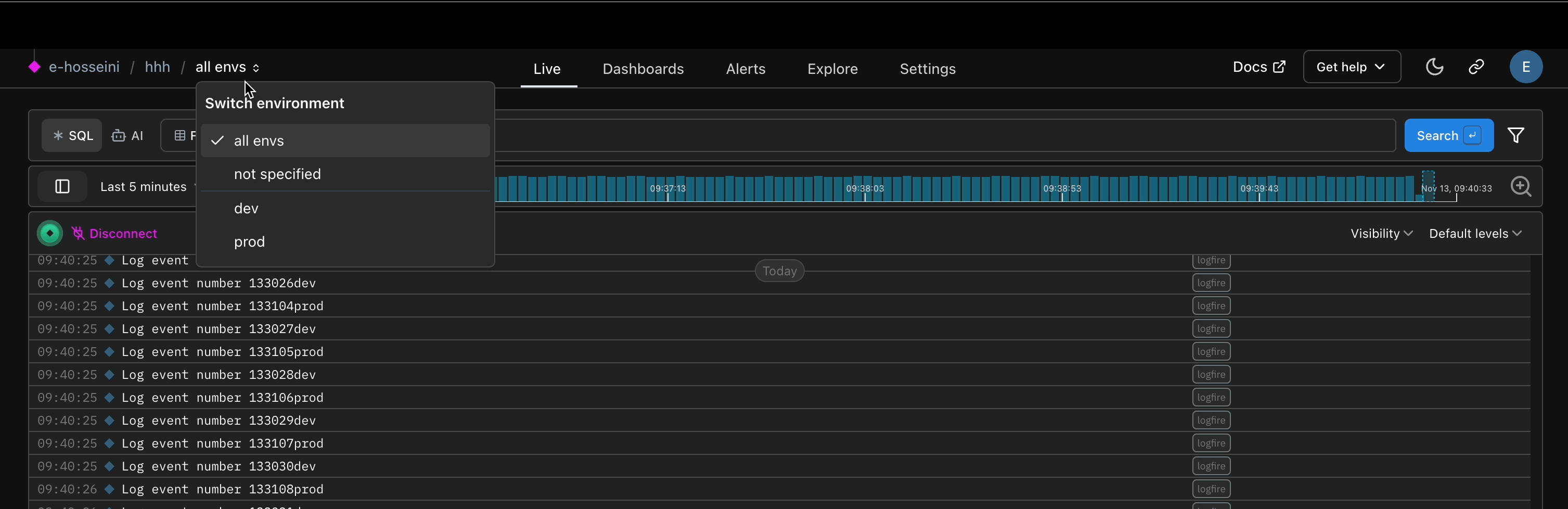
Note that by default there are system generated environments:
all envs: Searches will include everything, including spans that had no environment set.env not specified: Searches will only include spans that had no environment set.
So env not specified is a subset of all envs.
Any environments you create via the SDK will appear below the system generated environments. When you select an environment, all subsequent queries (e.g. in Live view, Dashboards, or SQL Workbench) will filter by that environment. You can select more than one environment at a time, and hovering an environment reveals a pin icon to save it as your personal default for the project: that default is applied whenever you open the project.
No, you cannot create or delete set environments via the UI, instead use the SDK.
Once an environment has been configured and received by logfire, technically it’s available for the length of the data retention period while that environment exists in the data. You can however add new ones, and change the configuration of which data is assigned to which environment name.
Environments are more lightweight than projects. Projects give you the ability to assign specific user groups and permissions levels (see this organization and projects documentation for details). So if you need to allow different team members to view dev vs. prod traces, then projects would be a better fit.