Instrument Magentic: trace prompts, retries, and tool calls
See what Magentic does when it turns a model’s reply into structured output: the prompt it built, each retry it needed, and the tool or function calls it made, as a trace (the full journey of one request or agent run, made of nested spans, where each span is one unit of work with a name, a start, and a duration) in Logfire.
Magentic is a library for getting structured output from models, built around standard Python type annotations and Pydantic. It emits its own spans as soon as Logfire is configured; there’s no separate Magentic instrument call.
- Each Magentic function call as a span, with the input arguments
- The prompt template and the messages sent to and from the model
- Retries, with a warning for each attempt that produced invalid output
- Tool and function calls the model made
- Token usage and any errors, once you also instrument the model provider (see below)
You’ll need a Logfire project. Open Add data in your project (top navigation) and follow the
setup for your language: it signs your machine in with logfire auth (a browser sign-in, no token
to copy) and, for production or other languages, creates a write token (the credential your app
uses to send data). New to Logfire? Start with Getting Started.
Magentic calls a model provider using your own API key, so each run costs money on that provider account.
Install logfire:
pip install logfire
uv add logfire
conda install -c conda-forge logfire
This works with your existing Magentic install; there’s no extra to add. If you don’t have it yet, pip install magentic.
Magentic needs no setup of its own; it starts emitting spans as soon as you call logfire.configure(). To also capture the underlying model calls (the full conversation and token usage), instrument the provider you use: logfire.instrument_openai() and/or logfire.instrument_anthropic().
from typing import Annotated

from magentic import OpenaiChatModel, SystemMessage, UserMessage, chatprompt
from pydantic import BaseModel, Field
from pydantic.functional_validators import AfterValidator

import logfire

logfire.configure()
logfire.instrument_openai()


def assert_upper(value: str) -> str:
    if not value.isupper():
        raise ValueError('Value must be upper case')
    return value


class Superhero(BaseModel):
    name: Annotated[str, AfterValidator(assert_upper)]
    powers: list[str]
    city: Annotated[str, Field(examples=['New York, NY'])]


@chatprompt(
    SystemMessage('You are professor A, in charge of the A-people.'),
    UserMessage('Create a new superhero named {name}.'),
    model=OpenaiChatModel('gpt-4o'),
    max_retries=3,
)
def make_superhero(name: str) -> Superhero: ...


hero = make_superhero('The Bark Night')
print(hero)
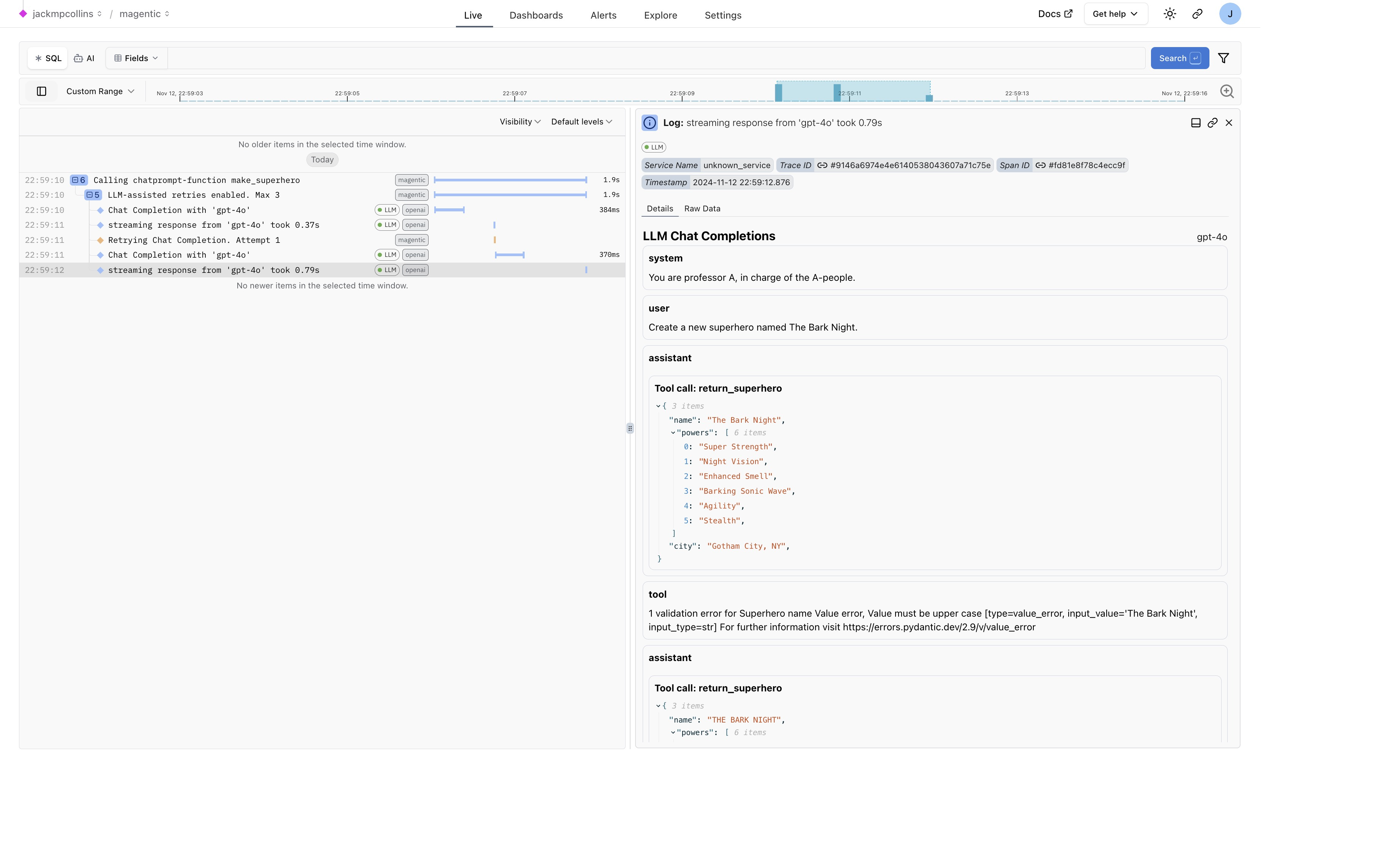
Run your program, then open the Live view. Within a few seconds you’ll see a trace for the make_superhero call. Click it to see the input arguments, the messages to and from the model, and a warning for each retry that was needed to produce valid output.
The example above creates this in Logfire:
Not seeing data? Check that logfire.configure() ran before your Magentic calls and that your write token is set. Missing the conversation and token counts? Instrument the model provider too (instrument_openai() and/or instrument_anthropic()), and call it exactly once.
- Magentic docs and feature list
- Model provider instrumentation: OpenAI · Anthropic