Instrument Mirascope: trace calls across LLM providers
See what your Mirascope functions do: the prompt template they built, the conversation with the model, and the tokens each call used, as a trace (the full journey of one request or agent run, made of nested spans, where each span is one unit of work with a name, a start, and a duration) in Logfire.
Mirascope is a library for building with models. It adds this instrumentation through its own @with_logfire decorator, which works with every model provider it supports.
- Each decorated function call as a span, with its prompt template, template fields, and input/output attributes
- The conversation with the model, rendered so you can read it like a transcript, including tool calls
- Token usage for each model call and any errors raised
- Validation of Pydantic models, when you also instrument Pydantic (see below)
You’ll need a Logfire project. Open Add data in your project (top navigation) and follow the
setup for your language: it signs your machine in with logfire auth (a browser sign-in, no token
to copy) and, for production or other languages, creates a write token (the credential your app
uses to send data). New to Logfire? Start with Getting Started.
Mirascope calls a model provider using your own API key, so each call costs money on that provider account.
Install logfire:
pip install logfire
uv add logfire
conda install -c conda-forge logfire
These examples use Mirascope v1’s @with_logfire integration: pip install 'mirascope[anthropic,openai]<2' (the examples below use both providers). (Mirascope v2 reorganized its API and moved tracing into a separate mirascope.ops module; the Logfire integration for v2 is tracked separately.)
Call logfire.configure(), then add Mirascope’s @with_logfire decorator to each function you want to trace. It works with all of Mirascope’s supported providers.
from mirascope.core import anthropic, prompt_template
from mirascope.integrations.logfire import with_logfire

import logfire

logfire.configure()


@with_logfire()
@anthropic.call('claude-sonnet-4-5')
@prompt_template('Please recommend some {genre} books')
def recommend_books(genre: str): ...


response = recommend_books('fantasy')  # this will automatically get logged with logfire
print(response.content)
#> Certainly! Here are some popular and well-regarded fantasy books and series: ...
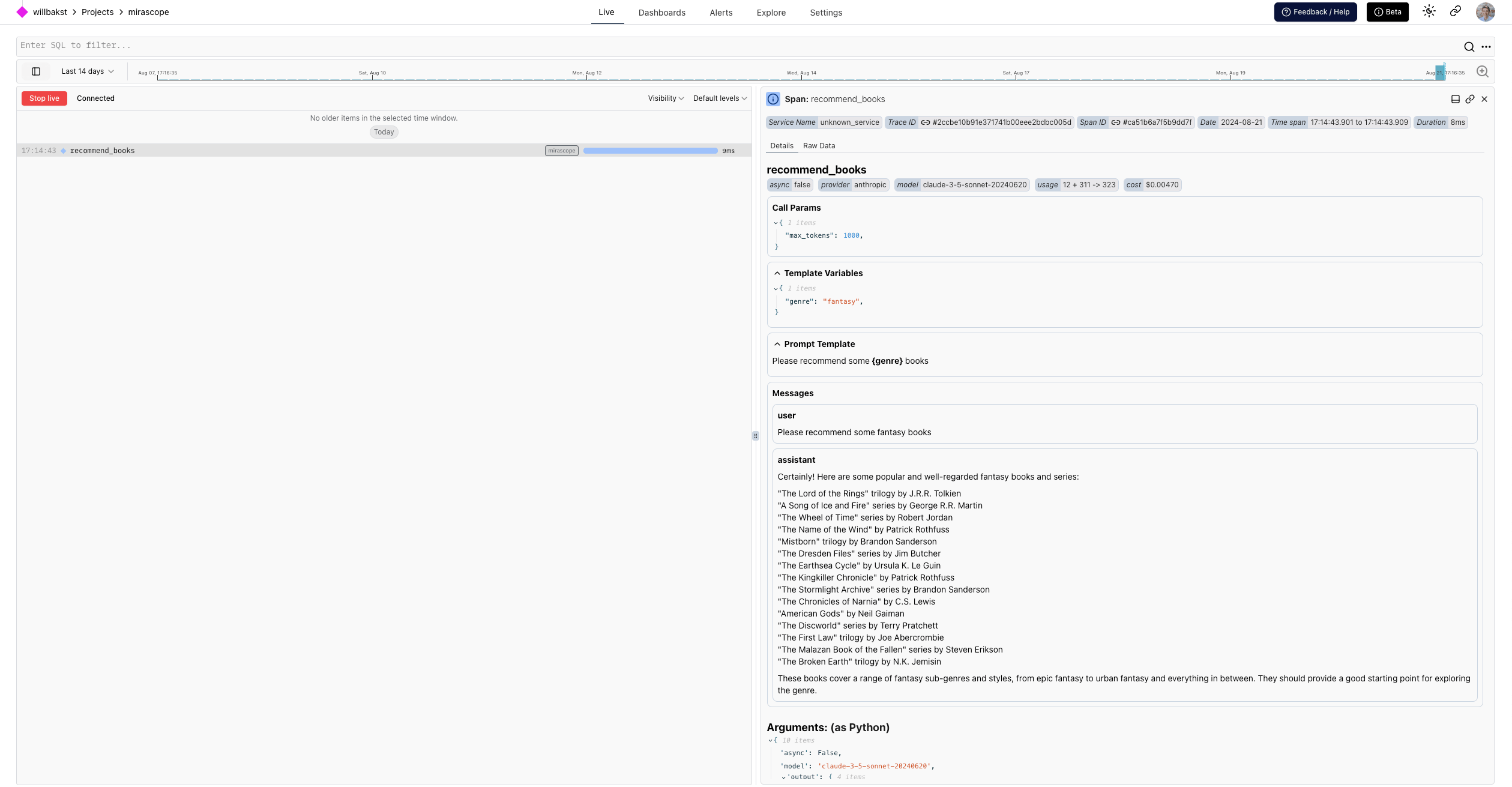
Run your program, then open the Live view. Within a few seconds you’ll see a span for the recommend_books call. Click it to read the conversation, and see the prompt template, template fields, and token count.
The example above shows up like this in Logfire:
Mirascope is built on Pydantic, so you can add logfire.instrument_pydantic() to also record model validation. This is useful when extracting structured information with a model:
from typing import Literal

from mirascope.core import openai, prompt_template
from mirascope.integrations.logfire import with_logfire
from pydantic import BaseModel

import logfire

logfire.configure()
logfire.instrument_pydantic()


class TaskDetails(BaseModel):
    description: str
    due_date: str
    priority: Literal['low', 'normal', 'high']


@with_logfire()
@openai.call('gpt-4o-mini', response_model=TaskDetails)
@prompt_template('Extract the details from the following task: {task}')
def extract_task_details(task: str): ...


task = 'Submit quarterly report by next Friday. Task is high priority.'
task_details = extract_task_details(task)  # this will be logged automatically with logfire
assert isinstance(task_details, TaskDetails)
print(task_details)
#> description='Submit quarterly report' due_date='next Friday' priority='high'
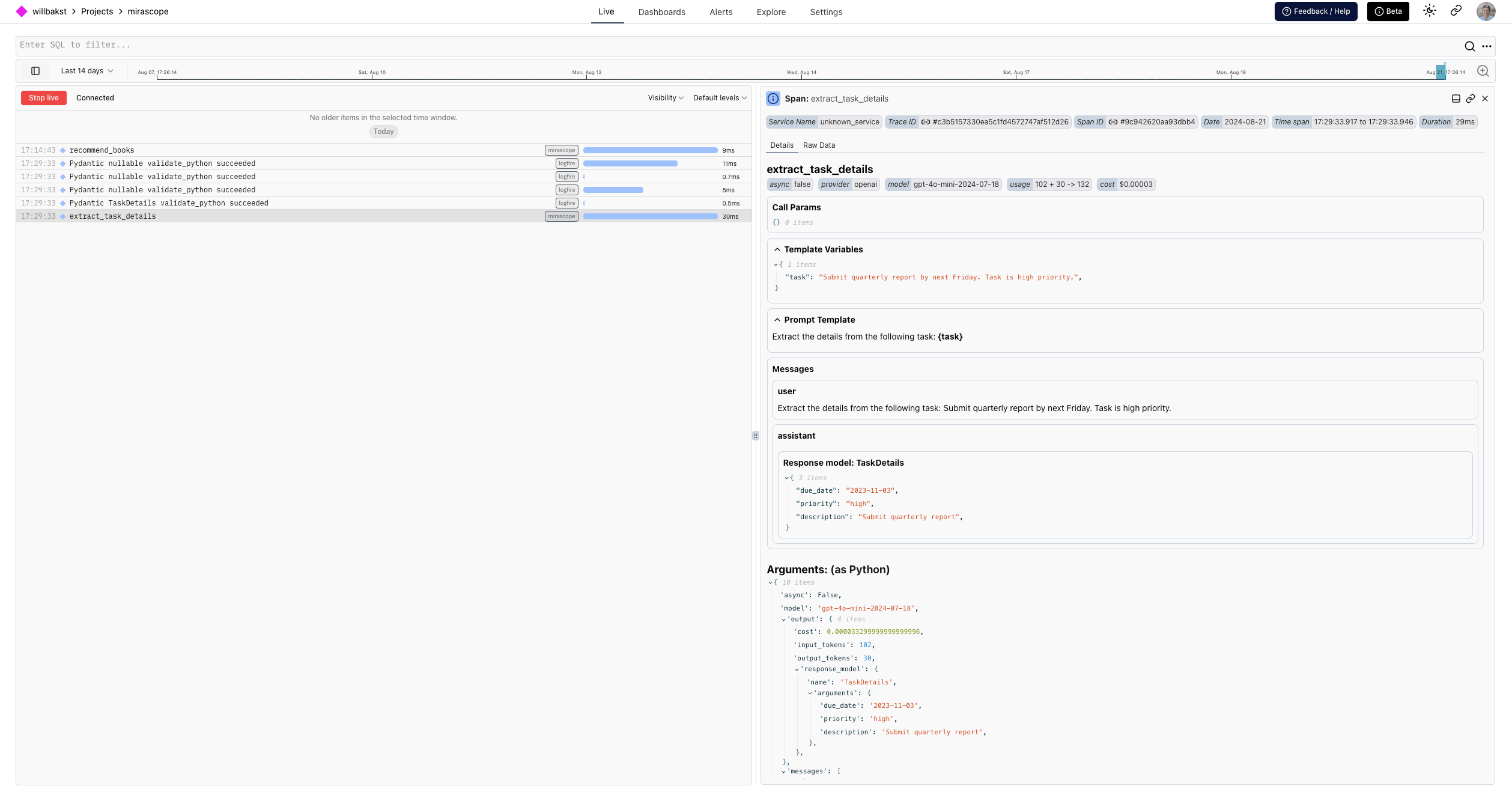
This adds validation tracking for the TaskDetails model alongside the call span and conversation:
Not seeing data? Check that logfire.configure() ran before the decorated function is called, that the function has the @with_logfire() decorator, and that your write token is set.
- Mirascope Logfire integration docs
- Mirascope documentation
logfire.instrument_pydantic(): for model-validation tracking