Instrument the Claude Agent SDK
See what your Claude Agent SDK agents do: each conversation, each turn, and every tool they call, as a trace (the full journey of one agent run, made of nested spans, where each span is one unit of work with a name, a start, and a duration) in Logfire.
- Each conversation as a trace, with a span per turn
- Every tool the agent calls, as a child span with its arguments and result
- The duration of each step and any errors raised along the way
You’ll need a Logfire project. Open Add data in your project (top navigation) and follow the
setup for your language: it signs your machine in with logfire auth (a browser sign-in, no token
to copy) and, for production or other languages, creates a write token (the credential your app
uses to send data). New to Logfire? Start with Getting Started.
The Claude Agent SDK calls Claude using your own credentials, so running an agent costs money on that account.
Install logfire:
pip install logfire
uv add logfire
conda install -c conda-forge logfire
The example below also needs the SDK itself:
pip install claude-agent-sdk
Call logfire.configure(), then logfire.instrument_claude_agent_sdk() to record every agent run.
import asyncio
from typing import Any

from claude_agent_sdk import (
    ClaudeAgentOptions,
    ClaudeSDKClient,
    create_sdk_mcp_server,
    tool,
)

import logfire

logfire.configure()
logfire.instrument_claude_agent_sdk()


# Example of using a tool in the Claude Agent SDK:
@tool(
    'get_weather',
    'Gets the current weather for a given city',
    {
        'city': str,
    },
)
async def get_weather(args: dict[str, Any]) -> dict[str, Any]:
    """Simulated weather lookup tool"""
    city = args['city']
    weather = 'Cloudy, 59°F'
    return {'content': [{'type': 'text', 'text': f'Weather in {city}: {weather}'}]}


async def main():
    weather_server = create_sdk_mcp_server(
        name='weather',
        version='1.0.0',
        tools=[get_weather],
    )

    options = ClaudeAgentOptions(
        system_prompt='You are a friendly travel assistant who helps with weather information.',
        mcp_servers={'weather': weather_server},
        allowed_tools=['mcp__weather__get_weather'],
    )

    async with ClaudeSDKClient(options=options) as client:
        await client.query("What's the weather like in Berlin?")

        async for message in client.receive_response():
            print(message)


asyncio.run(main())
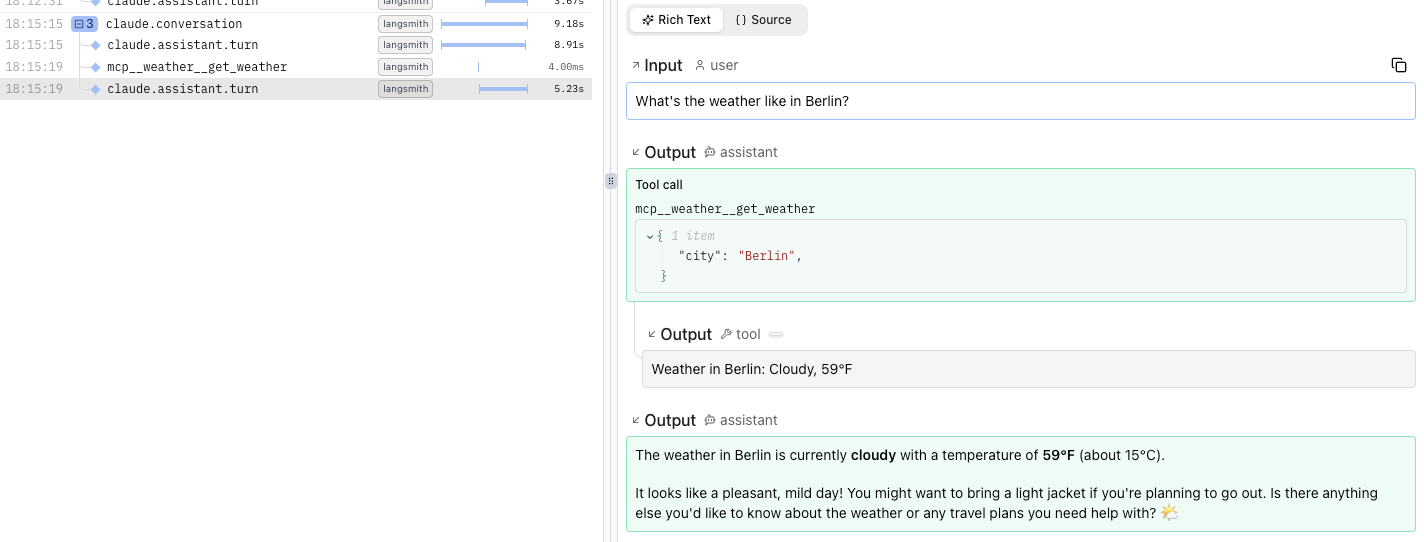
Run your program, then open the Live view. Within a few seconds you’ll see a trace for the agent run. Click it to see each turn and the get_weather tool call nested inside.
The example above looks like this in Logfire:
Not seeing data? Check that logfire.configure() ran before instrument_claude_agent_sdk(), that your write token is set, and that you called the instrument function exactly once. Missing tool-call spans? Make sure the ClaudeSDKClient is created after the instrument call (see the warning above).
- API reference:
logfire.instrument_claude_agent_sdk() - Claude Agent SDK