Instrument LangChain: see every step your chains and agents take
See every step your LangChain chains and LangGraph agents take: the model calls, tool calls, how many tokens (the units a model reads and bills by, a few characters of text each) they used, how long they took, and any errors, as a trace (the full journey of one request or agent run, made of nested spans, where each span is one unit of work with a name, a start, and a duration) in Logfire.
LangChain has built-in tracing through LangSmith that speaks OpenTelemetry (the open standard Logfire receives data in), so there’s no separate Logfire instrument call. You turn on that tracing with a few environment variables, and Logfire receives the data.
- Each chain, agent, and tool step as a span, with its duration and any exceptions
- Model calls, with the conversation and the number of tokens used
- Nested steps of a chain or agent, shown as child spans in one trace
You’ll need a Logfire project. Open Add data in your project (top navigation) and follow the
setup for your language: it signs your machine in with logfire auth (a browser sign-in, no token
to copy) and, for production or other languages, creates a write token (the credential your app
uses to send data). New to Logfire? Start with Getting Started.
Install logfire:
pip install logfire
uv add logfire
conda install -c conda-forge logfire
This works with your existing langchain (or langgraph) install: nothing extra to add.
Set three environment variables to turn on LangSmith’s OpenTelemetry tracing, call
logfire.configure() to connect to your project, and Logfire receives the data. The variables must be
set before you import langchain or langgraph.
LANGSMITH_OTEL_ENABLED=true
LANGSMITH_OTEL_ONLY=true
LANGSMITH_TRACING=true
The example below calls an OpenAI model, so it also needs your model provider’s credential: set the
OPENAI_API_KEY environment variable to your OpenAI API key (swap in another provider’s model and key
if you prefer).
Here’s a complete example using LangGraph:
import os

import logfire

# These environment variables need to be set before importing langchain or langgraph
os.environ['LANGSMITH_OTEL_ENABLED'] = 'true'
os.environ['LANGSMITH_OTEL_ONLY'] = 'true'
os.environ['LANGSMITH_TRACING'] = 'true'

from langchain.agents import create_agent

logfire.configure()


def add(a: float, b: float) -> float:
    """Add two numbers."""
    return a + b


math_agent = create_agent('openai:gpt-5-mini', tools=[add], name='math_agent')

result = math_agent.invoke({'messages': [{'role': 'user', 'content': "what's 123 + 456?"}]})
print(result['messages'][-1].content)
The resulting trace looks like this in Logfire:
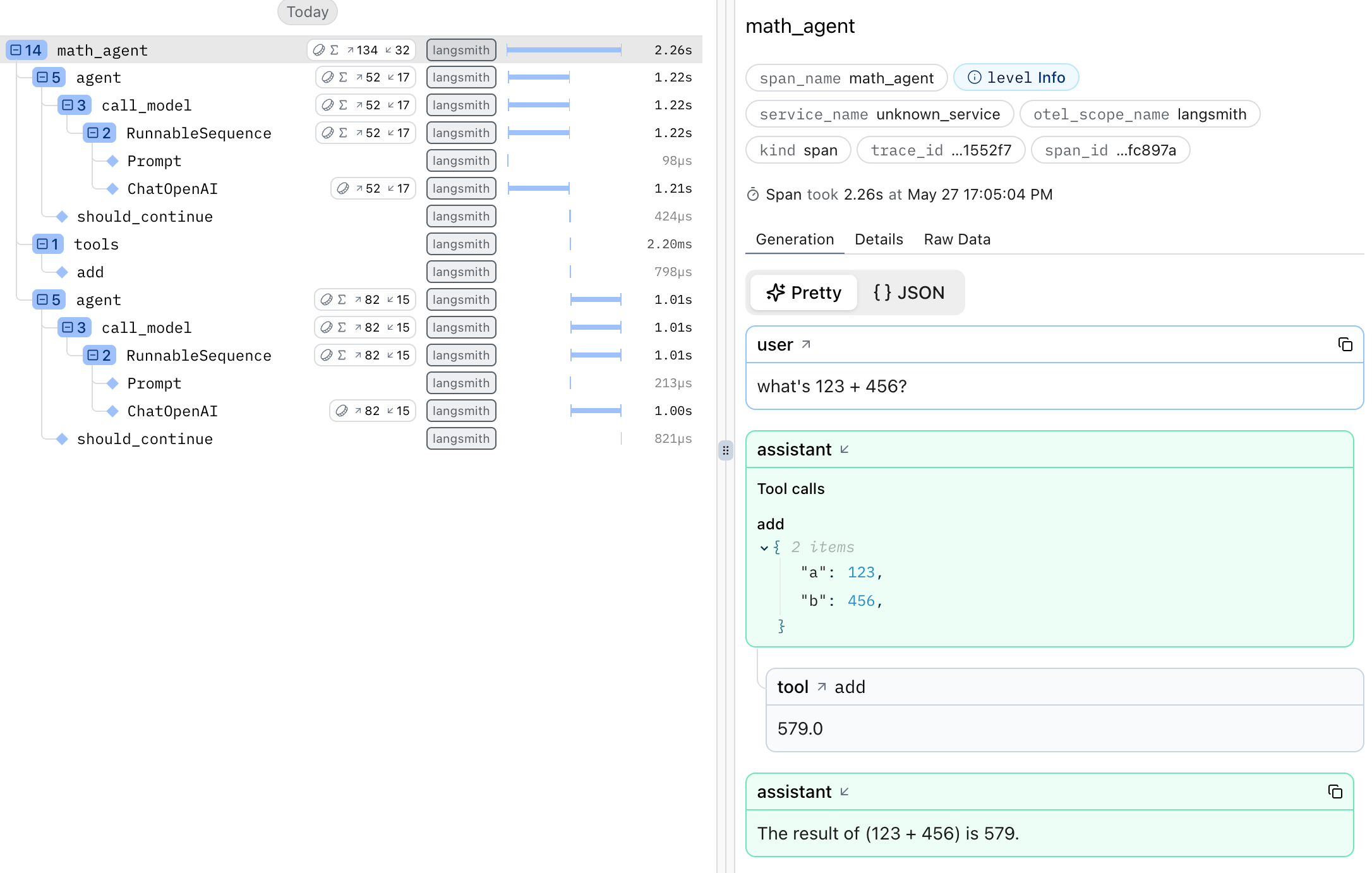
Run your program, then open your project in the Logfire web app and go to the Live view. Within a few seconds you should see a trace for the agent run, with a span for each step. Click into it to see the model calls and tool calls.
The LangSmith export above lands your traces in the Live view, but it does not mark an agent root span, so your agents do not appear on the Agents page. If you want them there, instrument with OpenInference instead of the LangSmith export:
pip install openinference-instrumentation-langchain
from openinference.instrumentation.langchain import LangChainInstrumentor

import logfire

logfire.configure()
LangChainInstrumentor().instrument()
A deep agent built with create_deep_agent runs as a LangGraph graph. OpenInference marks the graph’s root span as the agent only when the agent has a name, so pass name=:
from deepagents import create_deep_agent

agent = create_deep_agent(tools=[...], system_prompt='...', name='research_agent')
The deep agent then appears on the Agents page as research_agent. Without a name, its root span is a generic graph span, so it does not appear as its own row. Sub-agents run as nested graphs, so only the top-level deep agent appears; the sub-agent’s own model and tool calls are still visible inside that agent’s runs.
Not seeing your LangChain steps in Logfire? Check these first:
- The three
LANGSMITH_*environment variables are set before importinglangchainorlanggraph. Set them at the very top of your program, above the imports. logfire.configure()runs at startup, so the connection is ready when the first step runs.- Your Logfire write token is set. In local development, run
logfire projects use <your-project>; in production, set theLOGFIRE_TOKENenvironment variable. See Getting Started.
- LangSmith tracing over OpenTelemetry: Trace LangChain with OpenTelemetry