LocalStack
LocalStack gives an agent access to an emulated AWS environment, so it can
provision and exercise AWS services without touching a real account. It wires
the AWS CLI to a running LocalStack instance,
injecting the endpoint, region, and credentials, and can optionally start and
stop a LocalStack Docker container for each run, or one that the runs inside
async with agent: share.
While Pydantic AI Harness is on 0.x releases, the API may change between minor releases; when it does, deprecation warnings and release-note migration guidance tell you (or your agent) exactly how to upgrade. See the version policy.
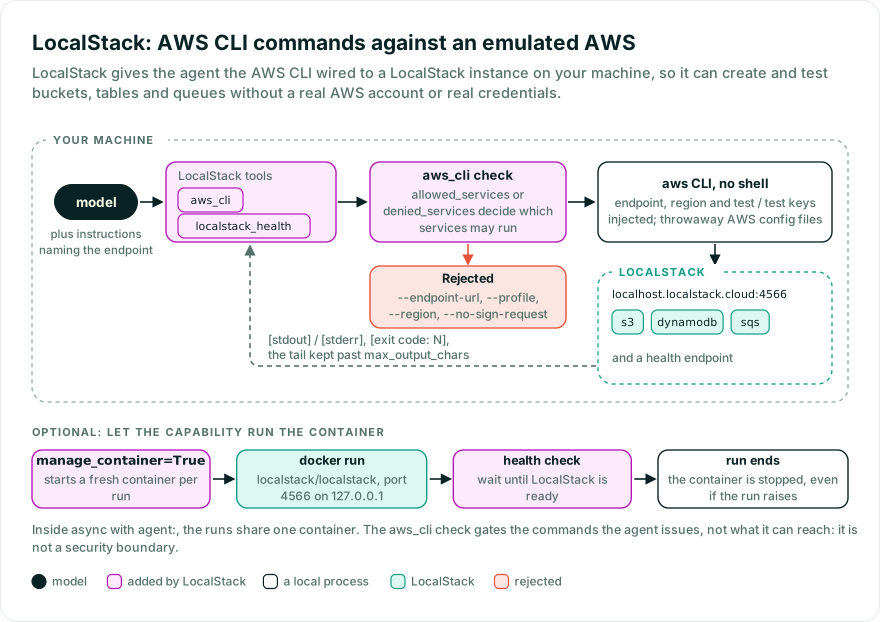
Agents that build or test cloud infrastructure need somewhere to create buckets, tables, queues, and functions. Real AWS costs money, puts real credentials within the agent’s reach, and is hard to reset between runs. LocalStack emulates AWS locally; this capability handles the wiring: the endpoint, dummy credentials, the AWS CLI, and a health check.
from pydantic_ai import Agent
from pydantic_ai_harness import LocalStack

agent = Agent(
    'anthropic:claude-sonnet-5-5',
    capabilities=[LocalStack()],
)

result = agent.run_sync('Create an S3 bucket called reports and list all buckets.')
print(result.output)
By default the agent connects to a LocalStack instance you started separately,
for example with the
localstack CLI
(localstack start). The defaults match LocalStack’s conventions: the edge
endpoint http://localhost.localstack.cloud:4566 (which resolves to
127.0.0.1) and test / test credentials. To have the capability start and stop the
container for you, set manage_container=True (see
Managing the container).
| Tool | Purpose |
|---|---|
aws_cli | Run an AWS CLI command against LocalStack. Pass the command without the leading aws and without --endpoint-url; both are injected. Returns labelled stdout/stderr plus an exit code on failure. |
localstack_health | Query LocalStack’s health endpoint and return the JSON of which services (s3, dynamodb, sqs, etc.) are available. |
Commands run as an argument vector (no shell), so shell operators and
redirection in the command string have no effect. Each command runs with stdin
closed and with its own empty AWS config and credentials files in place of
~/.aws/config and ~/.aws/credentials, so aws configure reads and writes
those throwaway files and its settings last for that one command. Output is
labelled with [stdout] / [stderr] markers and an [exit code: N] line on
non-zero exit. When it exceeds max_output_chars the tail is kept (the head
is dropped), so errors survive truncation. The cap applies to the command’s
result itself, so a durable execution record of it is bounded too.
aws_cli takes an optional timeout_seconds that overrides default_timeout
for one command. It must be a finite number greater than zero. To bound how long
the model can make any tool call run, set the agent’s tool_timeout.
The AWS CLI can read from and write to local files through arguments such as
--body, file://, fileb://, and s3 cp. Treat this capability as both
AWS-emulator access and AWS CLI access to the process’s filesystem.
| Field | Effect |
|---|---|
allowed_services | If non-empty, only these AWS services may be used (allowlist), e.g. ['s3', 'dynamodb']. |
denied_services | These AWS services are always rejected (denylist). |
allowed_services and denied_services are mutually exclusive: set one, not
both. The service is the first token that is neither a global option nor its
value (s3 in --output text s3 ls). Global options are recognized by any
prefix the AWS CLI accepts, so --out text s3 ls names s3 too. Commands that
pass --endpoint-url, --profile, --region, or --no-sign-request, or any
prefix of them, are rejected, since the capability injects the target and
credentials.
Set manage_container=True and the capability starts a LocalStack Docker
container for each run and stops it when the run ends. Docker must be installed
and running.
from pydantic_ai_harness import LocalStack

LocalStack(
    manage_container=True,
    image='localstack/localstack',
    container_env={'DEBUG': '1', 'PERSISTENCE': '1'},
    startup_timeout=120.0,
)
The container’s edge port (4566) is published on the host port from
endpoint_url, and the capability waits for the health endpoint before the run
starts, then stops the container when it ends (even if the run raises). Each run
gets its own container on the same host port, so concurrent runs of one agent
need to share one: inside async with agent:, entering the agent starts one
container that the runs inside share, and exiting stops it. Alternatively, point
them at an externally managed instance (manage_container=False).
Managed containers bind to 127.0.0.1 by default, reached through
localhost.localstack.cloud. Set host_address to publish on a different
address; any value other than 127.0.0.1 or 0.0.0.0 is then also the host of
the tool endpoint and of the endpoint the instructions name, except that the
IPv6 bind-all :: is reached at ::1. Scoped IPv6 addresses such as
fe80::1%eth0 are rejected.
Since LocalStack 2026.03.0, localstack/localstack needs an auth token to start
(a free Hobby token covers community usage). LOCALSTACK_AUTH_TOKEN, or the
legacy LOCALSTACK_API_KEY when no token is set, is forwarded from the current
process through the Docker CLI environment, never the docker run arguments,
unless container_env already sets one of them. To run without a token, pin
image to a localstack/localstack:4.x tag.
Docker-backed services such as Lambda need the Docker socket mounted, and some
services expose ports outside the gateway (LocalStack reserves 4510-4559).
Enable those explicitly when a service you test requires them:
from pydantic_ai_harness import LocalStack

LocalStack(manage_container=True, service_port_range='4510-4559', mount_docker_socket=True)
Mounting the Docker socket gives the container host-level Docker control. Keep
mount_docker_socket=False unless the emulated service requires it and the run
environment is already trusted.
The same lifecycle is available standalone as an async context manager:
import asyncio

from pydantic_ai_harness.localstack import LocalStackContainer


async def main() -> None:
    async with LocalStackContainer(environment={'DEBUG': '1'}) as localstack:
        ...  # talk to localstack.endpoint_url


asyncio.run(main())
Under durable execution, each AWS CLI command and health check against an external LocalStack instance is recorded, so a recovered run reuses its output instead of running the command again. Temporal and Prefect record each tool call in its own activity or task. DBOS runs function tools in workflow code, so there the command runs as its own step.
A managed container (manage_container=True) starts empty in the process that
recovers a run, so on DBOS LocalStack does not record its commands: recovery
runs them again, which rebuilds the container’s state. Temporal and Prefect
record every tool call, so there recovery replays the recorded output and the
new container lacks the resources the earlier commands created. Point
endpoint_url at an external LocalStack instance for durable runs on those
engines.
Runs that share one container inside async with agent: also share its state.
If one of them recovers on DBOS while that container is still up, the commands
it runs again meet the resources it and its sibling runs already created, so
commands that are not idempotent, such as s3 mb or sqs create-queue, can
fail. For durable runs, use an external instance, or keep commands idempotent.
The records are named after the capability’s id, which defaults to
localstack, so durable execution needs no configuration.
LocalStack emits no spans of its own. Core’s
instrumentation already records each
aws_cli and localstack_health call as a tool span. Starting and stopping a
managed container makes no decision worth a span. When Docker is missing or
fails, or LocalStack never becomes ready, the start raises LocalStackError.
from pydantic_ai_harness import LocalStack

LocalStack(
    endpoint_url='http://localhost.localstack.cloud:4566',  # edge endpoint (host port reused when managed)
    region='us-east-1',                    # region for the CLI and environment
    access_key_id='test',                  # LocalStack accepts any value
    secret_access_key='test',              # LocalStack accepts any value
    allowed_services=[],                   # allowlist (mutually exclusive with denied)
    denied_services=[],                    # denylist
    default_timeout=60.0,                  # seconds, per command and health check
    max_output_chars=50_000,               # output cap returned to the model
    aws_cli_path='aws',                    # CLI executable (e.g. 'aws' or 'awslocal')
    manage_container=False,                # start/stop a Docker container per run or agent context
    image='localstack/localstack',         # image used when managing the container
    host_address='127.0.0.1',              # host address for Docker port publishing
    service_port_range=None,               # e.g. '4510-4559' for non-gateway service ports
    mount_docker_socket=False,             # required by Docker-backed services such as Lambda
    container_name=None,                   # optional name for the managed container
    container_env={},                      # env vars for the managed container
    docker_path='docker',                  # Docker executable
    startup_timeout=120.0,                 # seconds to wait for the container to be ready
    include_instructions=True,             # add usage instructions to the prompt
)
The AWS CLI must be installed and on PATH (or point aws_cli_path at it). If
the binary is missing, aws_cli returns an error instead of aborting the
run. Set include_instructions=False to omit the capability’s prompt text when
you supply your own.
LocalStack works with Pydantic AI’s
agent spec:
# agent.yaml
model: anthropic:claude-sonnet-5-5
capabilities:
  - LocalStack:
      endpoint_url: http://localhost.localstack.cloud:4566
      allowed_services: ['s3', 'dynamodb', 'sqs']
from pydantic_ai import Agent
from pydantic_ai_harness import LocalStack

agent = Agent.from_file('agent.yaml', custom_capability_types=[LocalStack])
Pass custom_capability_types so the spec loader knows how to instantiate
LocalStack.
- Ten agents, ten clouds, one answer (Pydantic): a fan-out of sub-agents, each with its own emulated AWS
- LocalStack documentation
- Pydantic AI capabilities
- Toolsets
Bases: AbstractCapability[AgentDepsT]
Access to an emulated AWS environment via LocalStack.
Gives the agent AWS CLI tooling wired to a running LocalStack instance, so it
can provision and interact with AWS services (S3, DynamoDB, SQS, Lambda, etc.)
without touching real AWS. Start LocalStack separately (localstack start or
its Docker image) before running the agent, or set manage_container=True
to have the capability start a container for you.
from pydantic_ai import Agent
from pydantic_ai_harness.localstack import LocalStack

agent = Agent('anthropic:claude-sonnet-4-6', capabilities=[LocalStack()])
result = agent.run_sync('Create an S3 bucket called reports and list all buckets.')
print(result.output)
Against an external LocalStack instance, each AWS CLI command and health check runs as a durable operation, so under durable execution a recovered run reuses the recorded output instead of running the command again.
Base URL of the running LocalStack instance.
Defaults to LocalStack’s localhost.localstack.cloud domain (which resolves to
127.0.0.1) for compatibility with AWS SDKs that need subdomain-style hosts.
Type: str Default: 'http://localhost.localstack.cloud:4566'
AWS region passed to the CLI and exported to the environment.
Type: str Default: 'us-east-1'
AWS access key id. LocalStack accepts any value; defaults to its test convention.
Type: str Default: 'test'
AWS secret access key. LocalStack accepts any value; defaults to its test convention.
Type: str Default: field(default='test', repr=False)
If non-empty, only these AWS services may be used (allowlist), e.g. ['s3', 'dynamodb'].
Type: Sequence[str] Default: field(default_factory=(list[str]))
These AWS services are always rejected (denylist).
Type: Sequence[str] Default: field(default_factory=(list[str]))
Default timeout in seconds for AWS CLI commands and the health check.
Type: float Default: 60.0
Maximum characters of output returned to the model. Must be positive.
Type: int Default: 50000
Path or name of the AWS CLI executable (e.g. aws or awslocal).
Type: str Default: 'aws'
If True, start a LocalStack Docker container for each run and stop it when the run ends.
Inside async with agent:, one container is started when the agent is
entered, shared by every run inside, and stopped when the agent context
exits. Requires Docker. When False (default), the agent connects to a LocalStack
instance you started separately at endpoint_url.
Type: bool Default: False
Docker image to run when manage_container is True.
Type: str Default: 'localstack/localstack'
Host address Docker publishes the LocalStack edge port on.
Type: str Default: '127.0.0.1'
Optional host/container port range for services that expose their own ports, e.g. 4510-4559.
Type: str | None Default: None
If True, mount /var/run/docker.sock into the managed container for Docker-backed services like Lambda.
Type: bool Default: False
Optional name for the managed container. Leave None to let Docker assign one.
Type: str | None Default: None
Environment variables passed to the managed container, e.g. {'DEBUG': '1'}.
Type: Mapping[str, str] Default: field(default_factory=(dict[str, str]), repr=False)
Path or name of the Docker executable used to manage the container.
Type: str Default: 'docker'
Seconds to wait for the managed container to become ready before failing.
Type: float Default: 120.0
If True, add instructions telling the model how to use the emulated environment.
Type: bool Default: True
Stable identity for durable execution, which records commands against an external instance under it.
Type: str | None Default: 'localstack'
@classmethod
def combine(
    cls,
    capabilities: Sequence[AbstractCapability[AgentDepsT]],
) -> AbstractCapability[AgentDepsT]
Two under one id are one configuration stated twice; two that disagree raise rather than merge.
AbstractCapability[AgentDepsT]
def get_instructions() -> str | None
Explain the emulated environment to the model, unless disabled.
def get_toolset() -> AgentToolset[AgentDepsT]
Build and return the LocalStack toolset.
AgentToolset[AgentDepsT]
Bases: FunctionToolset[AgentDepsT]
Gives an agent the ability to drive an emulated AWS environment.
Wraps the AWS CLI: aws_cli runs a command against a running LocalStack
instance with the endpoint, region, and credentials injected, while
localstack_health reports which emulated services are available.
Commands are executed as an argument vector (no shell), so shell operators
and redirection in the command string have no effect. Each command runs with
stdin closed and with its own empty AWS config and credentials files in place
of ~/.aws/config and ~/.aws/credentials.
LocalStack passes operations so that each command and health check runs
as one of its durable operations, whose result durable execution records
instead of running the command again on recovery.
@async
def for_run(ctx: RunContext[AgentDepsT]) -> AbstractToolset[AgentDepsT]
Return the instance this run enters: a fresh one when it needs its own container.
get_toolset builds one shared instance at agent construction. A toolset
that does not manage a container holds no per-run state, so every run
shares it. A managed toolset gives each run its own instance (and its own
container) that __aexit__ can stop, unless the shared instance already
runs a container, as it does inside async with agent:. Runs then share
that container, which stops when the agent context exits.
AbstractToolset[AgentDepsT]
@async
def call_tool(
    name: str,
    tool_args: dict[str, Any],
    ctx: RunContext[AgentDepsT],
    tool: ToolsetTool[AgentDepsT],
) -> Any
Cap every str tool result at the dispatch seam, as a backstop.
aws_cli and localstack_health already cap their own output so durable
records stay bounded; this seam also covers tools added after
construction. A tool returning rich content (e.g. ToolReturn) needs
this seam extended.
@async
def __aenter__() -> Self
Start the managed LocalStack container, if configured, before tools run.
Entering is reentrant: only the first entry starts the container and only the matching last exit stops it.
@async
def __aexit__(*args: object) -> None
Stop the managed LocalStack container once the last entry exits.
@async
def aws_cli(
    command: str,
    *,
    timeout_seconds: Annotated[float, Field(gt=0, allow_inf_nan=False)] | None = None,
) -> str
Run an AWS CLI command against the emulated AWS environment.
Pass the command without the leading aws and without --endpoint-url;
the endpoint, region, and credentials are injected automatically. For
example s3 mb s3://my-bucket, s3 ls, or dynamodb list-tables.
str — Labelled stdout/stderr output, with an exit code on non-zero exit.
command : str
The AWS CLI command to run (e.g. s3 ls).
Maximum seconds to wait, greater than zero (default: the configured timeout).
@async
def localstack_health() -> str
Report the health and availability of the emulated AWS services.
Queries LocalStack’s health endpoint and returns the raw JSON, which maps each service (s3, dynamodb, sqs, etc.) to its state (available, running, etc.).
str — The health JSON, or an error message if LocalStack is unreachable.
Async context manager that starts and stops a LocalStack Docker container.
Drives the docker CLI, so Docker must be installed and running. On enter it
launches the container, polls the health endpoint until LocalStack is ready,
and exposes endpoint_url. On exit it stops the container, which is started
with --rm, so stopping also removes it.
async with LocalStackContainer() as localstack:
    ...  # talk to localstack.endpoint_url
URL of the container’s edge endpoint.
For the default loopback publish addresses (127.0.0.1 and the
bind-all 0.0.0.0, both reachable at 127.0.0.1), uses LocalStack’s
localhost.localstack.cloud domain, which resolves to 127.0.0.1 and
supports the subdomain-style hosts some AWS SDKs need. The IPv6 bind-all
:: is reached at ::1. For any other host_address, uses that address
literally (bracketed when it is an IPv6 literal), since
localhost.localstack.cloud does not resolve there.
Type: str
The running container’s id, or None when it is not running.
@async
def __aenter__() -> Self
Start the container and wait for it to become ready.
@async
def __aexit__(*args: object) -> None
Stop and remove the container.