Background Tools
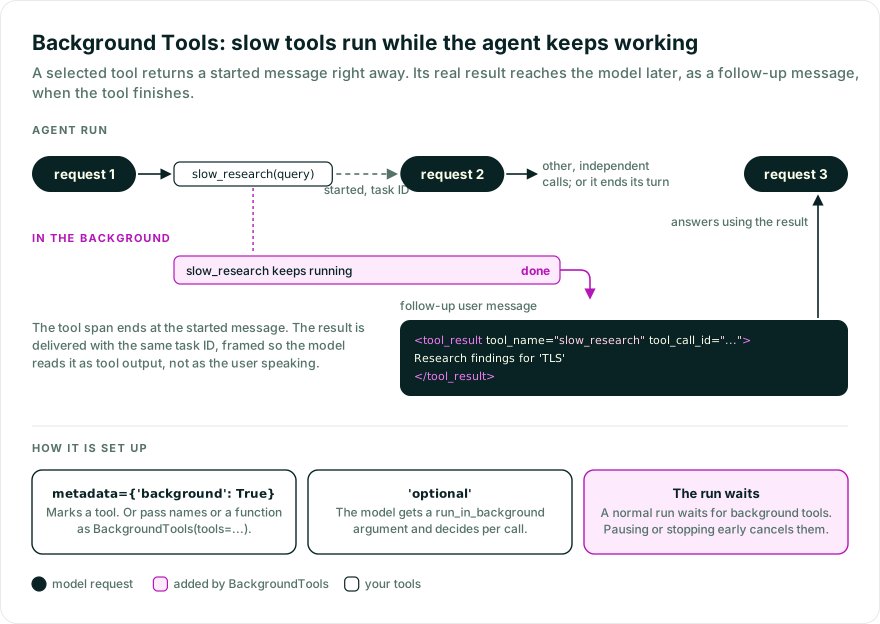
BackgroundTools lets selected tools run in the background while the agent continues without
waiting. Use it when the model can work on something else until the result is ready.
Install the OpenAI provider before running this example:
pip install "pydantic-ai-slim[openai]" pydantic-ai-harness
uv add "pydantic-ai-slim[openai]" pydantic-ai-harness
import asyncio

from pydantic_ai import Agent
from pydantic_ai_harness import BackgroundTools

agent = Agent('openai:gpt-6.1-sol', capabilities=[BackgroundTools()])

@agent.tool_plain(metadata={'background': True})
async def slow_research(query: str) -> str:
    """Research a topic thoroughly. Runs in the background."""
    await asyncio.sleep(60)  # Replace with real work.
    return f'Research findings for {query!r}'
By default, any tool with metadata={'background': True} runs in the background. BackgroundTools tells the model how to continue while the tool runs.
While Pydantic AI Harness is on 0.x releases, the API may change between minor releases; when it does, deprecation warnings and release-note migration guidance tell you (or your agent) exactly how to upgrade. See the version policy.
BackgroundTools(tools=...) accepts the standard ToolSelector:
from pydantic_ai_harness import BackgroundTools

# By metadata key (default)
BackgroundTools()                                 # tools with metadata={'background': True}
BackgroundTools(tools={'background': True})       # explicit form
BackgroundTools(tools={'kind': 'research'})       # custom metadata key

# By name
BackgroundTools(tools=['slow_research', 'deep_dig'])

# By function
BackgroundTools(tools=lambda ctx, td: td.name.startswith('research_'))
Use metadata={'background': 'optional'} to let the model decide for each call. The model sees a
run_in_background argument, but your function does not receive it.
A tool selected by BackgroundTools(tools=...) always runs in the background. Sequential tools,
realtime sessions, and calls that code mode’s run_code makes from its sandbox run normally, even
with run_in_background. Do not use run_in_background as one of your function’s own parameters.
from pydantic_ai import Agent
from pydantic_ai_harness import BackgroundTools

agent = Agent('openai:gpt-6.1-sol', capabilities=[BackgroundTools()])

@agent.tool_plain(metadata={'background': 'optional'})
async def slow_research(query: str) -> str:
    return f'Research findings for {query!r}'
Combine with SetToolMetadata or FunctionToolset.with_metadata(...) to mark several tools as background without touching individual definitions:
from pydantic_ai import Agent, FunctionToolset
from pydantic_ai_harness import BackgroundTools

async def deep_research(query: str) -> str:
    return f'Research findings for {query!r}'

async def crawl_site(url: str) -> str:
    return f'Crawled {url}'

research_tools = FunctionToolset([deep_research, crawl_site]).with_metadata(background=True)
agent = Agent(
    'openai:gpt-6.1-sol',
    toolsets=[research_tools],
    capabilities=[BackgroundTools()],
)
The model first receives a message saying that the tool has started. The message includes a task ID. When the tool finishes, the model receives the result with the same task ID.
Each follow-up is a ModelRequest containing a
UserPromptPart whose first content item is
TextContent with
metadata={'origin': 'pydantic-ai-harness.background_tools.result.v1', 'tool_call_id': original_tool_call_id}, including handled
failure notifications. This identifies the entire completion part, including any files and extra
content. The metadata is not sent to the model and survives native message serialization and merging
consecutive requests. The Vercel AI and AG-UI message conversions omit this metadata. A history
loaded back from them keeps the text and its framing, but the follow-up is then an ordinary user
prompt.
The follow-up wraps what the tool returned in <tool_result tool_name="..." tool_call_id="...">
tags, the same tags Pydantic AI puts around tool files it sends on the user channel. This tells the
model the text is the tool’s output rather than something the user said, and which pending call it
completes. The < of every opening or closing framing tag inside the output (<tool_result>,
<system> and the rest) is escaped, so the output stays inside its frame. A failed call is framed
the same way with outcome="failed", wrapping the message from ModelRetry or ToolFailed.
Text and files returned by the tool are sent to the model. ToolReturn.metadata
is discarded.
ModelRetry, ToolFailed, approval, and deferral errors are reported to the model as text, also
when a before_tool_execute or after_tool_execute hook raises them. A ValidationError from
such a hook is reported too, as a sequential tool retries it. Any other tool exception ends the
run with the original exception, as it does for a sequential tool.
A ModelRetry or ValidationError counts toward the tool’s retries when its follow-up is
delivered, however long the tool ran, and a result resets the count. The started message does
neither, so ctx.retry and ctx.last_attempt behave as they do for a sequential tool.
Running out of retries or raising CancelledError also ends the run. The run ends at its next step, so
a model request already in progress finishes first. A tool can call ctx.cancel() to stop the run and
the other background tools.
A normal run waits for its background tools to finish. A pending call counts toward
tool_calls_limit. If the run pauses for deferred tools or stops early, unfinished tools are
cancelled. Results of tools that finished before a deferred-tool pause are kept in the message
history, so a resumed run sees them, unless every call in the paused step was deferred. Results
that have not been delivered when a run stops early are dropped. Async tools must allow
cancellation; ignoring it can prevent the run from stopping.
run_stream()andrun_stream_sync()wait for background tools but do not deliver their results. The streamed response may only say that the work has started. Userun_stream_events(),run(),run_sync(), or consume all ofagent.iter()when the final response needs the result.- A sequential tool can overlap background work that started earlier. Tools that must not overlap should protect their shared data or should not run in the background.
- Realtime sessions already run tools concurrently, so
BackgroundToolsleaves them unchanged. after_tool_execute,on_tool_execute_error, and thewrap_tool_executehooks of capabilities listed afterBackgroundToolsrun inside the background task and see the real result.wrap_tool_executehooks of capabilities listed before it, and tool result events, see the started message.- The result reaches the model as a user message, in plain text that names the tool and task. A tool that returns untrusted content, such as a fetched web page, can make that content look like another task’s result. Delimit or sanitize such output inside the tool.
- List
RepairToolArguments, orCoder, which includes it, beforeBackgroundTools. Otherwise a malformed call that setsrun_in_backgroundis retried instead of repaired. A repaired call runs in the foreground.
BackgroundTools does not add tracing spans. Pydantic AI’s tool span ends when the started message
is returned, so it does not cover the tool’s work or record a failure. The completed result remains in
the agent’s message history.
BackgroundTools works with Temporal.
With DBOS, put durable work in an explicit DBOS step and call that step from the background tool.
Do not call ctx.enqueue() inside a durable activity or task. Its messages cannot be restored during
replay.
BackgroundTools(tools: ToolSelector = {'background': True})
Install Agent spec support before using this example:
pip install "pydantic-ai-slim[spec]" pydantic-ai-harness
uv add "pydantic-ai-slim[spec]" pydantic-ai-harness
# agent.yaml
model: openai:gpt-6.1-sol
capabilities:
  - BackgroundTools: {}
from pydantic_ai import Agent
from pydantic_ai_harness import BackgroundTools

agent = Agent.from_file('agent.yaml', custom_capability_types=[BackgroundTools])