boxd Sandbox
Run your agent’s commands and file edits in an isolated boxd cloud machine instead of on your machine.
While Pydantic AI Harness is on 0.x releases, the API may change between minor releases; when it does, deprecation warnings and release-note migration guidance tell you (or your agent) exactly how to upgrade. See the version policy.
pip install "pydantic-ai-harness[coder,boxd,anthropic]"
uv add "pydantic-ai-harness[coder,boxd,anthropic]"
The coder extra is there because the examples use Coder; the sandbox itself doesn’t need it. The anthropic extra is there because the examples use an Anthropic model; swap it for your model provider’s extra. Then set BOXD_API_KEY to an API key from boxd auth keys create (each key belongs to one boxd organization), and ANTHROPIC_API_KEY for the examples.
from pydantic_ai import Agent
from pydantic_ai_harness.boxd_sandbox import BoxdSandbox
from pydantic_ai_harness.coder import Coder

agent = Agent('anthropic:claude-opus-5-5', capabilities=[BoxdSandbox(), Coder()])
result = agent.run_sync('Clone https://github.com/pydantic/pydantic-ai and summarize how capabilities work.')
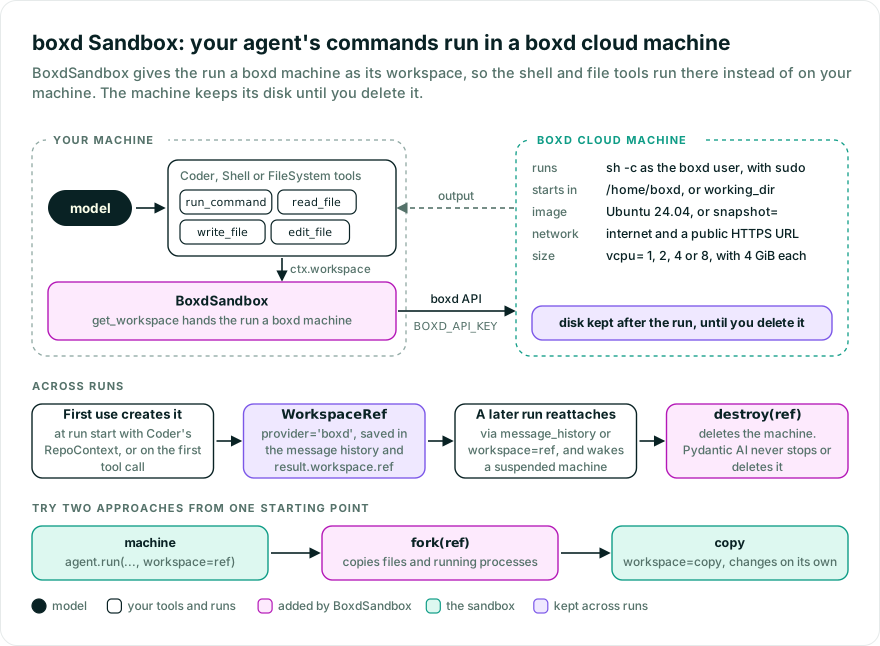
Coder’s shell and file tools now run in the machine, not on your machine. With Coder, RepoContext creates the machine when the run starts, even without a tool call; use Coder(repo_context=False) for lazy creation. It keeps running after the run ends until boxd suspends or hibernates it for being idle, and keeps its disk until you delete it; see Clean up.
Give the agent a project directory with BoxdSandbox(working_dir='/home/boxd/project'): a new machine gets it created for you, and commands and relative paths start there.
boxd’s default image is Ubuntu 24.04 with git, Python 3, uv, Node.js, and ripgrep (rg), which Coder uses for searches. For your project’s dependencies, install them in a machine, save it as a snapshot with boxd snapshots save, and pass BoxdSandbox(snapshot='my-snapshot'). A snapshot boxd doesn’t know, or one it is still saving, fails on first use with WorkspaceUnavailableError. BoxdSandbox(vcpu=4) picks a larger machine: 1, 2, 4, or 8 vCPUs, with 4 GiB of memory each. It can’t be combined with snapshot, since a machine from a snapshot keeps the size it was saved at.
from pydantic_ai import Agent
from pydantic_ai_harness.boxd_sandbox import BoxdSandbox
from pydantic_ai_harness.coder import Coder

agent = Agent('anthropic:claude-opus-5-5', capabilities=[BoxdSandbox(), Coder()])
result = agent.run_sync('Clone https://github.com/pydantic/pydantic-ai and summarize how capabilities work.')

followup = agent.run_sync(
    'Which capability would you add next, and where would it live?',
    message_history=result.all_messages(),
)
The follow-up run finds the machine in the message history and works in it, so the clone is still there. Without the history, a run starts a new machine. If the machine was suspended or stopped, the follow-up run wakes or starts it again. If the machine has been deleted, the run raises WorkspaceUnavailableError instead of starting over in an empty one.
For a narrower agent, use Shell and FileSystem instead of Coder, or write your own tool that runs in the machine:
from pydantic_ai import Agent, RunContext
from pydantic_ai_harness.boxd_sandbox import BoxdSandbox
from pydantic_ai_harness.filesystem import FileSystem
from pydantic_ai_harness.shell import Shell

agent = Agent('anthropic:claude-opus-5-5', capabilities=[BoxdSandbox(), Shell(), FileSystem()])


@agent.tool
async def run_python(ctx: RunContext, code: str) -> str:
    """Run a Python snippet in the machine."""
    result = await ctx.workspace.run(['python3', '-c', code], timeout=10)
    return result.stdout + result.stderr
Commands run under sh -c as the non-root boxd user, which has passwordless sudo. File writes create missing parent directories, write through a symlink to its target, and keep an existing file’s mode, and file reads refuse FIFOs rather than waiting for a writer. File operations use boxd’s file API as the same user, so Unix permissions apply to them as they do to commands. On a machine whose boxd agent predates that API, such as one created from an older snapshot, they run as shell commands until the machine reboots.
A command timeout starts after the machine is ready. A timeout or a cancelled run stops the command and the processes in its process group, and the machine keeps running for other commands. WorkspaceTimeoutError carries the output the command printed so far. timeout=None doesn’t lift boxd’s own limit: it ends a command that prints nothing for 30 minutes, which also raises WorkspaceTimeoutError, so have long builds print progress.
run() returns when the command exits, even if a background child it started is still running; output that child writes afterwards is not returned. A command whose combined output passes 10 MiB is stopped and raises WorkspaceOutputLimitError, with the first 64 KiB of each stream in stdout and stderr. Redirect large or background output to a file instead; Shell.start_command manages its own output log.
See Workspaces for more.
To come back to the machine without the message history, pass its ref back as workspace=:
from pydantic_ai import Agent
from pydantic_ai_harness.boxd_sandbox import BoxdSandbox
from pydantic_ai_harness.coder import Coder

agent = Agent('anthropic:claude-opus-5-5', capabilities=[BoxdSandbox(), Coder()])

result = agent.run_sync('Clone https://github.com/pydantic/pydantic-ai and summarize how capabilities work.')
ref = result.workspace.ref  # store this, e.g. in your database

later = agent.run_sync('Which capability would you add next, and where would it live?', workspace=ref)
The ref holds no credentials, so the process that reattaches needs BOXD_API_KEY too. Pass workspace='new' to start a fresh machine even when the message history names one.
org, snapshot, vcpu, and auto_suspend_timeout only shape a new machine; working_dir and env apply to every command, including after you reattach. A new machine gets working_dir created for it; on an attached machine it must already exist, or commands fail with WorkspaceError.
A run leaves a backend you built open. Call await backend.aclose() when you are done with it: that closes the client it opened from the environment, not the machine, and a later operation opens a new one. A client= you passed is never closed.
fork(ref) copies a machine into a new isolated one, with its files and running processes as they are at that moment, and returns the copy’s ref. After that the two change independently, so agents can try different approaches from the same starting point at once:
import asyncio

from pydantic_ai import Agent
from pydantic_ai_harness.boxd_sandbox import BoxdSandbox
from pydantic_ai_harness.coder import Coder

sandbox = BoxdSandbox()
agent = Agent('anthropic:claude-opus-5-5', capabilities=[sandbox, Coder()])


async def main() -> None:
    setup = await agent.run('Clone https://github.com/pydantic/pydantic-ai and install it with `uv sync`.')
    ref = setup.workspace.ref
    assert ref is not None  # set once the run has used the machine
    copy = await sandbox.fork(ref)

    await asyncio.gather(
        agent.run('Speed up the slowest test by caching what it builds.', workspace=ref),
        agent.run('Speed up the slowest test by mocking its network calls.', workspace=copy),
    )
    await asyncio.gather(sandbox.destroy(ref), sandbox.destroy(copy))


asyncio.run(main())
The copy starts with everything the machine had, including what the agent wrote to disk, and isn’t tied to it afterwards: destroy each when you are done.
To seed files before the agent starts, build the backend yourself, write through a Workspace, and pass the backend to the run:
from pydantic_ai import Agent
from pydantic_ai.workspaces import Workspace
from pydantic_ai_harness.boxd_sandbox import BoxdSandbox, BoxdSandboxBackend
from pydantic_ai_harness.coder import Coder

agent = Agent('anthropic:claude-opus-5-5', capabilities=[BoxdSandbox(), Coder()])


async def run_in_prepared_machine() -> str:
    backend = BoxdSandboxBackend(working_dir='/home/boxd/project')
    try:
        await Workspace(backend).write_text('TASK.md', 'Add a `--version` flag to cli.py.\n')
        result = await agent.run('Do the task in TASK.md.', workspace=backend)
        return result.output
    finally:
        await backend.aclose()
        ref = backend.ref  # set once the machine exists
        if ref is not None:
            await BoxdSandbox().destroy(ref)
The run uses the backend as it is, so BoxdSandbox’s settings don’t apply to it, and leaves it open: close it with aclose(). To keep the machine instead, store backend.ref and pass it as workspace= to reattach later. For boxd features the workspace API doesn’t cover, such as snapshots and public URLs, await backend.get_sandbox() returns the machine’s boxd.Machine record; use its id with your own boxd.AsyncBoxd.
Pydantic AI never stops or deletes the machine. boxd suspends, and later hibernates, a machine that has had no network activity for as long as your organization’s defaults say (set auto_suspend_timeout= in seconds to change suspending for new machines, or 0 to turn it off). BoxdSandbox sets no delete timer, so boxd deletes the machine only if your organization’s defaults give new machines an idle-destroy or delete-after timer; boxd machine get shows a machine’s timers. Delete it with the ref you stored:
from pydantic_ai.workspaces import WorkspaceRef
from pydantic_ai_harness.boxd_sandbox import BoxdSandbox


async def delete_machine(ref: WorkspaceRef) -> None:
    await BoxdSandbox().destroy(ref)
destroy(ref) deletes the machine whatever state it is in; a machine that no longer exists returns quietly. Use backend(ref) to construct a lazy backend for an existing machine.
A failed run returns no result, so there is no ref to store. To delete its machine, clean up in an on_run_error hook; after_run doesn’t run when a run fails:
from typing import Any

from pydantic_ai import Agent, RunContext
from pydantic_ai.capabilities import Hooks
from pydantic_ai.run import AgentRunResult
from pydantic_ai_harness.boxd_sandbox import BoxdSandbox
from pydantic_ai_harness.coder import Coder

hooks = Hooks()


@hooks.on.run_error
async def delete_failed_run_machine(ctx: RunContext[None], *, error: BaseException) -> AgentRunResult[Any]:
    if ctx.workspace.ref is not None:
        await BoxdSandbox().destroy(ctx.workspace.ref)
    raise error


agent = Agent('anthropic:claude-opus-5-5', capabilities=[BoxdSandbox(), Coder(), hooks])
A run that ends before its ref is stored, such as a crash, Ctrl-C, or a killed worker right after creation, leaves the machine behind. Machines the backend creates are named pydantic-ai-<hex> and logged at INFO (Created boxd machine <id> (<name>), or Forked boxd machine ... for a copy); find leftovers with boxd list and delete one with await BoxdSandbox().destroy(WorkspaceRef(provider='boxd', id=...)).
Machines BoxdSandbox creates, and copies fork makes, are isolated: code the agent runs holds no boxd credentials and can’t reach your other boxd machines. It can reach the internet, and like every boxd machine it has a public HTTPS address that serves the port its code listens on.
BoxdSandbox refuses to attach to or fork a machine that isn’t isolated or is on a named boxd network, and destroy refuses one that isn’t isolated. A machine from a snapshot keeps the networks of the machine the snapshot was saved from, so save snapshots from a machine on no network. A ref can still name any isolated machine your credentials can see, so keep refs server-side.
| Option | What it does |
|---|---|
client | A boxd.AsyncBoxd to share across runs on one event loop, or to point at another boxd cluster. Default: None, a client each run opens and closes when it ends, from BOXD_TOKEN, else BOXD_API_KEY, else the boxd machine it runs in. You close a client you pass; BoxdSandbox never does. |
org | boxd organization a new machine belongs to. Default: None, the API key’s organization, or your default one for other credentials. |
snapshot | boxd snapshot a new machine starts from, by name or id. Default: None, boxd’s default image. An unknown snapshot fails on first use. |
vcpu | Size of a new machine: 1, 2, 4, or 8 vCPUs, with 4 GiB of memory each. Default: None, the organization’s default size. It can’t be combined with snapshot: a machine from a snapshot keeps the size it was saved at. |
auto_suspend_timeout | Seconds without network activity before boxd suspends a new machine; 0 disables it. Default: None, the organization’s default. A command wakes a suspended machine. |
working_dir | Absolute directory commands start in and relative paths resolve against. Default: None, the machine’s own (/home/boxd, where commands run as non-root boxd); set a project directory, or use relative paths for portable code. Created on a new machine; on an attached machine it must already exist. |
env | Environment variables every command gets. Default: None. Nothing from your machine’s environment reaches the machine. |
boxd runs on the asyncio event loop only; under Trio the backend raises UserError.
Pass one client=, as below. Without it, every workspace operation opens a new client that logs in to boxd again, and boxd allows 30 logins a minute from one IP address, so a busy worker fails with RateLimitError. With one client, every activity on the worker’s event loop shares its session token. Run a Temporal dev server on localhost:7233 first.
import asyncio
import uuid

import boxd
from pydantic_ai import Agent
from pydantic_ai.durable_exec.temporal import PydanticAIPlugin, PydanticAIWorkflow, TemporalDurability
from pydantic_ai_harness.boxd_sandbox import BoxdSandbox
from pydantic_ai_harness.coder import Coder
from temporalio import workflow
from temporalio.client import Client
from temporalio.worker import Worker

agent = Agent(
    'anthropic:claude-opus-5-5',
    name='boxd_coder',
    capabilities=[BoxdSandbox(client=boxd.AsyncBoxd()), Coder(), TemporalDurability()],
)


@workflow.defn
class SandboxWorkflow(PydanticAIWorkflow):
    __pydantic_ai_agents__ = [agent]

    @workflow.run
    async def run(self, prompt: str) -> str:
        return (await agent.run(prompt)).output


async def main() -> None:
    client = await Client.connect('localhost:7233', plugins=[PydanticAIPlugin()])
    async with Worker(client, task_queue='sandbox', workflows=[SandboxWorkflow]):
        print(
            await client.execute_workflow(
                SandboxWorkflow.run,
                'Use the shell tool to run pwd.',
                id=f'sandbox-{uuid.uuid4()}', task_queue='sandbox',
            )
        )


if __name__ == '__main__':
    asyncio.run(main())
Coder, Shell, and FileSystem work under DBOS, Temporal and Prefect. See the Coder, Shell, and FileSystem guides for engine-specific limits.
Removing a capability while workflows using it are still running changes their replay history. Drain those workflows or use Temporal worker versioning before deploying the change.
BoxdSandbox emits no spans of its own. Core’s instrumentation records the machine on the agent run span as pydantic_ai.workspace.provider and pydantic_ai.workspace.id, and each command or file operation a tool makes runs inside that tool call’s span; operations at run start, such as RepoContext loading repo instructions, run in the agent run span. Creating a machine logs its id and name at INFO (Created boxd machine <id> (<name>)) on the pydantic_ai_harness.boxd_sandbox._backend logger.
Bases: AbstractCapability[AgentDepsT]
Supply an isolated boxd machine as the run’s workspace.
A run with no reference creates a fresh machine on first use; pass a WorkspaceRef to attach
to an existing one. Ending a run does not delete the machine: boxd suspends it when idle and
keeps it, disk included, until you delete it, unless your organization’s defaults set a delete timer.
Commands run under sh -c as the machine’s non-root boxd user.
The machine is isolated: it holds no boxd credentials and has no peers on your organization’s
private network, and attaching to one that is not isolated raises WorkspaceUnavailableError.
This capability supplies the workspace only. Compose it with capabilities that use it, such
as Coder, Shell, and FileSystem. See
Workspaces for more.
A boxd.AsyncBoxd to share across runs on one event loop; you close it. When None,
each run opens one from the environment (BOXD_TOKEN or BOXD_API_KEY) and closes it when the run ends.
Type: AsyncBoxd | None Default: None
boxd organization a newly created machine belongs to; the API key’s organization, or your
default one, when None.
Type: str | None Default: None
boxd snapshot a newly created machine starts from, by name or id; boxd’s default image when
None. An unknown snapshot raises WorkspaceUnavailableError on first use.
Type: str | None Default: None
Size of a newly created machine: 1, 2, 4, or 8 vCPUs, with 4 GiB of memory each; the
organization’s default size when None. It cannot be combined with snapshot: a machine
created from a snapshot keeps the size it was saved at.
Type: Literal[1, 2, 4, 8] | None Default: None
Idle network seconds before boxd suspends a newly created machine; 0 disables it, and
None keeps the organization’s default. A command wakes a suspended machine.
Type: int | None Default: None
Absolute directory commands start in and relative paths resolve against; None uses the
machine’s own (/home/boxd). Created on a new machine; an attached machine must already have it.
Type: str | None Default: None
Environment variables every command gets, also on an attached machine; a command’s env is
layered on top. Nothing is read from the host.
Type: Mapping[str, str] | None Default: field(default=None, repr=False)
def backend(ref: WorkspaceRef) -> BoxdSandboxBackend
Construct a lazy backend for an existing machine.
BoxdSandboxBackend
@async
def destroy(ref: WorkspaceRef) -> None
Delete a machine by id, whatever state it is in.
A machine that no longer exists is already gone, so destroying it returns quietly. A machine
that is not isolated raises ValueError and is left alone: BoxdSandbox never created it.
@async
def fork(ref: WorkspaceRef) -> WorkspaceRef
Copy a machine into a new isolated machine and return the copy’s ref.
The copy has the machine’s disk and memory as they are now, running processes included, and the
two change independently after: pass its ref as workspace= to run an agent in the copy, and
destroy it when you are done. A machine that is not isolated, or that is on a named boxd network, raises
WorkspaceUnavailableError, as attaching to it does.
WorkspaceRef
def get_workspace(
    ctx: RunContext[AgentDepsT],
    *,
    ref: WorkspaceRef | None,
) -> WorkspaceBackend | None
Build the backend for this run. No I/O here: it attaches or creates on first use.
WorkspaceBackend | None
Bases: WorkspaceBackend, SupportsCommands, SupportsFilesystem, SupportsRealpath
A boxd machine as a Pydantic AI WorkspaceBackend.
Commands run inside an isolated boxd microVM, and file operations use boxd’s file API as the same user.
Building one does no I/O. The first operation creates an isolated machine named pydantic-ai-
and 32 hex digits, or attaches to the one ref names, waking or starting it as needed;
get_sandbox() returns its boxd.Machine record. The backend does not stop or delete the
machine; that is the application’s job.
A command’s output streams back while it runs and is returned once it exits. A shell string
runs under /bin/sh -c; a timeout or cancellation stops the command and its process group.
A deleted machine, one that is not isolated, an unknown snapshot, and rejected credentials raise
WorkspaceUnavailableError.
client : AsyncBoxd | None Default: None
A boxd.AsyncBoxd API client to create or attach with. The caller owns closing it.
Without one, the backend opens its own from the environment on first use and closes it
in aclose().
ref : WorkspaceRef | None Default: None
Identity of an existing machine to attach to on first use; it must be isolated.
boxd organization a newly created machine belongs to; the API key’s organization, or
your default one, when None.
boxd snapshot a newly created machine starts from, by name or id; boxd’s default
image when None.
Size of a newly created machine: 1, 2, 4, or 8 vCPUs, with 4 GiB of memory each; the
organization’s default size when None. It cannot be combined with snapshot: a
machine created from a snapshot keeps the size it was saved at.
Idle network seconds before boxd suspends a newly created machine; 0
disables it, and None keeps the organization’s default. A command wakes a suspended
machine.
Absolute directory commands start in and relative paths resolve against; the
machine’s own default when None.
Environment variables every command gets; a command’s own env is layered on top.
Nothing is read from the host environment.
Identity of the machine, or None before one has been created.
For a machine this backend created, the id is boxd’s machine id.
Type: WorkspaceRef | None
@async
def get_sandbox() -> Machine
Return the machine’s current boxd.Machine record, creating or attaching to it on first use.
Use its id with your own boxd.AsyncBoxd for boxd features the workspace API does not
cover, such as snapshots, checkpoints, and public URLs. Attaching by ref to a machine
that no longer exists raises WorkspaceUnavailableError; it does not create a replacement.
Machine
@async
def fork() -> WorkspaceRef
Copy the machine into a new isolated machine and return the copy’s ref, creating or attaching on first use.
The copy has the machine’s disk and memory as they are now, running processes included, and the
two change independently after. Pass its ref as workspace= to work in the copy. The copy is not
tied to this backend, so delete it with BoxdSandbox().destroy(ref) when you are done.
A machine that is not isolated, or that is on a named boxd network, raises
WorkspaceUnavailableError, as attaching to it does: the copy would keep that access.
WorkspaceRef
@async
def aclose() -> None
Close the AsyncBoxd API client this backend opened for itself.
A client passed as client= is left alone, and the machine keeps running. A later operation
opens a new client and attaches by ref. BoxdSandbox calls this when the run that used the
backend ends.
@async
def working_dir() -> str
Return the canonical directory commands start in, probed once per connection.