Linear
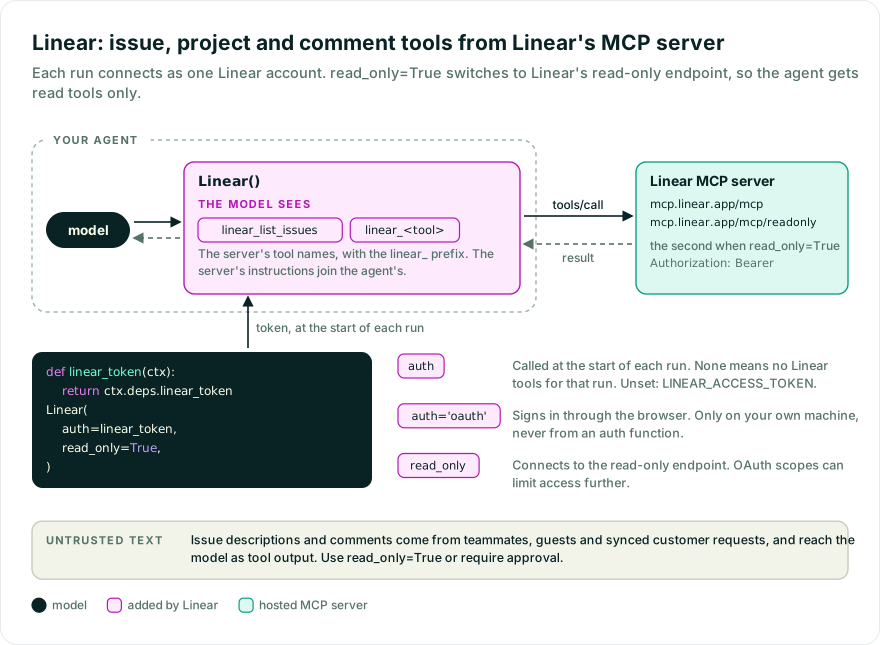
Let an agent read and change Linear issues, projects, teams, and comments through Linear’s hosted MCP server. The agent gets every tool the server offers, write tools included, scoped to the connected account. Pass read_only=True for read tools only.
While Pydantic AI Harness is on 0.x releases, the API may change between minor releases; when it does, deprecation warnings and release-note migration guidance tell you (or your agent) exactly how to upgrade. See the version policy.
pip install "pydantic-ai-harness[linear]" "pydantic-ai-slim[openai]"
uv add "pydantic-ai-harness[linear]" "pydantic-ai-slim[openai]"
Set LINEAR_ACCESS_TOKEN to a Linear API key or OAuth access token, or pass auth= a token. On your own machine, auth='oauth' signs you in through the browser instead. See the provider setup.
from pydantic_ai import Agent
from pydantic_ai_harness.linear import Linear

agent = Agent('openai:gpt-6.1-sol', capabilities=[Linear(read_only=True)])
result = agent.run_sync('List my open issues, highest priority first')
print(result.output)
auth decides which Linear account each run uses:
auth | Account used |
|---|---|
Not set, None, or '' | LINEAR_ACCESS_TOKEN. If that is not set either, creating the agent raises an error. |
| An API key or OAuth token | That token, for every run. |
'oauth' | The account you sign in to through the browser. This only works on your own machine. |
| A function | Called at the start of each run, and can be async. The token it returns is used for that run. If it returns None or '', that run has no Linear tools. A function never uses LINEAR_ACCESS_TOKEN, and must not return 'oauth'. |
A fixed token or LINEAR_ACCESS_TOKEN suits a script or an agent on your own machine, where every run is the same account.
In an app where each user connects their own Linear account, one agent serves all of them, so the token cannot be fixed when the agent is created. Pass a function that reads the current user’s token from the run’s deps:
from dataclasses import dataclass

from pydantic_ai import Agent, RunContext
from pydantic_ai_harness.linear import Linear


@dataclass
class Deps:
    linear_token: str | None


def linear_token(ctx: RunContext[Deps]) -> str | None:
    return ctx.deps.linear_token


agent = Agent('openai:gpt-6.1-sol', deps_type=Deps, capabilities=[Linear(auth=linear_token)])
Each run opens its own connection. read_only=True still applies to every run.
Your app obtains, stores, and refreshes each user’s token: a Linear API key the user pastes, or an access token from your own Linear OAuth flow. Put it in the deps before the run, or load it in an async auth function.
With durable execution such as Temporal, read the token from the run’s deps, not a global: the function may run in another process.
The capability’s id defaults to linear, so defer_loading=True works without one. With None or '' it still connects under linear, but that Linear is not combined with others. To use two Linear accounts in one agent, give each Linear its own id and tool_prefix. Two with the same id but different settings raise when the agent is built.
read_only=True connects to Linear’s read-only endpoint instead of the full one. OAuth token scopes can limit access further.
The agent sees each of the server’s tools under the linear_ prefix, as in linear_list_issues, so they don’t collide with other tools on the agent. Set tool_prefix to use a different prefix, or tool_prefix=None to keep the names the server gives them.
read_only selects tools by what the server marks as read-only, not by name, so the prefix does not change what it keeps. A toolset wrapper on capability.get_toolset(), such as filtered(), sees the names the agent sees, prefix included.
Linear used to give the agent the server’s tool names unprefixed. A tool such as list_issues now reaches the agent as linear_list_issues. Code that refers to them by name, such as a filtered() wrapper, an approval rule, or a ToolGuardrail(tools=[...]), needs the new names. A rule that no longer matches stops applying, so an approval rule or guardrail that named an old tool lets its calls through without approval or checks until you update it. Pass tool_prefix=None to keep the old names. If you wrapped Linear in PrefixTools to avoid collisions, you can drop the wrapper and set tool_prefix instead; keeping it adds both prefixes.
- Durable runs in flight. A Temporal or DBOS run replays the model responses it recorded, and their tool calls use the old names, so a run started before the change that calls a
Lineartool after it no longer replays. Activity and step names come from the capability’sid, which is unchanged. Let those runs finish, keeptool_prefix=Noneuntil they have, or deploy the change with Temporal worker versioning or a new DBOS application version.
Issue descriptions and comments hold text written by other people, such as teammates, guests, and integrations that sync in customer requests, and that text reaches the model as tool output. Use read_only=True or require approval if the agent should not change Linear data.
To filter tools or require approval in your application, wrap the toolset with the existing toolset wrappers. For example, this asks for approval before every tool call:
from pydantic_ai import Agent
from pydantic_ai.messages import DeferredToolRequests
from pydantic_ai_harness.linear import Linear

capability = Linear()
agent = Agent(
    'openai:gpt-6.1-sol',
    toolsets=[capability.get_toolset().approval_required()],
    output_type=[str, DeferredToolRequests],
)
Handle the approval requests with the deferred tools workflow. To cap the size of tool output, add Tool Output Limits.
Pass client (a FastMCP client or transport) to control the connection yourself, for example to add a proxy, another authentication scheme, or MCP handlers. The client owns the URL and authentication, so it cannot be combined with auth. With a client, read_only=True keeps only the tools the server marks as read-only. If none are marked, the agent gets no Linear tools and emits an MCPReadOnlyNoToolsWarning.
The server’s own instructions, including those of a client’s server, are added to the agent’s instructions. Pass include_instructions=False to leave them out.
A client is one connection shared by every run; see Per-user credentials to connect each user separately. To use two connections, give each a distinct id and tool_prefix.
Linear emits no spans of its own. Core instrumentation records each Linear tool call as a tool span.