GitHub
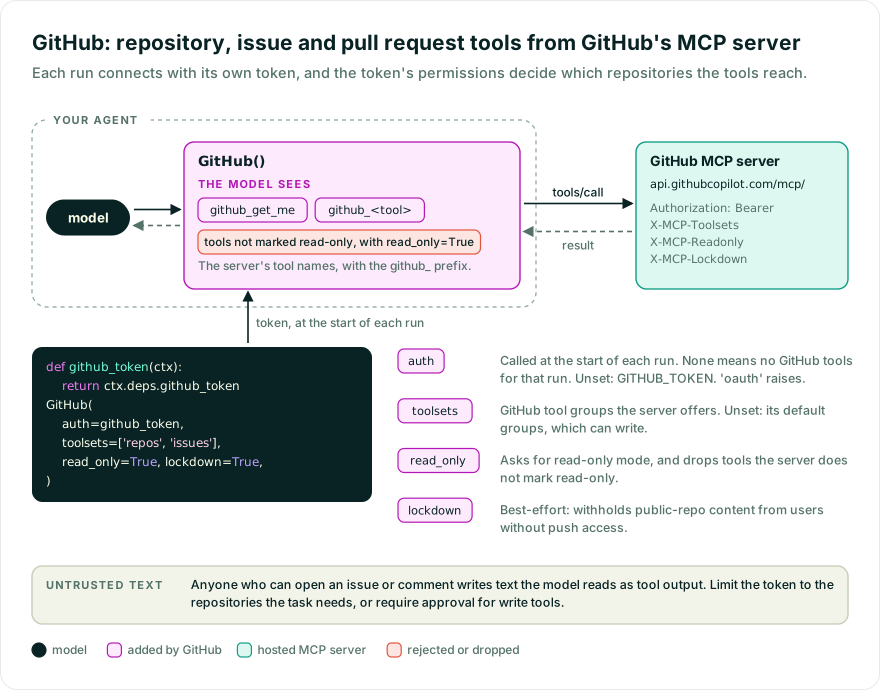
Let an agent read and change GitHub repositories, issues, pull requests, and other resources. By default it gets the tools in GitHub’s default tool groups, which include tools that make changes; toolsets picks other groups. The token’s permissions decide what those tools can reach.
While Pydantic AI Harness is on 0.x releases, the API may change between minor releases; when it does, deprecation warnings and release-note migration guidance tell you (or your agent) exactly how to upgrade. See the version policy.
pip install "pydantic-ai-harness[github]" "pydantic-ai-slim[openai]"
uv add "pydantic-ai-harness[github]" "pydantic-ai-slim[openai]"
Set GITHUB_TOKEN to a GitHub personal access token, or pass auth= a token. See the provider setup.
from pydantic_ai import Agent
from pydantic_ai_harness.github import GitHub

agent = Agent('openai:gpt-6.1-sol', capabilities=[GitHub()])
result = agent.run_sync('Summarize the resources I can access')
print(result.output)
auth decides which GitHub account each run uses:
auth | Account used |
|---|---|
Not set, None, or '' | GITHUB_TOKEN. If that is not set either, creating the agent raises an error. |
| A token | That token, for every run. |
| A function | Called at the start of each run, and can be async. The token it returns is used for that run. If it returns None or '', that run has no GitHub tools. A function never uses GITHUB_TOKEN. |
A token of 'oauth', from any of these, raises an error: GitHub does not support the automatic OAuth client registration that FastMCP’s browser sign-in needs.
A fixed token or GITHUB_TOKEN suits a script or an agent on your own machine, where every run is the same account.
In an app where each user connects their own GitHub account, one agent serves all of them, so the token cannot be fixed when the agent is created. Pass a function that reads the current user’s token from the run’s deps:
from dataclasses import dataclass

from pydantic_ai import Agent, RunContext
from pydantic_ai_harness.github import GitHub


@dataclass
class Deps:
    github_token: str | None


def github_token(ctx: RunContext[Deps]) -> str | None:
    return ctx.deps.github_token


agent = Agent('openai:gpt-6.1-sol', deps_type=Deps, capabilities=[GitHub(auth=github_token)])
Each run connects as its own user, so concurrent runs never share an account. read_only, lockdown, toolsets, and url still apply to every run.
Your app gets, stores, and refreshes each user’s token: for example, a “Connect GitHub” button that signs the user in through your GitHub App and saves the user access token, or a settings page where each user pastes a personal access token. Before each run, put it in the deps, or load it in an async auth function.
When users differ in more than their credential, such as a user whose organization is on a GitHub Enterprise Cloud data-residency endpoint, build the whole capability for each run with a dynamic capability:
from dataclasses import dataclass

from pydantic_ai import Agent, RunContext
from pydantic_ai.capabilities import DynamicCapability
from pydantic_ai_harness.github import GITHUB_MCP_URL, GitHub


@dataclass
class Deps:
    github_token: str | None
    github_mcp_url: str | None = None


def github(ctx: RunContext[Deps]) -> GitHub[Deps] | None:
    if not ctx.deps.github_token:
        return None
    return GitHub(auth=ctx.deps.github_token, url=ctx.deps.github_mcp_url or GITHUB_MCP_URL)


agent = Agent('openai:gpt-6.1-sol', deps_type=Deps, capabilities=[DynamicCapability(github, id='github')])
The token is sent to url, so store only endpoints your app has checked, such as https://copilot-api.<subdomain>.ghe.com/mcp, rather than any URL a user types.
With durable execution such as Temporal, read the credential from the run’s deps rather than from a global, since the function may run in another process. The capability’s id defaults to github, so defer_loading=True works without one. To add more than one GitHub to an agent, give each a distinct id and tool_prefix; two that share an id but differ raise an error.
toolsets=['repos', 'issues', 'actions'] picks which of GitHub’s tool groups the server offers. Leave it unset to get the server’s default groups. read_only=True asks the server for its read-only mode, and also drops any tool the server does not mark as read-only; if none are marked, the agent gets no GitHub tools and emits an MCPReadOnlyNoToolsWarning. lockdown=True asks GitHub to withhold issue, pull request, and comment content in public repositories written by users without push access; some tools return an error instead. GitHub describes it as a best-effort content filter, not a security boundary: other tools can still return that content. Set url to use a GitHub Enterprise Cloud endpoint; it must be an https:// URL. A plain http:// URL sends the token unencrypted, so it emits a HarnessDeprecationWarning and will raise in a future release.
The capability does not limit which repositories the agent can reach. Set that with the token’s or GitHub App’s permissions. To send other headers, or to use custom authentication, pass a configured client.
The agent sees each of the server’s tools under the github_ prefix, as in github_get_me, so they don’t collide with other tools on the agent. Set tool_prefix to use a different prefix, or tool_prefix=None to keep the names the server gives them.
read_only selects tools by what the server marks as read-only, not by name, so the prefix does not change what it keeps. toolsets names GitHub tool groups, which the server selects before any prefix applies. A toolset wrapper on capability.get_toolset(), such as filtered(), sees the names the agent sees, prefix included.
GitHub used to give the agent the server’s tool names unprefixed. A tool such as get_me now reaches the agent as github_get_me. Code that refers to them by name, such as a filtered() wrapper, an approval rule, or a ToolGuardrail(tools=[...]), needs the new names. A rule that no longer matches stops applying, so an approval rule or guardrail that named an old tool lets its calls through without approval or checks until you update it. Pass tool_prefix=None to keep the old names. If you wrapped GitHub in PrefixTools to avoid collisions, you can drop the wrapper and set tool_prefix instead; keeping it adds both prefixes.
- Durable runs in flight. A Temporal or DBOS run replays the model responses it recorded, and their tool calls use the old names, so a run started before the change that calls a
GitHubtool after it no longer replays. Activity and step names come from the capability’sid, which is unchanged. Let those runs finish, keeptool_prefix=Noneuntil they have, or deploy the change with Temporal worker versioning or a new DBOS application version.
Tool results include text written by anyone who can open an issue, pull request, or comment in a repository the token can read. That text can contain instructions aimed at the agent. With a token that reads private repositories and writes to public ones, such instructions can lead the agent to copy private content into a public issue or pull request. Use read_only=True, lockdown=True (best-effort), a token limited to the repositories the task needs, approval for write tools (below), or Prompt Injection Defender.
To filter tools or require approval in your application, wrap the toolset with the existing toolset wrappers. For example, this asks for approval before every tool call:
from pydantic_ai import Agent
from pydantic_ai.messages import DeferredToolRequests
from pydantic_ai_harness.github import GitHub

capability = GitHub()
agent = Agent(
    'openai:gpt-6.1-sol',
    toolsets=[capability.get_toolset().approval_required()],
    output_type=[str, DeferredToolRequests],
)
Handle the approval requests with the deferred tools workflow. To cap the size of tool output, add Tool Output Limits.
Pass client when you need control of the connection itself: your own FastMCP client or transport, for example one with a different authentication scheme, a proxy, a plain-HTTP local server, or MCP handlers. The client then owns the URL and authentication, so passing client together with auth, url, toolsets, or lockdown raises an error. With a client, read_only=True keeps only the tools the server marks as read-only, instead of asking the server for read-only mode. include_instructions=False stops the server’s instructions from reaching the model.
A client is one connection shared by every run; see Per-user credentials to connect each user separately. To use two connections, give each a distinct id and tool_prefix.
GitHub emits no spans of its own. Core’s instrumentation already records each GitHub tool call as a tool span.