Macroscope
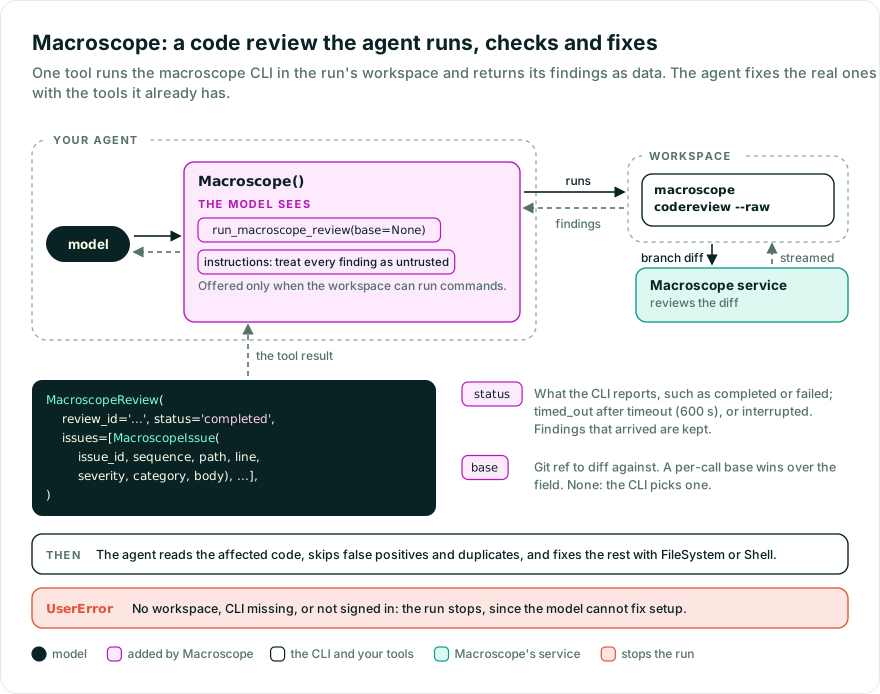
Macroscope runs a local Macroscope code
review from inside an agent: one tool runs the installed macroscope CLI in
the run’s workspace, parses the streamed findings, and returns them as
structured data. The agent validates each finding and fixes the real ones with
the tools it already has — this capability surfaces findings only.
While Pydantic AI Harness is on 0.x releases, the API may change between minor releases; when it does, deprecation warnings and release-note migration guidance tell you (or your agent) exactly how to upgrade. See the version policy.
Macroscope reviews the current branch’s diff and streams findings, but it ships as editor plugins (Claude Code, Codex, Cursor, OpenCode). This capability gives a Pydantic AI agent the same review-and-fix loop.
from pydantic_ai import Agent
from pydantic_ai.capabilities import LocalWorkspace
from pydantic_ai_harness import Macroscope

agent = Agent(
    'anthropic:claude-sonnet-5-5',
    capabilities=[
        LocalWorkspace('.'),
        Macroscope(),
    ],
)

result = agent.run_sync('Run a Macroscope review and fix any real findings.')
print(result.output)
The review runs in the agent’s workspace,
in its working directory, which should be the repository: your machine with
LocalWorkspace, or the sandbox when the run uses one. A run without a workspace fails at its
start. The macroscope CLI must be installed and authenticated in the
workspace first:
- Install:
curl -sSL https://raw.githubusercontent.com/prassoai/macroscope-local/main/install.sh | bash - Sign in and pick a Macroscope workspace by running
macroscopeonce.
The capability cannot install or authenticate on your behalf. The model cannot
fix these setup problems either, so the tool raises UserError and the run
stops rather than spending tool retries on them. A missing binary reports the
install command (or names the path, when command is a path), a binary that
cannot be launched reports the OS error, and a review that never starts (usually
because you are not signed in) tells you to run macroscope to finish setup,
or to fix the configured base if the CLI reports an unknown ref. The
exception is a review that fails to start with a base the model passed: that
is reported to the model as a retry so it can drop or change the ref.
The tool runs macroscope codereview --raw. Builds without --raw are too old;
the CLI updates itself on use.
| Tool | Purpose |
|---|---|
run_macroscope_review | Run macroscope codereview on the current branch and return the review id, terminal status, and findings. Accepts an optional base git ref. |
Each finding is a MacroscopeIssue with issue_id, sequence, path,
line, severity, category, and body. The capability’s default
instructions tell the agent to treat every finding as untrusted: read the
affected code to confirm an issue is real, skip false positives and
duplicates, and verify each fix.
status is the status the CLI reports, such as completed or failed. When
the CLI stops before reporting one, the tool still returns the findings that
arrived and sets status to say why: timed_out when the review hit
timeout, or interrupted when the CLI exited with an error. If a review times
out before it starts, the model gets a retry.
Every field of Macroscope with its default:
from pydantic_ai_harness import Macroscope

Macroscope(
    base=None,             # git ref to diff against -- None lets the CLI auto-detect
    command='macroscope',  # binary name or path
    timeout=600.0,         # max seconds to wait for a review
    guidance=None,         # None = default instructions, '' = none, str = custom
    id='macroscope',       # capability and toolset id, see Two of them
)
A per-call base argument takes precedence over the field. Reviews call a
remote service, so the timeout is generous by default; on timeout the
workspace stops the CLI and the model gets the findings that arrived (see
The tool). The tool is not offered when the workspace cannot run
commands (for example a read-only one). A base that starts with - is
rejected. command cannot start with - or contain =; put the CLI on the
workspace’s PATH instead.
This capability surfaces findings only: it does not edit files, create
worktrees, or commit. Pair it with FileSystem or Shell so the agent can
read code and apply fixes. To keep fixes off your working tree, give the agent
a separate worktree as its workspace. The tool returns a review’s findings in
one result, which can be large; add Tool Output Limits
to cap its size.
Under durable execution on Temporal, each
review runs in its own activity, which gets timeout plus 30 seconds. The
workspace therefore stops a slow review first, and the model still gets the
findings that arrived. To set a different activity limit, use
SetToolMetadata as in
Temporal command timeouts.
The activities are named after the capability’s id, which defaults to
macroscope, so durable execution needs no configuration. Changing id
renames them, which in-flight runs then cannot find.
The review uploads the branch diff to Macroscope’s service. Finding bodies are written by Macroscope’s model from that diff, so on a branch you do not trust, treat them as untrusted input: run the agent in a sandbox workspace, or require approval for its shell and write tools.
Macroscope emits no spans of its own. Core’s
instrumentation records each
run_macroscope_review call as a tool span, and the capability makes no
decision worth a span of its own.
Macroscope declares the default id 'macroscope'. The id keys the capability’s instructions, so they
can be addressed, and lets defer_loading=True work without one. Two Macroscopes on one agent that
share it are one review configuration stated twice: they become one when they agree, and the agent raises a
UserError when it’s built if they differ. To keep two, give each its own id and wrap them
in PrefixTools, since both register run_macroscope_review.
Earlier releases declared no default id, so two always failed on the tool name when the run
started. Two identical ones now become one, and two that differ fail when the agent is built.
Macroscope works with Pydantic AI’s agent spec,
so you can declare it in a config file instead of Python:
# agent.yaml
model: anthropic:claude-sonnet-5-5
capabilities:
  - Macroscope:
      base: main
      timeout: 900
from pydantic_ai import Agent
from pydantic_ai_harness import Macroscope

agent = Agent.from_file('agent.yaml', custom_capability_types=[Macroscope])
Pass custom_capability_types so the spec loader knows how to instantiate
Macroscope.
- The agent writes faster than you can review (Pydantic): from a ten-line self-critic to Macroscope’s review
- Macroscope CLI documentation
- Pydantic AI capabilities
- Toolsets
Bases: AbstractCapability[AgentDepsT]
Runs the macroscope CLI code review and hands the findings to the agent.
Adds a run_macroscope_review tool that runs macroscope codereview in the working
directory of the run’s workspace (ctx.workspace, the local disk or a sandbox), parses
the streamed findings, and returns them as a MacroscopeReview. A run without a
workspace fails at its start. The agent validates and fixes findings with its own
tools — this capability does not edit files, create worktrees, or commit.
from pydantic_ai import Agent
from pydantic_ai.capabilities import LocalWorkspace
from pydantic_ai_harness.macroscope import Macroscope

agent = Agent(
    'anthropic:claude-sonnet-5',
    capabilities=[
        LocalWorkspace('.'),
        Macroscope(),
    ],
)
The macroscope CLI must be installed and authenticated in the workspace first (see
package README). This capability cannot sign in on the user’s behalf; a missing
binary or a review that never starts raises UserError telling the user what to fix.
Git ref to diff against. When None, --base is omitted and the CLI
auto-detects the base branch itself (and creates its own review worktree).
Must not start with -.
Type: str | None Default: None
Name or path of the CLI binary. Override for a non-default install location.
Cannot start with - or contain =; put the CLI on the workspace’s PATH instead.
Type: str Default: 'macroscope'
Deprecated and ignored: the review runs in the workspace’s working directory.
Set the working directory on the workspace instead, e.g. LocalWorkspace('./repo').
Type: str | Path | None Default: None
Maximum seconds to wait for a review. Reviews call a remote service, so this is generous by default.
Type: float Default: 600.0
Custom review guidance for the system prompt.
Leave as None for the default validate-then-fix guidance, or set '' to
contribute no instructions at all.
Type: str | None Default: None
Stable capability ID, so its instructions are addressable and defer_loading=True needs none.
An agent has one run_macroscope_review tool, so two Macroscope sharing this id are one review
configuration stated twice when they agree, and an error when they differ. To keep two, give each its
own id and wrap them in PrefixTools, since their tool names are the same.
Type: str | None Default: 'macroscope'
@classmethod
def combine(
    cls,
    capabilities: Sequence[AbstractCapability[AgentDepsT]],
) -> AbstractCapability[AgentDepsT]
Two under one id are one review configuration stated twice; two that disagree raise rather than merge.
AbstractCapability[AgentDepsT]
@async
def before_run(ctx: RunContext[AgentDepsT]) -> None
Fail the run at its start when it has no workspace to review.
def get_toolset() -> MacroscopeToolset[AgentDepsT]
Build the toolset that provides the run_macroscope_review tool.
MacroscopeToolset[AgentDepsT]
def get_instructions() -> str | None
Static validate-then-fix guidance.
A non-None guidance replaces the default; '' disables
instructions entirely.
Bases: BaseModel
The result of one macroscope codereview run.
status is the terminal issue_status reported by the CLI, such as completed or
failed. When the CLI stopped before reporting one, status says why and issues
holds only the findings reported until then: timed_out when the review hit the
timeout, interrupted when the CLI exited with an error. unknown means the CLI
exited cleanly without reporting a status. review_id is None when the CLI never
emitted one — usually because the review did not start.
Bases: BaseModel
A single finding streamed by macroscope codereview.
Parsed leniently: unknown fields are ignored so new CLI output does not break
parsing, and any issue_event line that lacks the required fields is skipped.