Render Workflows
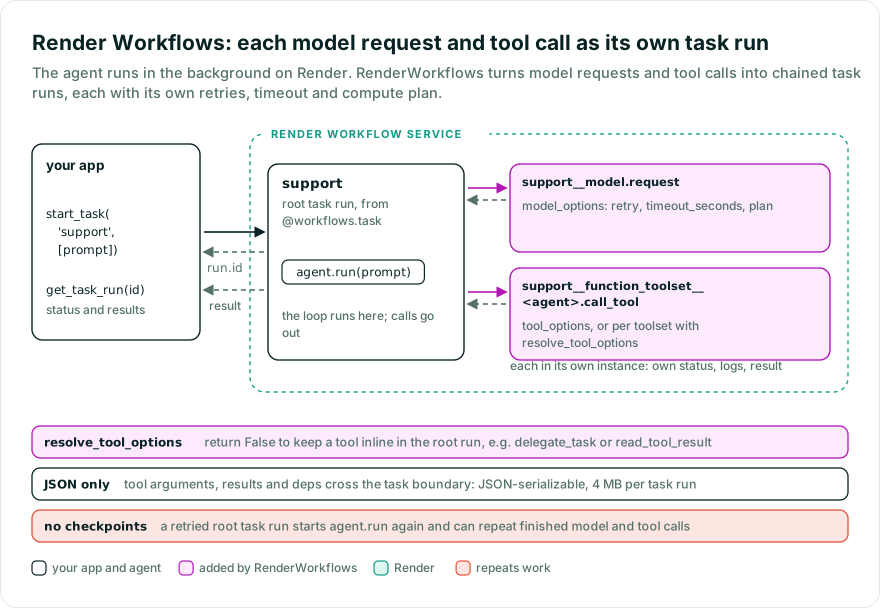
Run long-running Pydantic AI agents in the background with Render Workflows. When deployed, a workflow service groups your
registered Python task definitions, and Render executes each task run in its own instance. Your application starts a root-level task run that
calls agent.run(...); the integration starts chained task runs for supported model and tool operations. Each run
has its own status, logs, and result, and you can set different retries, timeouts, and compute plans. For example,
a document-processing tool can have a longer timeout than the model requests around it.
The integration does not checkpoint agent progress. If the task run that calls agent.run(...) retries, the agent
starts again and can repeat completed model requests and tool calls. Use it when your application can handle
repeated work.
If you only need background execution, a native Render task around agent.run(...) may be enough.
While Pydantic AI Harness is on 0.x releases, the API may change between minor releases; when it does, deprecation warnings and release-note migration guidance tell you (or your agent) exactly how to upgrade. See the version policy.
The example uses Pydantic AI’s TestModel and a mock weather tool, so it needs no LLM API key or Render deployment.
The model generates sample tool arguments and returns fixed text rather than interpreting the prompt.
You need Python 3.11 or later. Install the Render CLI 2.28.0 or later separately. The integration requires Render SDK 1.2.0 or later.
In a new directory, initialize a project with uv using uv init --bare; for an existing uv project, run the installation command directly. If you use pip, first create and activate a virtual environment.
pip install "pydantic-ai-harness[render]"
uv add "pydantic-ai-harness[render]"
The render extra supplies the Python SDK and its render-workflows executable.
Save the following as app.py in your project directory:
from pydantic_ai import Agent
from pydantic_ai.models.test import TestModel
from render import TaskContext, Workflows

from pydantic_ai_harness import RenderWorkflows


async def get_weather(city: str) -> str:
    return f'It is sunny in {city}.'


app = Workflows()
workflows = RenderWorkflows(app)
agent = Agent(
    TestModel(custom_output_text='The workflow completed.'),
    name='support',
    tools=[get_weather],
    capabilities=[workflows],
)


@workflows.task
async def support(ctx: TaskContext, prompt: str) -> str:
    del ctx
    return (await agent.run(prompt)).output
If you already have an agent, keep its model, instructions, and tools. Add workflows to its capabilities list,
and put the call to agent.run(...) inside a function decorated with @workflows.task, as shown above. Create the
agent and its tools at module load time so Render can register their tasks before starting the worker; attach
one RenderWorkflows instance per agent and use the same app object throughout.
support is a registered task definition. Each time the CLI, SDK, or API submits it, Render creates a new root-level task run.
Render supplies the TaskContext, so the caller passes only prompt. During that run, the integration uses
TaskContext.run() to start chained task runs for supported model and tool operations. Using a plain @app.task,
or calling the agent outside a @workflows.task function, leaves those operations in the same process as the agent.
From the directory containing app.py, run:
render workflows dev -- render-workflows app:app
uv run render workflows dev -- render-workflows app:app
The server listens on port 8120 and lists the registered tasks, including support and support__model.request.
Keep it running for the following commands.
With pip, run render workflows dev -- render-workflows app:app from your activated environment. The local development guide covers port options and the local server’s limits.
In another terminal, start the support task with a prompt:
render workflows tasks runs start support --local --input '["Check the weather."]' --confirm --output json
Copy the returned id into the following command to check the task run’s status and retrieve its result:
render workflows tasks runs show <RUN_ID> --local --output json
A successful run has status: "completed" and results: ["The workflow completed."]. If the job is still running, repeat the status command until it finishes.
To inspect the model and tool calls separately, list their task runs:
render workflows tasks runs list 'support__model.request' --local --output json
render workflows tasks runs list 'support__function_toolset__<agent>.call_tool' --local --output json
This example produces two model requests and one weather-tool call, each with a parentTaskRunId matching the root-level task run’s ID. Keep the server running to try the Python client in step 7. Stop it with Ctrl+C when you are done; its in-memory run history is lost on shutdown.
Install the provider dependency for the OpenAI example:
pip install "pydantic-ai-slim[openai]"
uv add "pydantic-ai-slim[openai]"
To make real model requests, set OPENAI_API_KEY in the terminal where you start the worker. In app.py, replace
TestModel(custom_output_text='The workflow completed.') with 'openai:gpt-6.1-sol' and remove the TestModel import.
Restart the server and repeat step 4; the response now comes from the model and will vary with the prompt.
Replace get_weather with your own tool functions and update the agent’s tools list to use them. Their arguments
and results must be JSON serializable because the integration sends them between tasks. For a document-processing
tool, for example, pass a document ID or storage URL and load the document inside the tool.
You can keep TestModel and the mock weather tool while working through the remaining steps without an LLM API key.
To give model requests and tool calls different retry limits, timeouts, or compute, replace the app and
workflows declarations in app.py with the following block. Keep it before the Agent(...) declaration:
from render import Options, Retry, Workflows

from pydantic_ai_harness import RenderWorkflows

app = Workflows()
workflows = RenderWorkflows(
    app,
    model_options=Options(
        retry=Retry(max_retries=3, wait_duration_ms=1_000),
        timeout_seconds=300,
        plan='flex',
    ),
    tool_options=Options(
        retry=Retry(max_retries=2, wait_duration_ms=1_000),
        timeout_seconds=120,
        plan='2c-4g',
    ),
)
To set the timeout for the entry task run that contains the agent loop, replace @workflows.task above support with
@workflows.task(timeout_seconds=600, plan='flex'). Restart the local server and repeat step 4 to check that the
updated task still runs. These settings are fixed when tasks register and cannot change between invocations.
For task configuration, see Task options and tool opt-out.
A failed chained task run can retry while the entry task run waits. Retrying the entry task run restarts
agent.run(...), so model and tool calls that already finished may run again. There is no checkpoint resume or replay
of completed steps. The Render SDK also does not let this integration assign stable idempotency keys to chained calls.
Either kind of retry can repeat an external action performed before its result was recorded; use application-level
idempotency keys or deduplication for writes and API requests that must not happen twice.
Render retries are separate from Pydantic AI’s ModelRetry, which asks the model to correct or reconsider a call,
and from retries in the provider SDK. Account for all three when setting retry limits and timeouts; see the
Pydantic AI retry guide.
Your application decides when to start a run of support. It can send every request or only selected background jobs,
and it can run on Render or another platform such as AWS. With the local task server still running, save this as
submit.py alongside app.py:
import asyncio

from render import RenderAsync


async def main() -> None:
    client = RenderAsync()
    run = await client.workflows.start_task('support', ['Check the weather.'])
    print(run.id)


if __name__ == '__main__':
    asyncio.run(main())
Run it in a second terminal:
env RENDER_USE_LOCAL_DEV=1 python submit.py
uv run env RENDER_USE_LOCAL_DEV=1 python submit.py
RENDER_USE_LOCAL_DEV=1 directs the client to the local server without requiring a Render API key. The script
prints the root-level task run ID as soon as Render accepts the request, without waiting for the agent’s answer.
To retrieve that run’s status and result, save this as check_run.py:
import asyncio
import json
import sys

from render import RenderAsync


async def main() -> None:
    client = RenderAsync()
    run = await client.workflows.get_task_run(sys.argv[1])
    print(json.dumps(run.to_dict(), indent=2))


if __name__ == '__main__':
    asyncio.run(main())
Pass the ID printed by submit.py:
env RENDER_USE_LOCAL_DEV=1 python check_run.py <RUN_ID>
uv run env RENDER_USE_LOCAL_DEV=1 python check_run.py <RUN_ID>
Repeat the check while the run is pending or running. On success, the response has status: "completed" and the
agent’s output in results; a failed run includes an error. With the unchanged test model, expect
results: ["The workflow completed."].
For a FastAPI endpoint or another web application, use the start_task call in your request handler and return
run.id with HTTP 202 Accepted. This avoids HTTP timeouts while a long-running LLM task finishes. Add a separate
status endpoint that calls get_task_run with that ID, so the browser or API client can check for the result.
Verify that the run belongs to the requesting user before returning its details, and keep Render credentials on
the server.
Once the local example works, deploy the project as a workflow service. Review the execution limits below, then:
- Push the project and its dependency files to your Git provider. Include the lockfile so the build installs the versions you tested locally.
- Create a workflow service linked to that repository. Set its root directory to the folder containing
app.pyand its build command to install the project’s dependencies. For a uv project whose dependencies are available in the build, useuv sync --locked. - Set the start command to
uv run render-workflows app:app(render-workflows app:appfor pip), and add the provider credentials, such asOPENAI_API_KEY, to the workflow service’s environment. Deploy and check thatsupportappears in its task list. - In the application that submits tasks, set
RENDER_API_KEYto a Render API key. RemoveRENDER_USE_LOCAL_DEVandRENDER_LOCAL_DEV_URLif set, then replace'support'insubmit.pywith the deployed task’s slug, such as'my-workflow/support'. Copy the actual slug from the task’s Dashboard page. - Run
uv run python submit.py, thenuv run python check_run.py <RUN_ID>with its returned ID. With pip, usepythonin the activated environment. The same client calls now submit and inspect a hosted root-level task run.
Render’s task submission guide covers authentication and other ways to trigger the deployed task.
The capability registers definitions for these operations:
- model requests, buffered stream requests, compaction, and suspended-response cleanup;
- per named function toolset, shared by its tools, argument validation and tool calls;
- per MCP and dynamic toolset, discovery, instructions, validation, and calls;
event_stream_handlerdelivery;- each method another capability declares with
@durable_operation.
Render’s limit of 500 task definitions per workflow service counts the entry task definition and these generated definitions. Each definition can produce many chained task runs, which Render schedules and bills individually.
Every registered leaf toolset needs a stable id because Render uses it in persisted task names. Pydantic AI rejects
missing or duplicate IDs before Render registers the tasks. This requirement also applies to toolsets contributed
by capabilities and to tools you keep in the parent task run with resolve_tool_options. When writing a custom
capability, give the toolset returned by get_toolset() an ID, such as FunctionToolset(id='search').
Configure the parent’s resolve_tool_options callback to return False for delegate_task, as shown in
Task options and tool opt-out. This keeps delegation in the parent task run, where
SubAgents can track its call limits and access the active run state.
To run a delegate’s model requests and supported tools as chained Render task runs, construct its Agent at
module load time with its own RenderWorkflows instance, using the same Workflows app as the parent agent. Without
that configuration, the delegated agent runs inside the parent task run.
Successful chained operations contribute usage and buffered events to the calling Pydantic agent run. Failed
operations and ModelRetry attempts do not forward those updates. The delegation limit applies within one active
parent task run; it does not impose a shared budget across retries of that run or separate root-level runs.
Immediate capability events require a synchronous decision before their emitter continues, which cannot be buffered across a chained task run. The integration rejects those events across the task boundary, so keep tools that emit them inline.
ToolOutputLimits measures and reduces a tool return after the tool task run returns to its parent run.
Configure resolve_tool_options to return False for its read_tool_result helper so the helper reads from the
same task that stored the result.
In Spill mode, the capability stores the full payload and gives the model a handle for a later read_tool_result
call. A store backed by the parent run’s local filesystem works within that run, but a retried entry task run or another
worker cannot rely on those files being present. Use a shared workspace or overflow store when results need to
survive beyond the parent task run.
For large artifacts, return bounded JSON containing a key into object storage, a database, or another durable service that both tasks can reach. A later tool can then fetch the artifact from that shared store.
Memory can read and write through Render task runs when its store is accessible to every worker. Use a shared
external backend, such as PostgresMemoryStore, for hosted runs. InMemoryStore and files on an individual worker
do not persist across task instances.
Use Render Options for the model, tool, event, and capability task definitions:
from render import Options, Retry, Workflows

from pydantic_ai.durable_exec import ToolsetCallToolId, ToolsetValidateToolArgumentsId
from pydantic_ai_harness import RenderWorkflows


def resolve_tool_options(operation_id, _tool, tool_name):
    if tool_name in {'delegate_task', 'read_tool_result', 'read_local_cache'}:
        return False
    if isinstance(operation_id, (ToolsetCallToolId, ToolsetValidateToolArgumentsId)):
        if operation_id.toolset_id == 'research_tools':
            return Options(timeout_seconds=300, plan='2c-4g')
    return None


app = Workflows()
workflows = RenderWorkflows(
    app,
    model_options=Options(
        retry=Retry(max_retries=3, wait_duration_ms=1_000),
        timeout_seconds=300,
        plan='flex',
    ),
    tool_options=Options(timeout_seconds=120, plan='2c-4g'),
    event_options=Options(timeout_seconds=60),
    capability_options=Options(timeout_seconds=120),
    resolve_tool_options=resolve_tool_options,
)
Each named toolset shares its call and validation task definitions. For the example above, create research_tools = FunctionToolset(id='research_tools'), add your research functions to it, and pass toolsets=[research_tools] when constructing the agent with capabilities=[workflows]. Import FunctionToolset from pydantic_ai.toolsets. The resolver selects that toolset’s ID to give its tools different settings. Adding or reordering tools within the toolset does not change its task names.
At registration, the resolver receives tool=None and tool_name='' for the toolset default. It also receives each statically known function tool and its name. Return the same settings for the toolset and its tools; None uses tool_options. Different per-tool settings are rejected because Render fixes task options when registering each definition.
Returning False for a function tool runs it inside the calling task run instead of starting a chained task run. The
shared toolset definitions remain registered. False is rejected for MCP and dynamic tools.
- JSON inputs and results: Dependencies, messages, model settings, metadata, tool arguments, events, and
results must be JSON serializable.
deps_typedefaults to the agent’s dependency type. Pass resource IDs across the boundary and construct live clients inside workers. - Task size: Render limits the total arguments of a task run to 4 MB, including the integration’s metadata. An oversized call fails before submission. Store large documents externally and pass their IDs or URLs.
- Task access: Callers with Workflow API access can submit generated model and tool tasks directly, bypassing checks in the entry function. Treat those callers as trusted to use the worker’s tools and credentials. Keep Render credentials on the server, authenticate application users, and submit validated inputs on their behalf. Caller-supplied dependencies and approval fields do not establish authorization.
- Retention: Render stores task state, including prompts, responses, tool arguments and results, and dependencies, for 30 days. Read credentials from worker environment variables rather than passing them through task inputs or results.
- Streaming and cancellation: Model responses and events are buffered until the chained task run finishes; provider tokens do not stream live to the caller. Pydantic AI cancellation tokens are unsupported inside a workflow, so use Render’s native task cancellation. Cancellation does not undo external tool side effects.
- Batched requests: Under
BatchModelRequests, the waits between checks of a batch are plain sleeps, so the task has to stay up for as long as the batch takes, and a retried entry task submits a waiting request again in a new batch.
Retry behavior is described in Configure retries and timeouts.
If a tool needs ctx.model, supply a model instance as the agent’s default or register it through
models={...}. A chained task run resolves that instance in its own process, and calls through ctx.model run
inside that task. A model specified only by a string has no registered instance available through ctx.model.
Render’s synchronous and asynchronous clients create root-level task runs through its API. To start a run of the entry task on a schedule, use a Render cron job.
The capability emits no additional OpenTelemetry spans. Pydantic AI traces model and tool operations, while
Render records task runs, retries, logs, and metrics. Configure Pydantic AI instrumentation when each worker
loads the app to use ctx.tracer inside chained task runs. It is a no-op when tracing is disabled. The caller’s
trace_include_content setting is preserved, but parent span context is not propagated across Render task
calls, so spans from chained task runs can appear in separate traces.
Bases: BaseDurabilityCapability[AgentDepsT]
Route supported agent operations through an explicit Workflows app.
Outside a Render task, the capability is transparent. Use this instance’s
task decorator for each workflow entry point that calls the agent.
Return the active Render task context for this capability.
Type: TaskContext | None
def __init__(
    app: Workflows,
    *,
    models: Mapping[str, Model] | None = None,
    event_stream_handler: EventStreamHandler[AgentDepsT] | None = None,
    name: str | None = None,
    deps_type: type[AgentDepsT] | None = None,
    model_options: Options | None = None,
    tool_options: Options | None = None,
    event_options: Options | None = None,
    capability_options: Options | None = None,
    resolve_tool_options: ToolOptionsResolver | None = None,
) -> None
Create a capability and register its operation tasks on app when bound.
The exact Render Workflows app started by the worker.
Additional models keyed by their registered model ID.
event_stream_handler : EventStreamHandler[AgentDepsT] | None Default: None
Optional handler for agent stream events.
Stable prefix for generated Render task names. Defaults to the agent name.
Dependency type used for task-boundary serialization. Defaults to the agent’s dependency type when the capability is bound.
model_options : Options | None Default: None
Options for model operation tasks.
tool_options : Options | None Default: None
Options for tool operation tasks.
event_options : Options | None Default: None
Options for event handler tasks.
capability_options : Options | None Default: None
Options for tasks generated from other capabilities’
@durable_operation methods.
resolve_tool_options : ToolOptionsResolver | None Default: None
Optional resolver for toolset registration options and
function-tool opt-out. The framework asks for a toolset default with
tool=None; each statically known function tool is then resolved with its
concrete tool and name. None keeps tool_options, and False executes that
function tool inline. Render fixes task options at registration, so returning
different Options for an individual tool raises a UserError. Put tools
needing different settings in separate named toolsets.
def activate(context: TaskContext) -> AbstractContextManager[None]
Activate a Render task context for an adapter or local test harness.
AbstractContextManager[None]
def task(
    func: Callable[Concatenate[TaskContext, P], Awaitable[R]],
    /,
) -> TaskDefinition[P, R]
def task(func: Callable[Concatenate[TaskContext, P], R], /) -> TaskDefinition[P, R]
def task(
    *,
    name: str | None = ...,
    retry: Retry | None = ...,
    timeout_seconds: int | None = ...,
    plan: str | None = ...,
) -> TaskDecorator
Register a task that activates this capability’s Render context.
TaskDefinition[…, Any] | TaskDecorator
def for_agent(agent: AbstractAgent[AgentDepsT, Any]) -> AbstractCapability[AgentDepsT]
Register Render tasks after core has bound toolsets, capabilities, and workspaces.
AbstractCapability[AgentDepsT]