Smol Sandbox
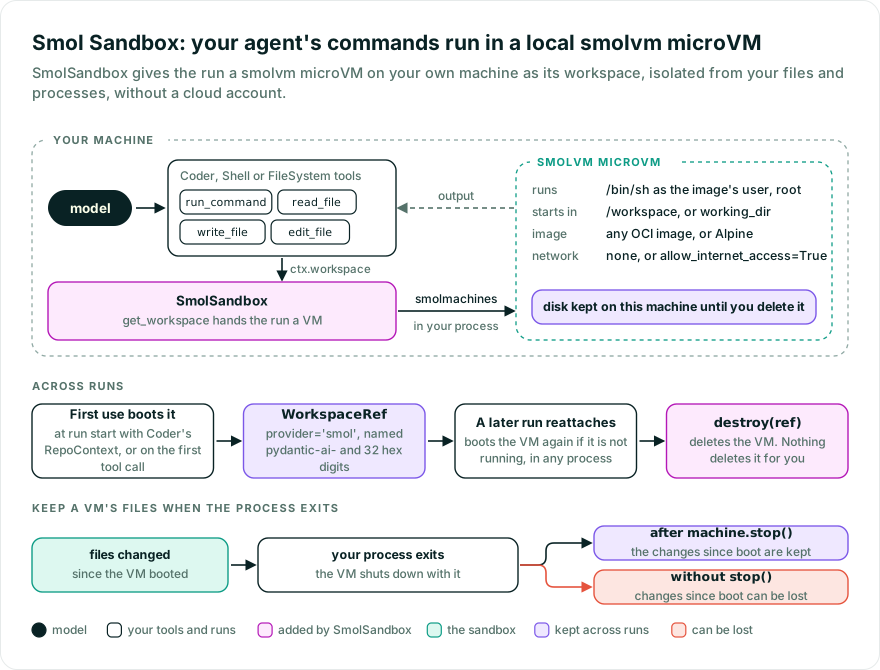
Run your agent’s commands and file edits in a smolvm microVM on your own machine, isolated from your files and processes, without a cloud account.
While Pydantic AI Harness is on 0.x releases, the API may change between minor releases; when it does, deprecation warnings and release-note migration guidance tell you (or your agent) exactly how to upgrade. See the version policy.
pip install "pydantic-ai-harness[coder,smol,anthropic]"
uv add "pydantic-ai-harness[coder,smol,anthropic]"
The smol extra installs smolmachines, the SDK that embeds the smolvm engine. The coder extra is there because the examples use Coder; the sandbox itself doesn’t need it. The anthropic extra is there because the examples use an Anthropic model; swap it for your model provider’s extra, and set ANTHROPIC_API_KEY for the examples.
smolmachines ships wheels for macOS on Apple silicon and for Linux on x86_64 and aarch64 (glibc 2.34 or newer). On Linux, the user running the agent needs read and write access to /dev/kvm. See Platforms.
from pydantic_ai import Agent
from pydantic_ai_harness.coder import Coder
from pydantic_ai_harness.smol_sandbox import SmolSandbox

agent = Agent('anthropic:claude-opus-5-5', capabilities=[SmolSandbox(image='python:3.12-alpine'), Coder()])
result = agent.run_sync('Write a script that prints the first 10 primes, and run it.')
Coder’s shell and file tools now run in a VM with its own kernel and filesystem, not on your machine. The VM boots on the run’s first use of the workspace; with Coder, RepoContext uses it when the run starts, so use Coder(repo_context=False) to boot only when a tool needs it. The VM keeps running after the run ends; see Clean up.
Without an image, the VM runs smolvm’s own Alpine Linux, which has BusyBox but no Python, git, or ripgrep, and needs no download. An image is any OCI image, such as python:3.12-alpine; smolvm pulls it on this machine the first time. Commands run as the image’s user, which is root in both, and start in /workspace, which is created if it’s missing.
A new VM has no network access. Pass SmolSandbox(allow_internet_access=True) to let the agent install packages or clone repositories. That access is unrestricted and comes from this machine, so treat it as access to anything this machine can reach, such as your local network or a cloud metadata endpoint, not only the internet. (In a probe with smolmachines 1.22.2, this machine’s own loopback address refused the VM.)
from pydantic_ai import Agent
from pydantic_ai_harness.coder import Coder
from pydantic_ai_harness.smol_sandbox import SmolSandbox

agent = Agent('anthropic:claude-opus-5-5', capabilities=[SmolSandbox(image='python:3.12-alpine'), Coder()])
result = agent.run_sync('Write a script that prints the first 10 primes, and run it.')

followup = agent.run_sync('Now make it print the first 100.', message_history=result.all_messages())
The follow-up run finds the VM in the message history and works in it, so the script is still there. Without the history, a run boots a new VM. If the VM has been deleted, the run raises WorkspaceUnavailableError instead of starting over in an empty one.
For a narrower agent, use Shell and FileSystem instead of Coder, or write your own tool:
from pydantic_ai import Agent, RunContext
from pydantic_ai_harness.filesystem import FileSystem
from pydantic_ai_harness.shell import Shell
from pydantic_ai_harness.smol_sandbox import SmolSandbox

agent = Agent('anthropic:claude-opus-5-5', capabilities=[SmolSandbox(image='python:3.12-alpine'), Shell(), FileSystem()])


@agent.tool
async def run_python(ctx: RunContext, code: str) -> str:
    """Run a Python snippet in the VM."""
    result = await ctx.workspace.run(['python', '-c', code], timeout=10)
    return result.stdout + result.stderr
See Workspaces for more.
To come back to the VM without the message history, store the run’s workspace ref and pass it back as workspace=:
from pydantic_ai import Agent
from pydantic_ai_harness.coder import Coder
from pydantic_ai_harness.smol_sandbox import SmolSandbox

agent = Agent('anthropic:claude-opus-5-5', capabilities=[SmolSandbox(image='python:3.12-alpine'), Coder()])

result = agent.run_sync('Write a script that prints the first 10 primes, and run it.')
ref = result.workspace.ref  # store this, e.g. in your database

later = agent.run_sync('Now make it print the first 100.', workspace=ref)
Pass workspace='new' to boot a fresh VM even when the message history names one. image, cpus, memory_mb and allow_internet_access only shape a new VM, so a VM booted with network access keeps it when you reattach; working_dir and env apply to every command.
Already have a smol.Machine or smol.AsyncMachine on this machine? Pass workspace=SmolSandboxBackend(sandbox=machine) to the run, with SmolSandboxBackend from pydantic_ai_harness.smol_sandbox, or SmolSandboxBackend(ref=WorkspaceRef(provider='smol', id=...)) with the VM’s name. The backend opens its own handle to the VM by its id, which on this machine is its name. SmolSandbox’s settings don’t apply to it; pass working_dir= and env= to the backend. The backend never deletes the VM. See Which VMs a run can use for what each way accepts.
VMs are persistent, so a ref also works from another process, which boots the VM again if it isn’t running. But smolmachines doesn’t flush a VM’s disk when the process using it exits, so file changes since the VM booted can be lost. To keep them, stop the VM before the process exits:
from pydantic_ai.workspaces import WorkspaceRef
from pydantic_ai_harness.smol_sandbox import SmolSandbox


async def stop_vm(ref: WorkspaceRef) -> None:
    machine = await SmolSandbox().backend(ref).get_sandbox()
    await machine.stop()
To seed files or install packages before the agent starts, boot the backend yourself, work in it through Workspace, and pass it to the run:
import asyncio

from pydantic_ai import Agent
from pydantic_ai.workspaces import Workspace
from pydantic_ai_harness.coder import Coder
from pydantic_ai_harness.smol_sandbox import SmolSandbox, SmolSandboxBackend

agent = Agent('anthropic:claude-opus-5-5', capabilities=[SmolSandbox(), Coder()])


async def main() -> None:
    backend = SmolSandboxBackend(image='python:3.12-alpine', allow_internet_access=True)
    try:
        workspace = Workspace(backend)
        await workspace.write_text('calc.py', 'def add(a, b):\n    return a - b\n')
        install = await workspace.run(['pip', 'install', 'pytest'], timeout=300)
        if install.exit_code != 0:
            raise RuntimeError(f'pip install failed: {install.stderr}')
        result = await agent.run('Fix the bug in calc.py.', workspace=backend)
        print(result.output)
    finally:
        ref = backend.ref  # set once the VM exists
        if ref is not None:
            await SmolSandbox().destroy(ref)


if __name__ == '__main__':
    asyncio.run(main())
The finally deletes the VM even when setup or the run fails. To keep it instead, store backend.ref and pass it as workspace= to reattach later. SmolSandbox’s settings don’t apply to a backend you pass as workspace=; give the backend its own. backend.get_sandbox() returns the SDK’s smol.AsyncMachine, for smol features the workspace API doesn’t cover.
A run never deletes its VM, and a VM keeps its disk on this machine until it is deleted. Delete it with the ref you stored:
from pydantic_ai.workspaces import WorkspaceRef
from pydantic_ai_harness.smol_sandbox import SmolSandbox


async def delete_vm(ref: WorkspaceRef) -> None:
    await SmolSandbox().destroy(ref)
Deleting a VM that is already gone returns quietly. smolmachines deletes a local VM through an attached handle, and attaching boots a stopped VM, so destroy boots a stopped VM first. Once started, a deletion finishes even if its caller is cancelled. SmolSandbox.backend(ref) builds an attached backend without booting anything.
Nothing deletes a VM for you, and there is no idle or lifetime limit. A VM shuts down when the process that booted it exits, but its disk stays on this machine. Booting a VM logs its id (see Telemetry), so you can find one left behind without a stored ref, for example by a durable execution worker that crashed after booting it.
backend.ref is set as soon as the VM starts booting, and destroy waits for a boot still in progress in this process, so the finally in Prepare a VM before the run deletes the VM even when the run is cancelled mid-boot. A failed run returns no result, so there is no ref to store: delete the VM in an on_run_error hook, as shown for E2B, or boot the backend yourself as in Prepare a VM before the run.
Every command runs through the VM’s /bin/sh, which starts an argv sequence with exec, keeping it literal, and gives a missing program exit code 127. A program whose name starts with - is looked up on PATH first, so exec can’t read it as an option. A shell=True string runs under /bin/sh -c. Custom images need a POSIX /bin/sh.
On a timeout or cancellation, the backend closes the command’s output stream, and smolvm kills the command and the processes it started. Jobs that outlive the command that started them, like a Shell background job, keep running. smolvm also kills a command itself 5 seconds after its timeout, in case the event loop is too busy to. A command whose combined output passes 10 MiB is stopped the same way and raises WorkspaceOutputLimitError, with the first 65,536 characters of each stream in stdout and stderr. Redirect large output to a file instead. The cap bounds what the backend keeps, not the memory this process uses: smolvm stops a command’s stdout and stderr once they pass 11 MiB, but smolmachines queues the output events the VM sends faster than the backend reads them without a limit of its own, so the overhead of those events isn’t bounded.
The backend’s own commands, mkdir -p for working_dir and pwd -P, raise WorkspaceTimeoutError after 60 seconds, so a broken image can’t hang the run.
File operations run as shell commands in the VM (see Writing a backend), so images need the usual file utilities, which Alpine’s BusyBox has. Files move 64 KiB per command, so reading or writing a file of several MiB takes seconds.
A deleted or stopped VM raises WorkspaceUnavailableError; a working_dir that was removed raises WorkspaceError. Other smolmachines failures propagate as smol.SmolError, for durable execution engines to retry.
The smol SDK runs its calls on asyncio threads, so the backend needs the asyncio event loop: under Trio, operations raise UserError.
The VM is the boundary: it has its own kernel and filesystem, nothing from this machine is mounted into it, no ports are published, and none of your environment variables reach it. Inside, commands run as the image’s user, root on smolvm’s own Alpine and most images, so anything the agent runs can change anything in the VM.
- smolvm runs in your process with your OS user’s permissions.
SMOLVM_*environment variables configure it, and some, likeSMOLVM_SECCOMP=off, turn off its own confinement on Linux, so don’t let untrusted input set them. imageis pulled by tag; pin a digest, such aspython:3.12-alpine@sha256:..., to get the same image every time.cpusandmemory_mbcap a VM; its disk size is smolvm’s default, and nothing limits how many VMs a process boots.
Whoever passes a ref runs commands in the VM it names. smolmachines can open any VM of your OS user on this machine by name, including VMs other tools made with your folders mounted. So what’s accepted depends on where the VM comes from:
| Where the VM comes from | What’s accepted |
|---|---|
SmolSandbox: a ref in the message history, workspace=ref, backend(ref) or destroy(ref) | Only VMs SmolSandbox booted, named pydantic-ai- and 32 hex digits. Any other name raises ValueError before anything runs. |
SmolSandboxBackend(sandbox=machine) or SmolSandboxBackend(ref=...), built by your code | Any VM on this machine, including one with mounts or network, because your code chose it. A Smol Cloud machine, like a VM deleted since, raises WorkspaceUnavailableError, unless a VM on this machine is named like its id. |
- A run in a VM you passed in writes that VM’s name into the message history. A later run given only that history raises
ValueError; it doesn’t open the VM or boot a new one. Pass the backend again, orworkspace='new'for a fresh VM. - Durable execution rebuilds the workspace from its ref, so it only works with VMs
SmolSandboxbooted. - The name doesn’t prove where a VM came from: any program running as your OS user can boot a VM with such a name, and smolmachines can’t report how an existing VM was configured. Only pass refs your application stored itself, and don’t build
SmolSandboxBackend(ref=...)from user input.
| Option | What it does |
|---|---|
image | OCI image for a new VM. Default: None, smolvm’s own Alpine Linux. |
cpus | vCPUs for a new VM. Default: None, smolvm’s default. |
memory_mb | Memory for a new VM in MiB. Default: None, smolvm’s default. |
allow_internet_access | Whether a new VM has unrestricted outbound network access, from this machine’s network. Default: False. |
working_dir | Absolute directory commands start in and relative paths resolve against, created if missing. Default: /workspace; None uses the VM’s own (/ without an image). |
env | Environment variables every command gets, on top of the image’s. Default: None. Nothing from your machine’s environment reaches the VM, and env is kept out of the capability’s repr, but the agent’s commands can read it. |
smolvm runs VMs with Apple’s Hypervisor framework on macOS and with KVM on Linux, so it runs on macOS on Apple silicon and on Linux on x86_64 and aarch64 with glibc 2.34 or newer. On other platforms the smol extra installs nothing and importing pydantic_ai_harness.smol_sandbox raises ImportError. A host that can’t run VMs, such as Linux without access to /dev/kvm, raises WorkspaceUnavailableError on first use. Check a host without booting a VM with smol.local_availability().
SmolSandbox emits no spans of its own. Core’s instrumentation records the VM on the agent run span as pydantic_ai.workspace.provider (smol) and pydantic_ai.workspace.id, and each command or file operation a tool makes runs inside that tool call’s span. Booting a VM also logs Creating smol VM <id> at INFO on the pydantic_ai_harness.smol_sandbox._backend logger before the boot starts, so the id is on record even if the run ends before it is stored. On this machine, a VM’s id is all your OS user’s processes need to attach to it.
Bases: AbstractCapability[AgentDepsT]
Supply a smolvm microVM on this machine as the run’s workspace.
A run with no reference boots a fresh VM on first use. Pass a WorkspaceRef supplied by the
application to attach to a VM from an earlier run; only ids in the form SmolSandbox names its VMs are accepted.
This capability supplies execution only. Compose it with tools or capabilities that use the
workspace, such as Coder, Shell, or FileSystem.
OCI image a new VM runs, such as 'python:3.12-alpine'; None boots smolvm’s own Alpine Linux without pulling anything.
Type: str | None Default: None
vCPUs for a new VM; smolvm’s default when None.
Type: int | None Default: None
Memory for a new VM in MiB; smolvm’s default when None.
Type: int | None Default: None
Whether a new VM gets unrestricted outbound network access, made from this machine’s network: the internet, but also its local network and services.
Type: bool Default: False
Absolute directory commands start in and relative paths resolve against, created if missing; None uses the VM’s own.
Type: str | None Default: '/workspace'
Environment variables every command gets, also on an attached VM; nothing is read from the host.
Type: Mapping[str, str] | None Default: field(default=None, repr=False)
def backend(ref: WorkspaceRef) -> SmolSandboxBackend
Attach lazily to an existing VM, one SmolSandbox created.
SmolSandboxBackend
@async
def destroy(ref: WorkspaceRef) -> None
Delete a VM by ref; one that is already gone returns quietly.
A boot of it still in progress in this process finishes first, and the deletion isn’t abandoned when the caller is cancelled. The SDK has no delete by ID for a local VM, so this attaches first, which boots a stopped VM briefly.
def get_workspace(
    ctx: RunContext[AgentDepsT],
    *,
    ref: WorkspaceRef | None,
) -> WorkspaceBackend | None
Build the backend for this run. No I/O here: it boots or attaches on first use.
WorkspaceBackend | None
Bases: WorkspaceBackend, SupportsCommands
A local smolvm microVM as a Pydantic AI WorkspaceBackend.
Commands run inside a VM on this machine, with its own kernel and filesystem, so they can’t
touch the host’s files or processes. File operations run as shell commands in the VM (see
Writing a backend),
so a custom image needs /bin/sh and the usual file utilities.
Building one does no I/O. The first operation boots a new persistent VM, or attaches to the one
sandbox is or ref names, and get_sandbox() returns the SDK’s smol.AsyncMachine. ref is set
as soon as a boot starts; a VM the backend boots is named pydantic-ai- and 32 hex digits. The backend
never deletes the VM; whoever holds the ref does. A ref also works from another process, which boots the VM
again, but only the VM’s stop() flushes its disk: stop it before this process exits to keep
recent file changes.
sandbox : smol.Machine | smol.AsyncMachine | None Default: None
A smol.Machine or smol.AsyncMachine on this machine that you already have. The backend
opens its own handle to it by id. Whoever created it owns deleting it.
ref : WorkspaceRef | None Default: None
Identity of an existing VM on this machine to attach to on first use: its name.
OCI image a new VM runs, such as 'python:3.12-alpine'; None boots smolvm’s own
Alpine Linux root filesystem without pulling anything.
vCPUs for a new VM; smolvm’s default when None.
Memory for a new VM in MiB; smolvm’s default when None.
allow_internet_access : bool Default: False
Whether a new VM gets unrestricted outbound network access, made from this machine’s network: the internet, but also its local network and services.
Absolute directory commands start in and relative paths resolve against, created
if missing when the backend first reaches the VM; None uses the VM’s own, / on the
default image.
Environment variables every command gets; per-command env is layered on top. Nothing is
read from the host environment.
Identity of the VM, or None before one starts booting.
Set before the boot finishes, so cleanup that runs while it is still booting can pass it to
SmolSandbox.destroy, which waits for the boot.
Type: WorkspaceRef | None
@async
def get_sandbox() -> smol.AsyncMachine
Return the SDK’s smol.AsyncMachine, for smol features the workspace API does not cover.
On a backend with no VM yet, this boots one or attaches to the one ref names, just like the
first operation. Attaching to a deleted VM raises WorkspaceUnavailableError; it does not
create a replacement.
smol.AsyncMachine
@async
def working_dir() -> str
The canonical absolute directory commands start in.
@async
def run(
    command: WorkspaceCommand,
    *,
    shell: bool = False,
    env: Mapping[str, str] | None = None,
    timeout: float | None = None,
) -> CommandResult
Run a command in the VM, killing it and the processes it started on timeout or cancellation.
CommandResult