Modal Sandbox
Run your agent’s commands and file edits in an isolated Modal cloud sandbox instead of on your machine.
While Pydantic AI Harness is on 0.x releases, the API may change between minor releases; when it does, deprecation warnings and release-note migration guidance tell you (or your agent) exactly how to upgrade. See the version policy.
pip install "pydantic-ai-harness[coder,modal,anthropic]"
uv add "pydantic-ai-harness[coder,modal,anthropic]"
modal token new
uv run modal token new
This saves your Modal credentials; in CI, set MODAL_TOKEN_ID and MODAL_TOKEN_SECRET instead. The coder extra is there because the examples use Coder; the sandbox itself doesn’t need it. The anthropic extra is there because the examples use an Anthropic model; swap it for your model provider’s extra, and set ANTHROPIC_API_KEY for the examples.
from pydantic_ai import Agent
from pydantic_ai_harness.coder import Coder
from pydantic_ai_harness.modal_sandbox import ModalSandbox

agent = Agent('anthropic:claude-opus-5-5', capabilities=[ModalSandbox(), Coder()])
result = agent.run_sync('Clone https://github.com/pydantic/pydantic-ai and summarize how capabilities work.')
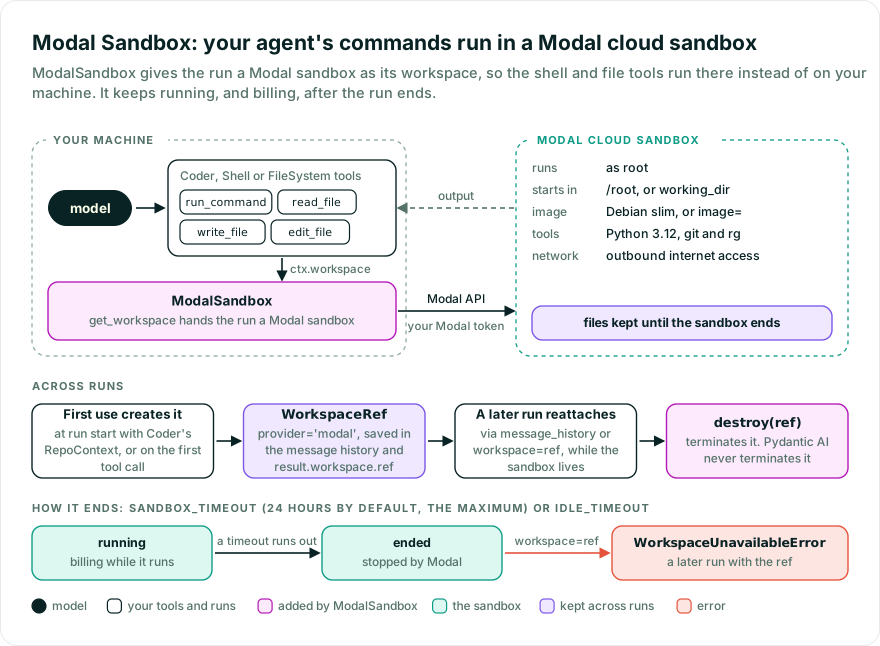
Coder’s shell and file tools now run in the sandbox, not on your machine. Coder’s RepoContext creates the sandbox when the run starts; pass Coder(repo_context=False) to create it on the first tool call instead. The sandbox keeps running, and billing, after the run ends; see Clean up.
A new sandbox lives for up to 24 hours, Modal’s maximum; pass ModalSandbox(sandbox_timeout=3600) to end it sooner. A first use may take several minutes while Modal builds or pulls an image. If Modal cannot start the sandbox, for example because the image does not exist, the first use raises an error that says why.
The default image runs as root in /root, the home directory, with Python 3.12, git, and rg, but none of your project’s dependencies, not even pytest. Install them in a custom image, or with await workspace.run(['pip', 'install', ...]) before the run, as in Prepare a sandbox before the run. Pass ModalSandbox(working_dir='/root/project') to keep the project out of the home directory; a new sandbox creates it. A custom image starts commands in its own working directory.
from pydantic_ai import Agent
from pydantic_ai_harness.coder import Coder
from pydantic_ai_harness.modal_sandbox import ModalSandbox

agent = Agent('anthropic:claude-opus-5-5', capabilities=[ModalSandbox(), Coder()])
result = agent.run_sync('Clone https://github.com/pydantic/pydantic-ai and summarize how capabilities work.')

followup = agent.run_sync(
    'Which capability would you add next, and where would it live?',
    message_history=result.all_messages(),
)
The follow-up run finds the sandbox in the message history and works in it, so the clone is still there. Without the history, a run starts a new sandbox. If the sandbox has been terminated or has expired, the run raises WorkspaceUnavailableError instead of starting over in an empty one.
For a narrower agent, use Shell and FileSystem instead of Coder, or write your own tool that runs in the sandbox:
from pydantic_ai import Agent, RunContext
from pydantic_ai_harness.filesystem import FileSystem
from pydantic_ai_harness.modal_sandbox import ModalSandbox
from pydantic_ai_harness.shell import Shell

agent = Agent('anthropic:claude-opus-5-5', capabilities=[ModalSandbox(), Shell(), FileSystem()])


@agent.tool
async def run_python(ctx: RunContext, code: str) -> str:
    """Run a Python snippet in the sandbox."""
    result = await ctx.workspace.run(['python', '-c', code], timeout=10)
    return result.stdout + result.stderr
See Workspaces for more.
Cancellation and command deadlines attempt to stop the foreground command without ending the sandbox; see What a timeout stops for the best-effort caveat. Shell sets a 30-second timeout; in your own tools, pass a timeout, as above.
If only your own tools use the sandbox, pass ModalSandbox(warn_if_no_tools=False) to silence the missing-tools warning, or filter its category, ModalSandboxNoToolsWarning.
File reads raise OSError for FIFOs, devices, and anything else that is not a regular file, as the local backend does.
run(timeout=...) starts its clock after sandbox acquisition and includes command start, execution, and output collection. On its deadline or cancellation, the backend attempts to stop the command’s foreground process group, not the shared sandbox or detached background jobs. Partial stdout and stderr are available on WorkspaceTimeoutError; if the stop RPC fails, the command may still run, so retain the sandbox ref for explicit cleanup. timeout=None has no command deadline; the sandbox’s own lifetime and idle settings still apply. On a custom or attached image without util-linux’s setsid, a deadline or cancellation stops only the wrapper process, not the command’s children; install util-linux in the image to stop them too.
To come back to the sandbox without the message history, store its ref and pass it back as workspace=:
from pydantic_ai import Agent
from pydantic_ai_harness.coder import Coder
from pydantic_ai_harness.modal_sandbox import ModalSandbox

agent = Agent('anthropic:claude-opus-5-5', capabilities=[ModalSandbox(), Coder()])

result = agent.run_sync('Clone https://github.com/pydantic/pydantic-ai and summarize how capabilities work.')
ref = result.workspace.ref  # store this, e.g. in your database

later = agent.run_sync('Which capability would you add next, and where would it live?', workspace=ref)
The ref holds no credentials, so the process that reattaches needs your Modal credentials too. Pass workspace='new' to start a fresh sandbox even when the message history names one.
image, app_name, create_app_if_missing, sandbox_timeout, and idle_timeout only shape a new sandbox; working_dir and env apply to every command, including after you reattach.
Already have a modal.Sandbox? Pass workspace=ModalSandboxBackend(sandbox=sandbox) to a run, with ModalSandboxBackend from pydantic_ai_harness.modal_sandbox. ModalSandbox’s settings don’t apply to it; pass working_dir= and env= to the backend. A backend’s get_sandbox() returns its modal.Sandbox for Modal features the workspace API does not cover; on a backend with no sandbox yet it creates one, like the first operation. It doesn’t change who terminates the sandbox: whoever holds the ref does.
To seed files or install packages before the agent starts, create the backend yourself, work in it through Workspace, and pass it to the run:
import asyncio

from pydantic_ai import Agent
from pydantic_ai.workspaces import Workspace
from pydantic_ai_harness.coder import Coder
from pydantic_ai_harness.modal_sandbox import ModalSandbox, ModalSandboxBackend

agent = Agent('anthropic:claude-opus-5-5', capabilities=[ModalSandbox(), Coder()])


async def main() -> None:
    backend = ModalSandboxBackend(working_dir='/root/project')
    try:
        workspace = Workspace(backend)
        await workspace.write_text('calc.py', 'def add(a, b):\n    return a - b\n')
        installed = await workspace.run(['pip', 'install', 'pytest'], timeout=300)
        if installed.exit_code != 0:
            raise RuntimeError(f'pip install failed: {installed.stderr}')
        result = await agent.run('Fix the bug in calc.py.', workspace=backend)
        print(result.output)
    finally:
        ref = backend.ref  # set once the sandbox exists
        if ref is not None:
            await ModalSandbox().destroy(ref)


if __name__ == '__main__':
    asyncio.run(main())
The finally terminates the sandbox even when setup or the run fails. If the task is cancelled while Modal is still creating the sandbox, backend.ref is still None there, and the sandbox Modal goes on to create keeps running; its ID is logged at WARNING (see Telemetry), so terminate it with ModalSandbox().destroy(WorkspaceRef(provider='modal', id=...)). To keep it instead, store backend.ref and pass it as workspace= to reattach later.
The sandbox keeps running, and billing, after the run ends. Pydantic AI never terminates it. Terminate it with the ref you stored:
from pydantic_ai.workspaces import WorkspaceRef
from pydantic_ai_harness.modal_sandbox import ModalSandbox


async def terminate_sandbox(ref: WorkspaceRef) -> None:
    await ModalSandbox().destroy(ref)
ModalSandbox().backend(ref) constructs a backend for an existing ref without I/O. destroy(ref) uses the sandbox ID directly; it does not resume an expired sandbox or run its tools, and a sandbox that no longer exists returns quietly. A sandbox whose image command ignores Modal’s stop signal (a bare python image, for example) can keep running for about 30 seconds after destroy returns. Only destroy sandboxes you own.
A sandbox you don’t terminate ends when its sandbox_timeout runs out, or after idle_timeout seconds without activity if you set one. See Modal’s timeouts.
A failed run returns no result, so there is no ref to store, and after_run doesn’t run. A run cancelled while Modal is still creating the sandbox leaves no ref for any hook; see Telemetry. To terminate a failed run’s sandbox, clean up in an on_run_error hook:
from typing import Any

import anyio

from pydantic_ai import Agent, RunContext
from pydantic_ai.capabilities import Hooks
from pydantic_ai.run import AgentRunResult
from pydantic_ai_harness.coder import Coder
from pydantic_ai_harness.modal_sandbox import ModalSandbox

hooks = Hooks()


@hooks.on.run_error
async def terminate_failed_run(ctx: RunContext[None], *, error: BaseException) -> AgentRunResult[Any]:
    if ctx.workspace.ref is not None:
        # Shielded, so an `anyio` deadline around the run doesn't cut the kill short,
        # and bounded, so a hung API call can't hang the run indefinitely.
        with anyio.move_on_after(30, shield=True):
            await ModalSandbox().destroy(ctx.workspace.ref)
    raise error


agent = Agent('anthropic:claude-opus-5-5', capabilities=[ModalSandbox(), Coder(), hooks])
| Option | What it does |
|---|---|
image | Image for a new sandbox: a registry tag or a modal.Image. Default: Debian slim with Python 3.12, git, and ripgrep. |
app_name | Modal app a new sandbox belongs to. Default: 'pydantic-ai-harness'. |
create_app_if_missing | Create that app if it doesn’t exist. Default: True. |
sandbox_timeout | Seconds a new sandbox lives before Modal stops it (10-86,400). Default: 86_400 (24 hours, Modal’s maximum). |
idle_timeout | Seconds without activity before Modal stops a new sandbox. Default: None, no idle limit. |
working_dir | Absolute directory commands start in and relative paths resolve against. Default: /root on the default image, otherwise the image’s own working directory. Created on a new sandbox; on an attached or caller-supplied sandbox it must already exist. |
env | Environment variables every command gets. Default: None. Nothing from your machine’s environment reaches the sandbox. |
warn_if_no_tools | Warn when the agent has no Shell or FileSystem tool. Default: True. |
Modal runs on the asyncio event loop only: its SDK uses asyncio tasks, so under Trio the backend raises UserError.
The sandbox is isolated from your machine, not from the network: it has outbound internet access, and every env value is readable by the model and by anything it runs, including code in a repository it clones. Put secrets in env only when the agent should have them. For network restrictions such as Modal’s block_network, create the modal.Sandbox yourself and pass ModalSandboxBackend(sandbox=...) as workspace=.
Install the temporal extra too:
pip install "pydantic-ai-harness[coder,modal,anthropic,temporal]"
uv add "pydantic-ai-harness[coder,modal,anthropic,temporal]"
Run a Temporal dev server on localhost:7233 first. The agent and workflow must be defined at module level for activity registration.
import asyncio
import uuid

from pydantic_ai import Agent
from pydantic_ai.durable_exec.temporal import PydanticAIPlugin, PydanticAIWorkflow, TemporalDurability
from pydantic_ai_harness.coder import Coder
from pydantic_ai_harness.modal_sandbox import ModalSandbox
from temporalio import workflow
from temporalio.client import Client
from temporalio.worker import Worker

agent = Agent(
    'anthropic:claude-opus-5-5',
    name='modal_coder',
    capabilities=[ModalSandbox(), Coder(), TemporalDurability()],
)


@workflow.defn
class SandboxWorkflow(PydanticAIWorkflow):
    __pydantic_ai_agents__ = [agent]

    @workflow.run
    async def run(self, prompt: str) -> str:
        return (await agent.run(prompt)).output


async def main() -> None:
    client = await Client.connect('localhost:7233', plugins=[PydanticAIPlugin()])
    async with Worker(client, task_queue='sandbox', workflows=[SandboxWorkflow]):
        print(
            await client.execute_workflow(
                SandboxWorkflow.run, 'Use the shell tool to run pwd.',
                id=f'sandbox-{uuid.uuid4()}', task_queue='sandbox',
            )
        )


if __name__ == '__main__':
    asyncio.run(main())
For a lazily created sandbox outside this example, use Coder(repo_context=False); by default Coder reads repository instructions when the run starts.
Removing a capability while workflows using it are still running changes their replay history. Drain those workflows or use Temporal worker versioning before deploying the change.
ModalSandbox emits no spans of its own. Core’s instrumentation records the sandbox on the agent run span as pydantic_ai.workspace.provider and pydantic_ai.workspace.id, and each command or file operation a tool makes runs inside that tool call’s span; operations at run start, such as RepoContext loading repo instructions, run in the agent run span. Creating a sandbox logs its ID at INFO on the pydantic_ai_harness.modal_sandbox._backend logger (Created Modal sandbox <id>). If every caller waiting for a new sandbox is cancelled before Modal finishes creating it, no cleanup sees its ref, and the same logger also logs its ID at WARNING.
The previous ModalSandbox registered its own run_command, read_file, write_file, and list_directory tools and terminated its sandbox when the run ended. Now it only supplies the sandbox, so add Coder(), or Shell() and FileSystem(), as shown above. Old arguments still construct, with a deprecation warning that names the replacement, and are ignored (sandbox_id still attaches). Removed imports fail with an error that names the replacement. The warnings use HarnessDeprecationWarning from pydantic_ai_harness.
- A run no longer terminates the sandbox. It runs until you terminate it or its
sandbox_timeoutends it (see Clean up). Setidle_timeout=to have Modal stop an unused sandbox sooner, or callawait ModalSandbox().destroy(result.workspace.ref)when you’re done with it. sandbox_timeoutdefaults to 24 hours instead of 5 minutes, so a later run can continue in the same sandbox.- A run that continues a
message_historyreattaches to the previous run’s sandbox. Passworkspace='new'for a fresh one. - Reattaching to an expired or terminated sandbox raises
WorkspaceUnavailableError. No empty replacement is created. If a command exits 137 because the sandbox was terminated mid-command, it raises the same error; a SIGKILLed command in a running sandbox returns exit 137.
| Previous API | Now |
|---|---|
| Sandbox terminated when the run ends | No longer: it keeps running, and billing, until its sandbox_timeout (24 hours by default) ends it. Set idle_timeout=, or call await ModalSandbox().destroy(result.workspace.ref). |
image, app_name, create_app_if_missing, env | Unchanged. image also takes a modal.Image, and its default now has git and ripgrep. |
sandbox_timeout | Unchanged name. The default is now 86_400 (24 hours) instead of 300. |
workdir | Renamed working_dir. workdir= still works, with a deprecation warning. |
| Default working directory | /root on the default image, where the old default image (python:3.12-slim) started commands in /. A custom image keeps its own WORKDIR. |
sandbox_id | Deprecated; still attaches to that sandbox when the run has no ref of its own, even with workspace='new'. Use agent.run(..., workspace=WorkspaceRef(provider='modal', id=sandbox_id)). |
session, ModalSandboxSession | session is deprecated and ignored; ModalSandboxSession is removed. Use agent.run(..., workspace=ModalSandboxBackend(sandbox=<modal.Sandbox>)). |
default_command_timeout | Deprecated and ignored. Use Shell(default_timeout=...). |
max_command_timeout | Deprecated and ignored, with no direct equivalent: nothing caps a timeout the model asks for. Shell(default_timeout=...) sets the timeout of commands that don’t give one; sandbox_timeout limits the lifetime of a new sandbox and does not apply to attached sandboxes. |
max_output_bytes, max_output_lines | Deprecated and ignored. Use Shell(max_output_chars=...) or ToolOutputLimits. A command whose combined stdout and stderr pass 10 MiB is stopped and raises WorkspaceOutputLimitError. |
max_read_bytes | Deprecated and ignored. Use FileSystem(max_read_lines=..., max_read_chars=...). |
instructions | Deprecated and ignored. Use the agent’s instructions. |
run_command tool | Removed. Use Shell(). |
read_file, write_file, list_directory tools | Removed. Use FileSystem(). It only reaches the working directory and below; FileSystem(root_dir='/') reaches the whole sandbox, as the old tools did. read_file’s offset is now zero-based: the old tool counted lines from 1. |
PrefixTools(ModalSandbox(...), prefix='modal') next to Shell() or FileSystem() | The modal_* tools are gone, and the unprefixed Shell and FileSystem tools, which used to act on your machine, now run in the sandbox. Drop PrefixTools. |
ModalSandboxExecResult | Removed. Use pydantic_ai.workspaces.CommandResult. |
ModalSandboxError | Removed. Catch pydantic_ai.workspaces.WorkspaceError. It doesn’t cover sandbox creation that doesn’t finish within 10 minutes (TimeoutError), or transient Modal errors such as connection failures, which propagate unchanged so a durable engine can retry them. Without the modal package, importing pydantic_ai_harness.modal_sandbox raises ImportError. |
ModalSandboxTerminalError, ModalSandboxUnavailableError, ModalSandboxAuthError | Removed. Catch pydantic_ai.workspaces.WorkspaceUnavailableError. |
- The agent outgrew your laptop (Pydantic): from a shell agent on your laptop to parallel
ModalSandboxcontainers
Bases: AbstractCapability[AgentDepsT]
Supply a Modal sandbox as the run’s workspace.
A run with an explicit WorkspaceRef attaches to that sandbox. Without a reference, the
first workspace operation creates a fresh Modal sandbox. Pydantic AI does not terminate the
sandbox; terminating it is the application’s job.
The capability registers no tools. Pair it with Coder, or with Shell and FileSystem,
which run their tools in the workspace, or write tools of your own that use it. Shell
commands run under sh -c in the sandbox’s shell environment.
Image a newly created sandbox runs: a registry tag, or a modal.Image; None is Debian slim with Python 3.12, git, and ripgrep.
Type: str | modal.Image | None Default: image
Modal app used when creating a sandbox.
Type: str Default: app_name
Whether Modal may create the app.
Type: bool Default: create_app_if_missing
Total lifetime of a newly created sandbox, in seconds (Modal’s timeout). Defaults to Modal’s maximum, 24 hours.
Type: int Default: sandbox_timeout
Seconds without activity after which Modal terminates a newly created sandbox; None never does.
Type: int | None Default: idle_timeout
Absolute directory commands start in and relative paths resolve against; when None, /root on the
default image, otherwise the image’s own working directory.
Type: str | None Default: working_dir
Environment variables every command in the sandbox gets; a command’s own env is layered on top.
Type: Mapping[str, str] | None Default: env
Warn, once per ModalSandbox instance, when none of a run’s tools has a Shell or FileSystem tool name.
Only tool names are checked, so custom tools that reach the sandbox under other names do not count.
Set it to False for agents that reach the sandbox only from their own tools or hooks.
This flag and its warning go away in the stable harness release.
Type: bool Default: warn_if_no_tools
@classmethod
def from_spec(
    cls,
    *,
    id: str | None = None,
    description: str | None = None,
    image: str | None = None,
    app_name: str = DEFAULT_APP_NAME,
    create_app_if_missing: bool = True,
    sandbox_timeout: int = DEFAULT_SANDBOX_TIMEOUT,
    idle_timeout: int | None = None,
    working_dir: str | None = None,
    env: Mapping[str, str] | None = None,
    warn_if_no_tools: bool = True,
    **kwargs: Any,
) -> ModalSandbox[Any]
Build from an agent spec, naming the fields a spec can express.
Core reads this signature to generate the spec’s JSON schema. Inherited, core falls back
to the variadic base from_spec, because __init__’s modal.Image hint is a
TYPE_CHECKING import, and publishes only the bare 'ModalSandbox'. A spec names an
image by its registry tag. **kwargs reaches
__init__ unchanged, so deprecated arguments keep their guidance and defer_loading
its refusal.
ModalSandbox[Any]
def backend(ref: WorkspaceRef) -> ModalSandboxBackend
Construct a backend for a stored Modal ref without opening the sandbox.
ModalSandboxBackend
@async
def destroy(ref: WorkspaceRef) -> None
Terminate a sandbox by ID without running commands or restoring its workspace.
A sandbox that no longer exists is already gone, so destroying it returns quietly.
def get_workspace(
    ctx: RunContext[AgentDepsT],
    *,
    ref: WorkspaceRef | None,
) -> WorkspaceBackend | None
Build a backend without performing Modal I/O.
WorkspaceBackend | None
Bases: WorkspaceBackend, SupportsCommands, SupportsFilesystem
A Modal sandbox implementing Pydantic AI’s WorkspaceBackend protocol.
Construction performs no I/O. The first operation creates or attaches to a sandbox, and the
typed modal.Sandbox is available through get_sandbox(). The backend does not terminate the
sandbox; terminating it is the application’s job.
Commands run in isolated process groups. Cancellation and command deadlines attempt to stop the foreground group without terminating the sandbox shared by other commands.
The protocol is structural, but subclassing it here makes a signature drift fail the type
check on this class instead of at a distant WorkspaceBackend call.
sandbox : modal.Sandbox | None Default: None
A live modal.Sandbox you already have. Whoever created it owns terminating it.
ref : WorkspaceRef | None Default: None
Identity of an existing sandbox to attach to on first use.
Registry tag, or a modal.Image, a newly created sandbox runs. None (the default)
is Debian slim with Python 3.12, git, and ripgrep.
app_name : str Default: DEFAULT_APP_NAME
Modal app a newly created sandbox belongs to.
create_app_if_missing : bool Default: True
Create the Modal app when it does not exist yet.
sandbox_timeout : int Default: DEFAULT_SANDBOX_TIMEOUT
Total lifetime of a newly created sandbox, in seconds (Modal’s timeout).
Defaults to Modal’s maximum, 24 hours.
Seconds without activity after which Modal terminates a newly created
sandbox; None (the default) never terminates it for being idle.
Absolute directory commands start in and relative paths resolve against,
applied to every command, including in an attached sandbox. None (the default) is
/root on the default image, otherwise the image’s own working directory.
Environment variables every command gets; a command’s own env is layered on top.
Identity of the sandbox, or None before one has been created.
Type: WorkspaceRef | None
@async
def get_sandbox() -> modal.Sandbox
Return the typed modal.Sandbox, for Modal features the workspace API does not cover.
On a backend with no sandbox yet, this creates one (which Modal bills) or attaches to the one
ref names, just like the first operation. Attaching by ref to a sandbox that no longer
exists raises WorkspaceUnavailableError; it does not create a replacement. After that it
returns the cached handle without checking that the sandbox is still running: one terminated
elsewhere surfaces on the next operation. Calling this does not make you responsible for
terminating the sandbox; whoever holds the ref decides, as before.
modal.Sandbox
UserError— The event loop is not asyncio.
@async
def working_dir() -> str
The sandbox’s working directory (absolute POSIX path).
@async
def run(
    command: WorkspaceCommand,
    *,
    shell: bool = False,
    env: Mapping[str, str] | None = None,
    timeout: float | None = None,
) -> CommandResult
Execute a command and wait for it to complete.
A shell command runs as /bin/sh -c <command>. Cancellation and command deadlines
stop its foreground process group, without terminating the shared sandbox.
CommandResult
Bases: UserWarning
Warned once per ModalSandbox when a run has no Shell or FileSystem tool to use the sandbox.
Pass ModalSandbox(warn_if_no_tools=False), or filter this category, when only your own tools use it.