Web Chat UI
Pydantic AI includes a built-in web chat interface that you can use to interact with your agents through a browser.
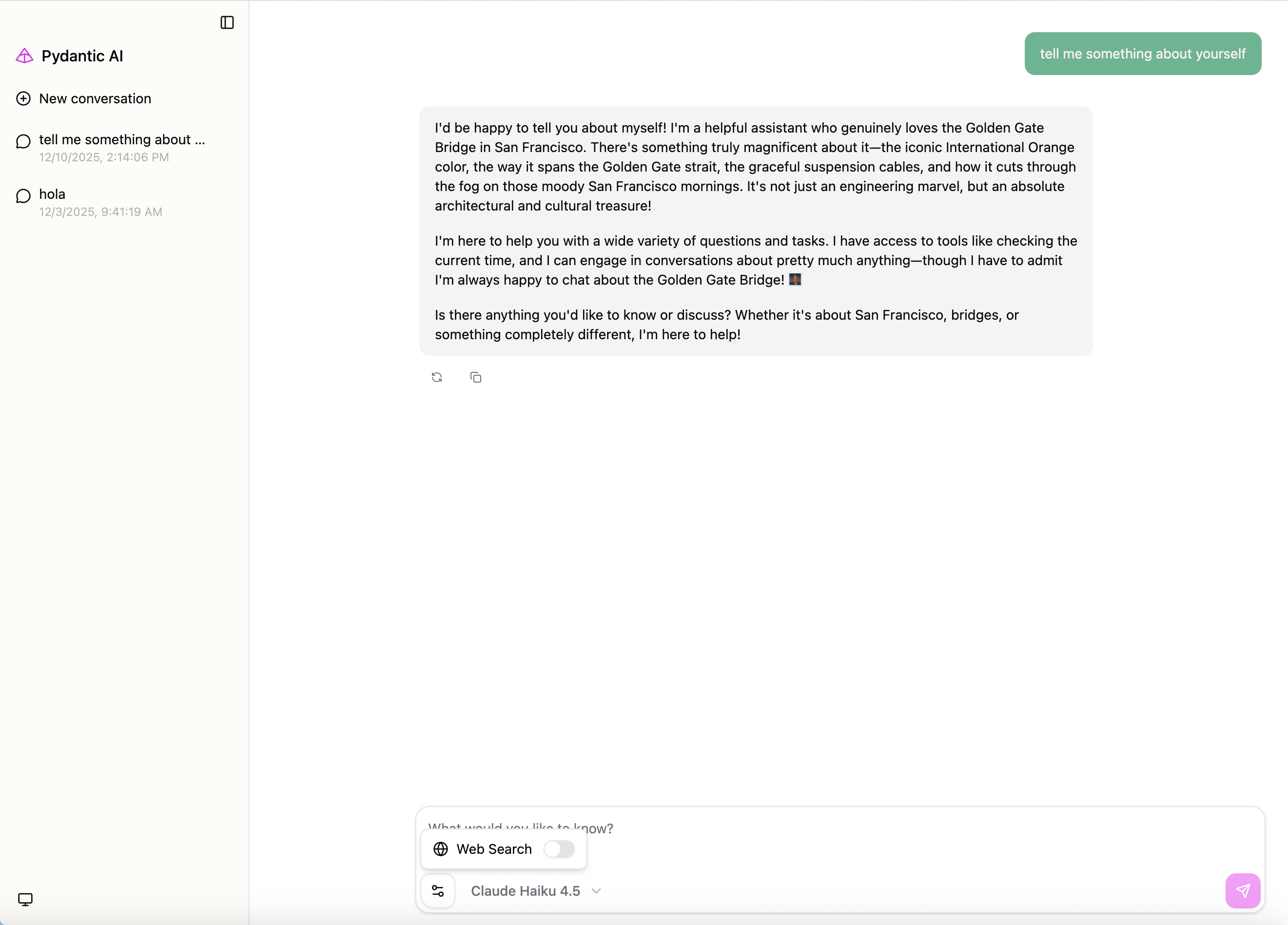
For CLI usage with clai web, see the CLI - Web Chat UI documentation.
Install the web extra (installs Starlette and Uvicorn):
pip install 'pydantic-ai-slim[web]'
uv add 'pydantic-ai-slim[web]'
Create a web app from an agent instance using Agent.to_web():
from pydantic_ai import Agent

agent = Agent('openai:gpt-6.1-sol', instructions='You are a helpful assistant.')

@agent.tool_plain
def get_weather(city: str) -> str:
    return f'The weather in {city} is sunny'

app = agent.to_web()
Run the app with any ASGI server:
uvicorn my_module:app --host 127.0.0.1 --port 7932
You can specify additional models to make available in the UI. Models can be provided as a list of model names/instances or a dictionary mapping display labels to model names/instances.
from pydantic_ai import Agent
from pydantic_ai.models.anthropic import AnthropicModel

# Model with custom configuration
anthropic_model = AnthropicModel('claude-sonnet-5-5')

agent = Agent('openai:gpt-6.1-sol')

app = agent.to_web(
    models=['openai:gpt-6.1-sol', anthropic_model],
)

# Or with custom display labels
app = agent.to_web(
    models={'OpenAI': 'openai:gpt-6.1-sol', 'Claude': anthropic_model},
)
Configure native tools on the agent with capabilities=[NativeTool(...)] to expose them as options in the UI (shown only for models that support each tool):
from pydantic_ai import Agent
from pydantic_ai.capabilities import NativeTool
from pydantic_ai.native_tools import CodeExecutionTool, WebSearchTool

agent = Agent(
    'openai:gpt-6.1-sol',
    capabilities=[NativeTool(CodeExecutionTool()), NativeTool(WebSearchTool())],
)

app = agent.to_web(models=['anthropic:claude-sonnet-5-5'])
You can pass extra instructions that will be included in each agent run:
from pydantic_ai import Agent

agent = Agent('openai:gpt-6.1-sol')

app = agent.to_web(instructions='Always respond in a friendly tone.')
Tools that require approval are surfaced in the UI as approve/reject prompts: when the agent calls such a tool, the UI renders the pending call and lets you approve or deny it before the run continues. This works out of the box — no extra configuration is needed.
The app answers only to requests whose Host header is an IP address (127.0.0.1, [::1], or a LAN address like 192.168.1.5) or localhost — including names under it, like my-app.localhost. Any other Host gets a 421 Misdirected Request. Hostnames are compared in ASCII form, so an internationalized name goes in the list as punycode (xn--bcher-kva.example), which is what the browser sends.
This is what stops a website from reaching the UI on your machine by pointing a hostname it controls at 127.0.0.1 — a DNS rebinding attack, which makes the browser treat that website and the UI as the same origin, so the content type requirement above no longer applies. An IP address can’t be rebound that way, because rebinding works by pointing a name at an address.
If you serve the UI under a real hostname — behind a reverse proxy, or through a tunnel like ngrok — name that hostname in allowed_hosts:
from pydantic_ai import Agent

agent = Agent('openai:gpt-6.1-sol')

app = agent.to_web(allowed_hosts=['ui.example.com'])

# `*.example.com` matches subdomains only; list the apex separately if you serve it too
app = agent.to_web(allowed_hosts=['example.com', '*.example.com'])
Or with the CLI:
clai web -m openai:gpt-6.1-sol --allowed-host ui.example.com
clai web --host <name> adds that name for you, so the URL it prints always works.
Every route is checked, including /api/health. A health check or container probe that sends a DNS name in its Host header gets the same 421, and monitoring systems often record only the status code or swap in their own error page, so the explanation may never reach you — point probes at the bound IP address or localhost, or add their hostname here.
Pass allowed_hosts=['*'] to answer to any host, but only if something in front of the app already authenticates requests. Only list domains whose subdomains you control: a wildcard for a domain where anyone can obtain a subdomain re-opens the problem.
All routes are answered only for allowed Host headers. The web UI app uses the following routes which should not be overwritten:
/and/{id}- Serves the chat UI/api/chat- Chat endpoint (POST, OPTIONS). RequiresContent-Type: application/json; other content types are rejected with415./api/configure- Frontend configuration (GET)/api/health- Health check (GET)
The app cannot currently be mounted at a subpath (e.g., /chat) because the UI expects these routes at the root. You can add additional routes to the app, but avoid conflicts with these reserved paths.
By default, the web UI is fetched from a CDN and cached locally. You can provide html_source to override this for offline usage or enterprise environments.
The default UI build is split across many files: index.html references a stylesheet and, at runtime,
lazily imports chunks for syntax highlighting, diagrams and math. Those references point back at the
CDN, so downloading index.html alone gives you a page that boots and then fails to render as soon as
a code block or an equation appears.
Use the offline build instead — a single self-contained file with every chunk, font and icon inlined, so it needs no network access beyond your own server:
from pydantic_ai.ui import OFFLINE_HTML_URL

print(OFFLINE_HTML_URL)  # Use this URL to download the self-contained UI HTML file
#> https://cdn.jsdelivr.net/npm/@pydantic/ai-chat-ui@2.1.0/offline/index.html
Download it once from a machine that has internet access, then move it into the air-gapped environment:
curl -o ~/pydantic-ai-ui.html <chat_ui_url>
Then use html_source to point to your local file or custom URL:
from pydantic_ai import Agent

agent = Agent('openai:gpt-6.1-sol')

# Use a local file (e.g., for offline usage)
app = agent.to_web(html_source='~/pydantic-ai-ui.html')

# Or use a custom URL (e.g., for enterprise environments)
app = agent.to_web(html_source='https://cdn.example.com/ui/index.html')
The offline file is around 16 MB. That is not extra weight so much as relocated weight — the default
build ships the same assets across 400-odd files that the browser fetches from the CDN on demand,
where the offline build front-loads all of them into the first request. The default to_web() path
is unchanged and still uses the split build:
from pydantic_ai.ui import DEFAULT_HTML_URL

print(DEFAULT_HTML_URL)
#> https://cdn.jsdelivr.net/npm/@pydantic/ai-chat-ui@2.1.0/dist/index.html