Control external MCP access
Limit external Model Context Protocol (MCP) clients to reading and querying Logfire data, without changing each connection or credential.
The policy belongs to an organization and applies across all of its projects. Use it when coding agents and other MCP clients should investigate Logfire data but should not create or change dashboards, alerts, notification channels, variables, or prompts. Logfire’s in-product AI Chat keeps its own approval flow and is not affected.
External MCP access controls are available on the Enterprise plan, including self-hosted deployments. Personal, Team, and Growth organizations keep normal credential-scoped MCP access, but cannot set an organization-wide read-only policy or use the agent-feedback tool.
You need:
- An organization on the Enterprise plan, or a self-hosted Logfire deployment.
- An organization admin role. Other organization members can view the policy but cannot change it.
- A client connected to the Logfire MCP server if you want to verify the result from a client.
- Select the organization you want to configure.
- Open Org settings → Security & access → MCP access.
- Choose an access mode:
- Full access: each credential’s permissions decide which tools the client can use. This setting does not grant permissions that the credential does not already have.
- Read-only: clients can query and read data. Logfire hides and refuses write tools even when the connected session or API key has write permissions.
- Choose whether to allow Agent feedback. This is on by default and is independent of the access mode.
Changes save immediately and apply on the client’s next request. Clients do not need to reconnect, sign in again, or rotate an API key.
If an organization leaves the Enterprise plan while Read-only is selected, Logfire continues enforcing read-only access so the plan change cannot silently re-enable write tools. Upgrade again or contact support before changing that stored policy.
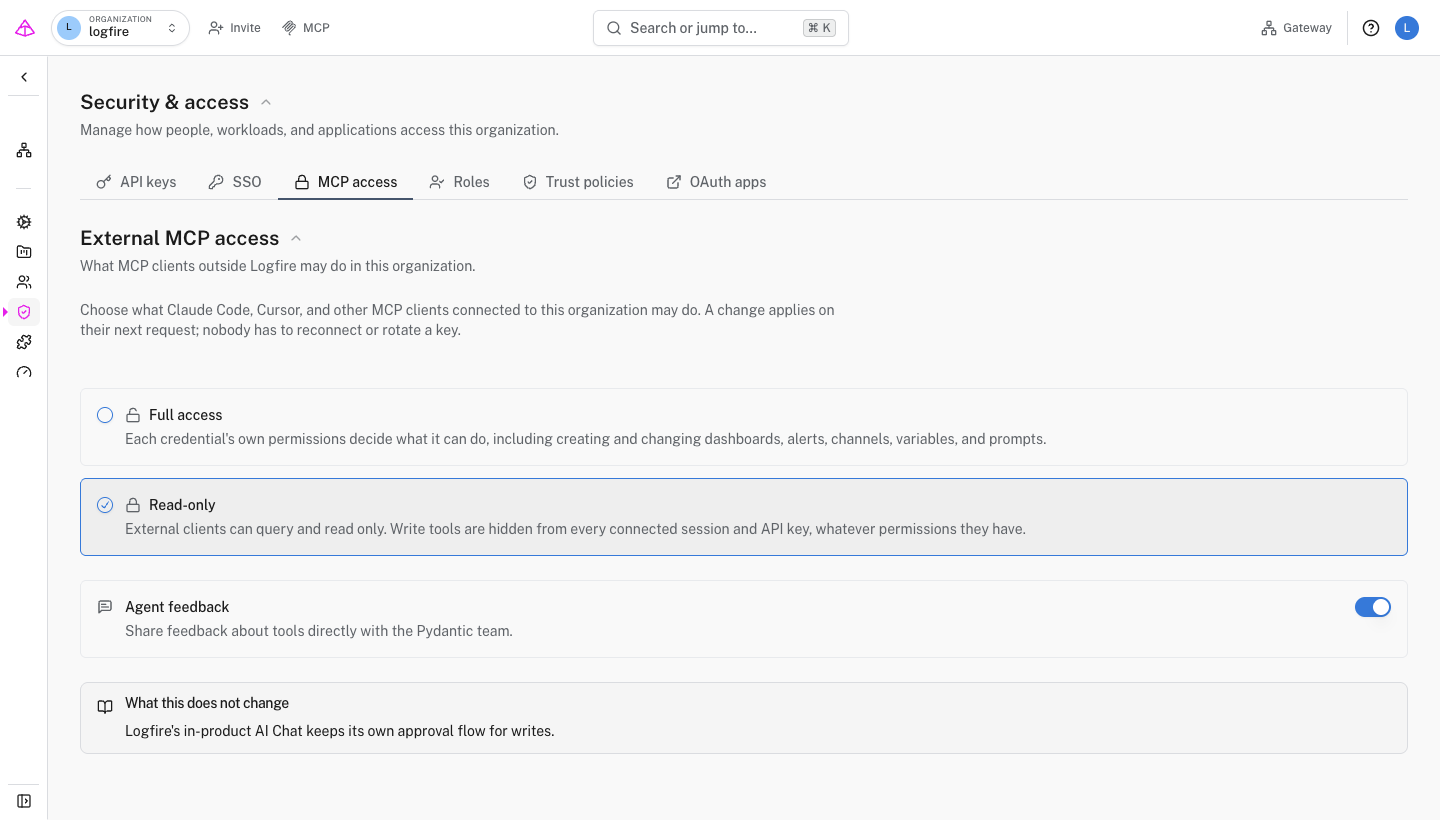
When Agent feedback is on, external clients can use the agent-feedback tool to report a confusing or broken tool, an unhelpful error, a missing capability, or something that worked well. The feedback goes to Pydantic and is not written to your Logfire project.
The tool remains available in either access mode because it does not read or change organization or project resources. Use the separate Agent feedback switch to control whether clients may send it.
Turn Agent feedback off if your organization does not allow agents to send product feedback to Pydantic. Logfire removes the tool from the client’s tool list and refuses calls to it on the next request.
Refresh the tool list in a connected MCP client.
- With Read-only selected, read tools such as
query_runremain available, while write tools such asdashboard_createare absent. - With Agent feedback off,
agent-feedbackis absent.
The server enforces the current policy on every request. A client with a cached tool list cannot bypass it.
Open Settings → Early access, reveal the experimental features with the flask icon, and enable External MCP access.
Organization-wide MCP access controls and the agent-feedback tool require the Enterprise plan. Upgrade the organization, or use them in a self-hosted deployment.
Only organization admins can change these settings. Ask an admin for help or for the appropriate organization role.
The client has cached an older tool list. Refresh its MCP tools or start a new client session. The server already refuses the write call under the current organization policy.
This policy covers MCP clients outside Logfire. Logfire’s in-product AI Chat uses a separate approval flow for write actions.