Run agent code in Agent Sandboxes from Python
Run Python in a remote Agent Sandbox from your application, with one call to
logfire.agent_sandboxes().
You check out a session, send it code, and get the result back.
Agent Sandboxes is available to every Logfire Cloud organization, in the US and EU regions. While it is in beta, the Agent Sandboxes page is hidden until you turn it on in your browser. Do one of these:
- Open the invitation link you received.
- Open the Early access settings page, show the experimental features, and turn on Agent Sandboxes.
- For a new project, start from product onboarding, as described below.
Then open AI Runtime > Agent Sandboxes in your project. If you see Enable Agent Sandboxes, ask a project manager to select it. An execution key does not enable the project by itself.
For a new project, you can also start from product onboarding:
- Choose Me or My team under Who are you setting up Logfire for?
- Select Use Agent Sandboxes under What do you want to do first?
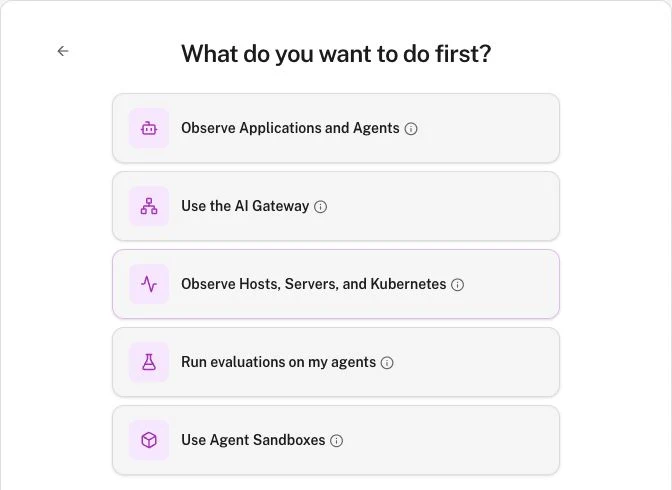
Logfire enables Agent Sandboxes for the project, adds a sidebar favorite, and opens Setup. This choice does not create an execution key or run code. Your account still needs permission to enable the project. The organization’s enabled-project limit also applies.
You also need a non-personal project API key with permission to run code in your project’s agent sandboxes
(project:execute_agent_sandboxes). The setup page creates the required key type:
- Open AI Runtime > Agent Sandboxes and select Setup.
- Under Choose an execution key, select Create execution key.
- Copy the key. It won’t be shown again.
Only project administrators can create a key here.
Keys created on the setup page expire after 30 days, or sooner if your organization limits key lifetime.
These keys also have the Send telemetry scope (project:write_otlp), so the same LOGFIRE_API_KEY works for
logfire.configure().
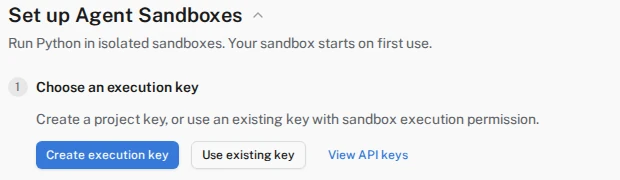
The setup page offers key creation or use of an existing key.
You can also create the key in Project settings → Security & access → API keys → New API key. Open Advanced and select Run code in this project’s agent sandboxes. Under Ownership, choose Service. Personal keys cannot run sandbox code. Ask a project administrator to create it if your role only permits personal keys. See Project API keys.
Set it as the LOGFIRE_API_KEY environment variable where your application runs:
export LOGFIRE_API_KEY='your-api-key'
The key also selects the data region your sandboxes run in, so you don’t need to configure a URL. See Use API keys for more about keys and permissions.
pip install 'logfire[agent-sandboxes]'
uv add 'logfire[agent-sandboxes]'
The extra installs pydantic-monty-client 1.6.0 or later, the client for Pydantic Monty sandboxes.
import asyncio

import logfire

logfire.configure()


async def main():
    async with logfire.agent_sandboxes() as pool:
        async with pool.checkout() as session:
            result = await session.feed_run('sum([20, 21, 1])')
            print(result)


asyncio.run(main())
Run python main.py.
It prints:
42
logfire.agent_sandboxes() returns a pool of sandboxes.
The pool opens a connection when you call pool.checkout(), which gives you a session with its own sandbox.
session.feed_run() executes the submitted snippet. The session also supports step-by-step execution with feed_start().
Variables and functions defined in one feed_run() call are available in later calls on the same session.
When the session’s async with block exits, the server saves its state under the session’s ID.
To continue from that state later, or to branch it into several sessions, see Persist, resume, and fork
sessions.
import asyncio

import logfire

logfire.configure()


async def main():
    async with logfire.agent_sandboxes() as pool:
        async with pool.checkout() as session:
            await session.feed_run('total = 40')
            result = await session.feed_run('total + 2')
            print(result)  # 42


asyncio.run(main())
Pass your own functions in external_lookup.
Sandbox code can call them by name, and each call runs in your application, not in the sandbox.
Expose only the functions the code needs.
Mounted volume files are another source of data.
import asyncio

from pydantic_monty import CollectString

import logfire

logfire.configure()


def get_weather(city: str) -> str:
    return f'Sunny in {city}'


async def main():
    output = CollectString()
    async with logfire.agent_sandboxes() as pool:
        async with pool.checkout() as session:
            result = await session.feed_run(
                "print('Checking the weather')\nget_weather('London')",
                external_lookup={'get_weather': get_weather},
                print_callback=output,
            )
    print(result)  # Sunny in London
    print(output.output)  # Checking the weather


asyncio.run(main())
Host functions can also be async def functions.
print_callback collects what the sandbox code prints.
Without it, printed output goes to your application’s standard output.
The hosted runtime records each session and code run as a span (one unit of work, with a name, start, and duration).
logfire.agent_sandboxes() sends the current trace context with each connection.
If your application has a current span, the hosted sandbox spans join its trace, the full journey of one request.
You do not need to call logfire.instrument_monty() for hosted sandbox activity.
To record Monty execution on your own machines, see Trace local Monty sandboxes.
logfire.agent_sandboxes() accepts the same pool options as Monty’s AsyncMontyRemote.
It returns an AsyncMontyRemote pool.
The most common ones:
max_processes: the maximum number of sessions open at once (defaults to the number of CPUs). Further checkouts wait.checkout_timeout: how many secondscheckout()waits for a free slot before raisingTimeoutError. Defaults to waiting forever.request_timeout: the maximum number of seconds for one call, such asfeed_run()(default 10). Raise it for long-running code. It must be a finite number of seconds.api_key: use a key other thanLOGFIRE_API_KEY, or theapi_keypassed tologfire.configure().
See logfire.agent_sandboxes() for every option.
logfire.agent_sandboxes() does not wrap Monty’s exceptions. If the server refuses a session, pool.checkout() raises
MontyRefusedError:
import asyncio

from pydantic_monty import MontyRefusedError

import logfire

logfire.configure()


async def main():
    async with logfire.agent_sandboxes() as pool:
        try:
            async with pool.checkout() as session:
                print(await session.feed_run('1 + 1'))
        except MontyRefusedError as exc:
            print(exc.status_code, exc.cause, exc.status_message)


asyncio.run(main())
No session existed when the server refused, so nothing ran, and you can safely retry.
status_code is the gRPC status, such as UNAUTHENTICATED, PERMISSION_DENIED, or RESOURCE_EXHAUSTED.
cause is the reason in snake_case, such as unauthenticated, capacity, or caller_cap.
retryable is True for RESOURCE_EXHAUSTED and UNAVAILABLE, and False for credential errors.
retry_after is the delay in seconds that the server suggests, or None.
If the client cannot reach the server, checkout() raises MontyConnectError.
Examples are an unreachable address, a DNS failure, a connection timeout, or a failed TLS handshake.
Nothing ran, and transport_error describes what failed.
If the server rejects the session’s settings, such as a profile that does not exist, the session’s first call raises
MontyConfigurationError with a message that starts with session refused:.
The client sends the settings with the first call, so checkout() itself succeeds.
The call did not run, and the session cannot be used.
MontyRefusedError, MontyConnectError, and MontyConfigurationError are all subclasses of MontyError.
Errors inside a checked-out session also come from Monty.
These include exceptions from your sandbox code, MontyCrashedError, MontyDisconnectError, and MontyShutdown.
Run the first snippet.
It prints 42.
Then open the Live view.
You should see a session main.py span with a run code span inside it, showing the code, the result, and how long it
took.
LogfireConfigError: Agent sandboxes require a Logfire API key with the project:execute_agent_sandboxes scope: no API key was found. SetLOGFIRE_API_KEY, passapi_keytologfire.configure(), or passapi_keytologfire.agent_sandboxes().MontyRefusedErrorwithstatus_codeUNAUTHENTICATEDorPERMISSION_DENIED: the server rejected the API key. Use a project API key, not a personal key. Check itsproject:execute_agent_sandboxesscope and that the key’s region matches the server. Also check that Agent Sandboxes are enabled for the project.MontyRefusedErrorwithcausecapacityorcaller_cap: too many sessions are open. Lowermax_processesto open fewer sessions at once, or retry after a delay. The SDK does not retry refusals for you.MontyConnectError: the client could not connect. Check the URL, network access, and TLS configuration. Use the server origin, such ashttps://logfire-us.pydantic.dev, without a path, query, or fragment.MontyConfigurationError: session refused: ...: the server rejected the session’s settings. The message names the setting, such as aprofileID that does not exist in the project.MontyDisconnectErrorduring a call: the session’s stream ended before the call finished. If the server ended it,causesays why, such asidle_timeout,session_timeout,turn_timeout, orcapacity. The call may have run, so do not replay it automatically. Check out a new session, and restore saved state withload_session()if you need it.LogfireConfigErrorabout the URL path: remove the old/monty-ws/path from theurlyou pass.RuntimeError: logfire.agent_sandboxes() requires the pydantic-monty-client package: install Logfire with the extra:pip install 'logfire[agent-sandboxes]'.MontyCrashedErrorwithtimed_out=True: the call took longer thanrequest_timeout. Pass a largerrequest_timeouttologfire.agent_sandboxes().
- Persist, resume, and fork sessions: continue a session later, take snapshots, and branch sessions.
- Agent Sandboxes overview: when to use sandboxes, and when not to.
- Trace local Monty sandboxes: run Monty on your own machine instead.
- Scrubbing: control which values are hidden before data is sent.