See Pixeltable operations and LLM calls in Logfire
See the work Pixeltable does for your tables alongside the LLM calls it makes. Pixeltable is declarative data infrastructure for multimodal AI apps: you define tables and computed columns (columns whose values come from a model or a Python function), and Pixeltable calls the models when rows are inserted or updated, then stores the results.
Pixeltable has native OpenTelemetry tracing in the opentelemetry-instrumentation-pixeltable package.
OpenTelemetry (OTel) is the open industry standard for collecting traces, metrics, and logs. Each Pixeltable
operation becomes one trace (the full journey of that operation, made of nested spans, each a single unit of work
with a name, a start, and a duration). Once logfire.configure() sets Logfire as the global
tracer provider, Pixeltable’s spans flow to Logfire with no extra exporter.
- One trace per Pixeltable operation:
insert,update,add_computed_column,collect,create_table, and more - A span per user-defined function (UDF) call, and per row for the first 100 rows of each operation, with attributes
such as
pxt.table_id,pxt.num_rows,pxt.column, andpxt.udf_path - With
logfire.instrument_openai(), the OpenAI calls made by computed columns, nested under the UDF span that made them, with model, messages, token counts, and cost
You’ll need a Logfire project. Open Add data in your project (top navigation) and follow the
setup for your language: it signs your machine in with logfire auth (a browser sign-in, no token
to copy) and, for production or other languages, creates a write token (the credential your app
uses to send data). New to Logfire? Start with Getting Started.
Install logfire:
pip install logfire
uv add logfire
conda install -c conda-forge logfire
Install Pixeltable, its OpenTelemetry instrumentation, and the openai package that the example’s computed column uses.
Logfire brings its own OpenTelemetry SDK, so the pixeltable[otel] extra’s SDK and exporters are not needed here:
pip install pixeltable opentelemetry-instrumentation-pixeltable openai
Set your OpenAI API key in the OPENAI_API_KEY environment variable before running the example (get one from
your OpenAI dashboard at platform.openai.com/api-keys).
Call logfire.configure(), logfire.instrument_openai(), and PixeltableInstrumentor().instrument() before the first
Pixeltable operation:
import logfire

logfire.configure()
logfire.instrument_openai()

from opentelemetry.instrumentation.pixeltable import PixeltableInstrumentor

PixeltableInstrumentor().instrument(span_level='debug')

import pixeltable as pxt
from my_udfs import word_count
from pixeltable.functions import openai

t = pxt.create_table('articles', {'id': pxt.Int, 'body': pxt.String}, if_exists='replace_force')
t.add_computed_column(words=word_count(t.body))
t.add_computed_column(
    summary=openai.chat_completions(
        messages=[{'role': 'user', 'content': 'Summarize in one sentence: ' + t.body}],
        model='gpt-4o-mini',
    ).choices[0].message.content
)
t.insert([
    {'id': 1, 'body': 'Pixeltable is declarative data infrastructure for multimodal AI apps.'},
    {'id': 2, 'body': 'Logfire is an observability platform built on OpenTelemetry.'},
])
print(t.select(t.id, t.words, t.summary).collect())
Pixeltable does not allow UDFs in the __main__ module of a script, so the custom UDF lives in its own module:
import pixeltable as pxt


@pxt.udf
def word_count(text: str) -> int:
    return len(text.split())
span_level='debug' adds per-row spans (up to 100 per operation) and per-UDF-call spans, so each OpenAI span nests
under the pixeltable.udf.chat_completions span that made it. The default, 'info', keeps operation, catalog, store,
and SQL spans, so the OpenAI spans nest under pixeltable.store.insert_rows instead.
Open the Live view. You should see a pixeltable.insert trace with
pixeltable.store.insert_rows, two pixeltable.row spans with pixeltable.udf.word_count under them, and two
pixeltable.udf.chat_completions spans, each with a Chat Completion with 'gpt-4o-mini' span under it. The
create_table, add_computed_column, and collect calls each appear as their own trace.
The example above looks like this in Logfire:
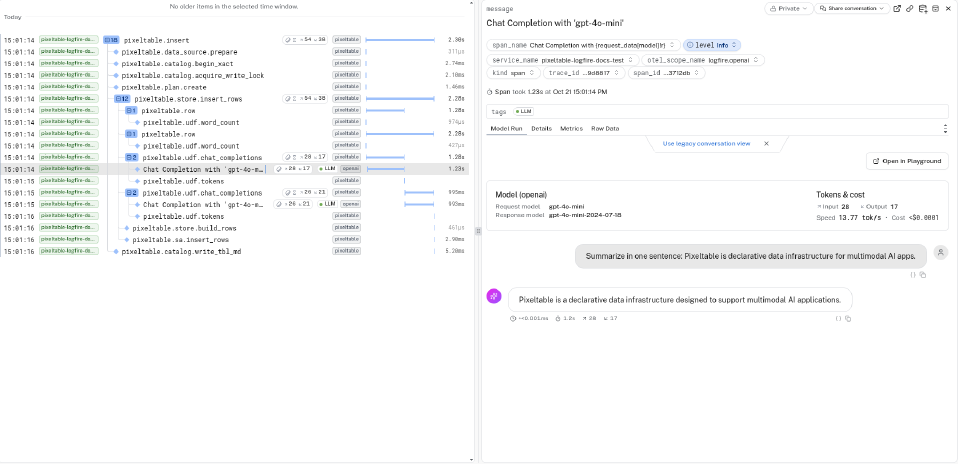
pixeltable.insert trace. The OpenAI chat completion is nested under pixeltable.udf.chat_completions, with the model, token counts, and cost.
- No Pixeltable spans appear: call
PixeltableInstrumentor().instrument()before the first Pixeltable operation, in the same process aslogfire.configure(). - No OpenAI spans under the UDF spans: call
logfire.instrument_openai()before the first insert. Computed-column results are stored, socollect()doesn’t call the model again. OpenAI spans appear oninsert,update, and whenadd_computed_columnfills existing rows. - No data appears in Logfire: check that your write token (the credential your deployed app uses to send
data to a Logfire project) is set. Run
logfire projects use <your-project>locally, or set theLOGFIRE_TOKENenvironment variable in production.
- Pixeltable observability guide: span levels, the full span tree, and Pixeltable’s OpenTelemetry metrics
- Pixeltable documentation